7 HubSpot Too Expensive Fixes for Canada: 2026 Field Guide
Seven ways to cut a HubSpot bill in Canada, cheapest first, with Canadian dollar list prices, HubSpot downgrade rules and a break-even calculator.
 Joshua Jackai
16 min read
Joshua Jackai
16 min read
Published 21 October 2026 · Last updated and fact-checked 21 October 2026
Short answer: HubSpot, the CRM software company, feels too expensive when seats, contacts and a second hub grow unchecked. The audit runs in seven steps, cheapest first: invoice, seats, contacts, hubs, downgrade list, renewal date, website. Marketing Hub Professional lists at CA$1,034 a month, CA$12,408 a year, plus CA$3,700 onboarding.
On 21 October 2026 I searched “hubspot too expensive” the way a Canadian owner would. Most results I saw were vendor comparison pages priced in US dollars. I did not find a Canadian dollar audit among them that tells you what to cut, what to downgrade and what breaks if you leave. This guide is that audit. It uses HubSpot’s own Canadian price pages and help articles, read on 21 October 2026, plus five peer-reviewed studies on cost, bias and CRM performance. Your invoice always wins over a price page, so treat every figure here as a list price to check against your own account.
In this guide
Key takeaways
- Marketing Hub Professional lists at CA$1,034 a month billed annually, which is CA$12,408 a year, plus a required one-time onboarding fee of CA$3,700 (HubSpot Canada pricing, 21 October 2026).
- Only marketing contacts count toward your tier and your cost. Non-marketing contacts do not (HubSpot Knowledge Base).
- HubSpot says a downgrade takes effect on your renewal date, and it asks you to contact it at least five business days before that date (HubSpot Knowledge Base).
- Moving from Professional or Enterprise to Starter stops CTAs from working, and workflows are deleted 90 days after the downgrade (HubSpot Knowledge Base).
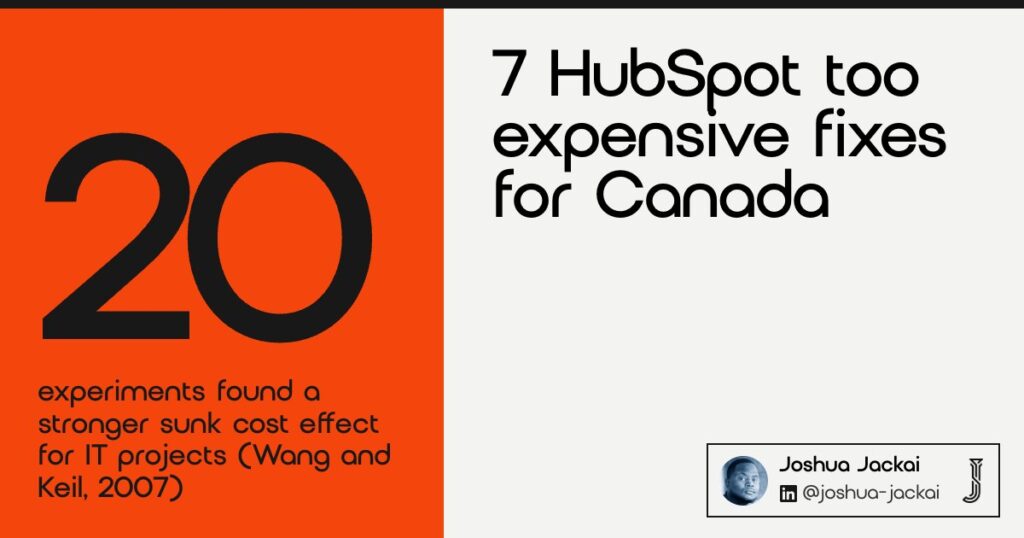
- Across 20 experiments, the sunk cost effect was stronger for information technology projects than for other projects (Wang and Keil, 2007).
- Content Hub Professional lists at CA$585 a month, CA$7,020 a year, so check whether your website actually runs on it (HubSpot Canada pricing).
| Step | What you check | Where to look | What it can save |
|---|---|---|---|
| 1. Read the invoice | Hubs, seats, contact tier, onboarding, billing period | Billing page and last invoice | Finds the real annual total |
| 2. Cut seats | Who logged in during the last 90 days | User list | CA$708 a year per extra Professional seat |
| 3. Shrink contacts | Marketing contacts that you do not market to | Contact tier setting | A lower tier at renewal |
| 4. Drop a hub | A second subscription nobody opens | Subscriptions list | CA$7,020 a year for Content Hub Professional |
| 5. Downgrade with a list | Workflows, CTAs, sequences, redirects | Feature inventory | The gap between two tiers |
| 6. Calendar the renewal | Renewal date, auto-renew, notice | Billing admin email | Avoids another locked year |
| 7. Decide on the website | Forms, tracking, CMS pages | Site and CRM | The largest line, if it moves |
1. Read the invoice line by line: best for finding the real annual total
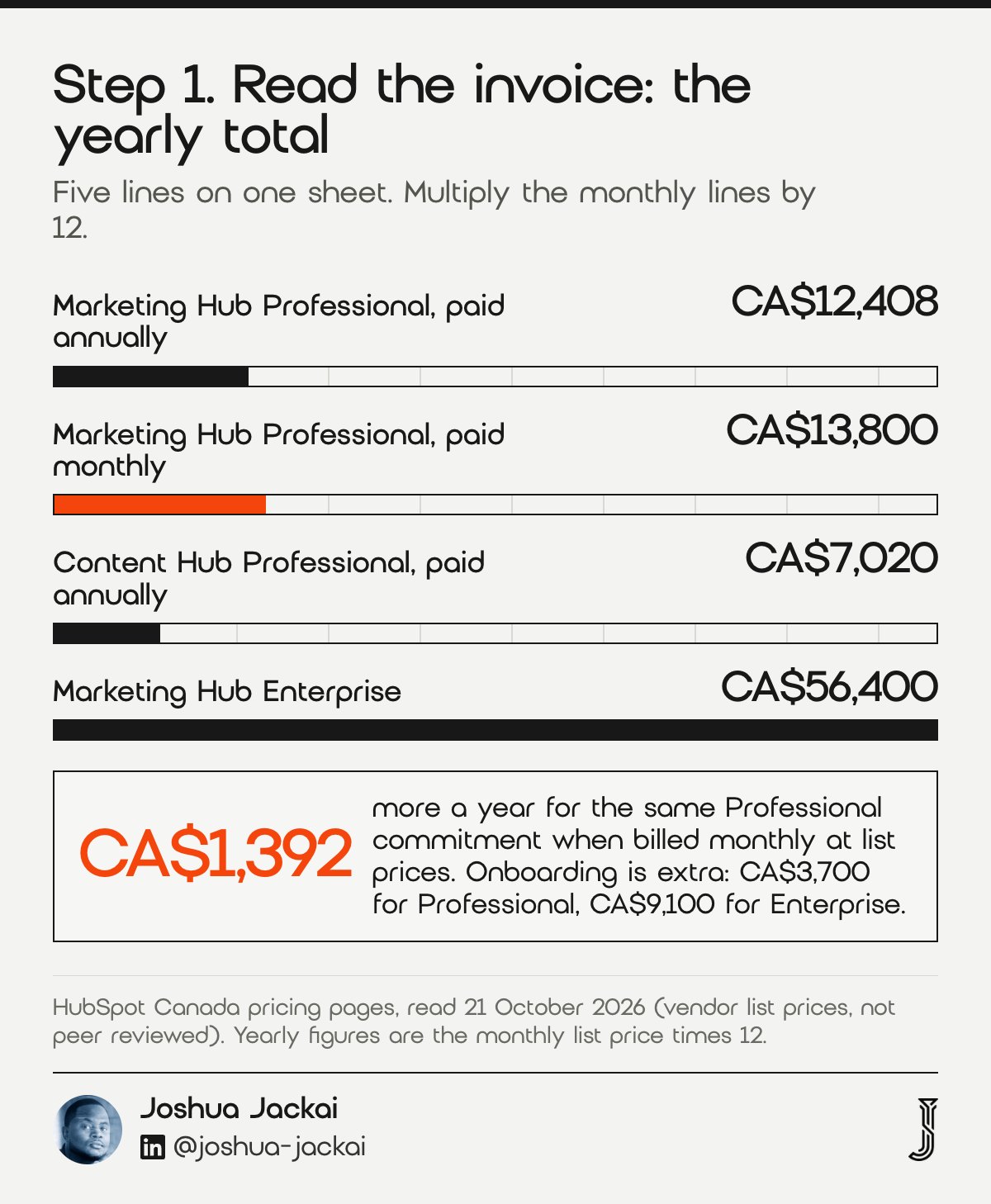
Open the last invoice and write down five lines: each hub and its tier, the number of paid seats, the marketing contact tier, any one-time onboarding fee, and whether you pay monthly or annually. Multiply the monthly lines by 12. On list prices, Professional costs CA$12,408 a year billed annually, and CA$13,800 if paid monthly.
- Time: about 30 minutes
- You need: the last invoice and billing admin access
- Output: one sheet with five lines and the yearly total
- Check: CA$1,034 a month on annual billing versus CA$1,150 on monthly billing at list prices
- Do not: start with a downgrade before you know the total
HubSpot’s Canadian pricing page, read on 21 October 2026, lists Marketing Hub Professional at CA$1,034 a month if you pay annually and CA$1,150 a month if you pay monthly, with an annual commitment in both cases. Over a year, that is a CA$1,392 difference for the same commitment, which is worth a question to your account manager. Professional includes 3 core seats and 2,000 marketing contacts, and the page adds that the required one-time Professional onboarding is CA$3,700, which is not in the monthly figure. Enterprise lists at CA$4,700 a month with CA$9,100 onboarding. If your account carries different numbers, trust the account. A worked example at list prices: Professional with its 3 seats (CA$12,408), four extra seats (CA$2,832) and Content Hub Professional (CA$7,020) comes to CA$22,260 a year, plus CA$3,700 onboarding in the first year, according to the same price pages.
Why do owners miss this? One reason is timing. Gourville and Soman found in experiments that the sunk cost of a prepayment fades as time passes. Their subjects were consumers, so I use this only as a reason to put the cost back in front of the team, not as proof about software buyers.
“Cost shown does not include the required, one-time Professional Onboarding for a fee of CA$3,700,” the HubSpot Canada pricing page stated.
“A consumer will gradually adapt to a historic cost with the passage of time, thereby decreasing its sunk-cost impact,” Gourville and Soman wrote in the Journal of Consumer Research.
2. Cut seats to the people who log in: best for the cheapest saving
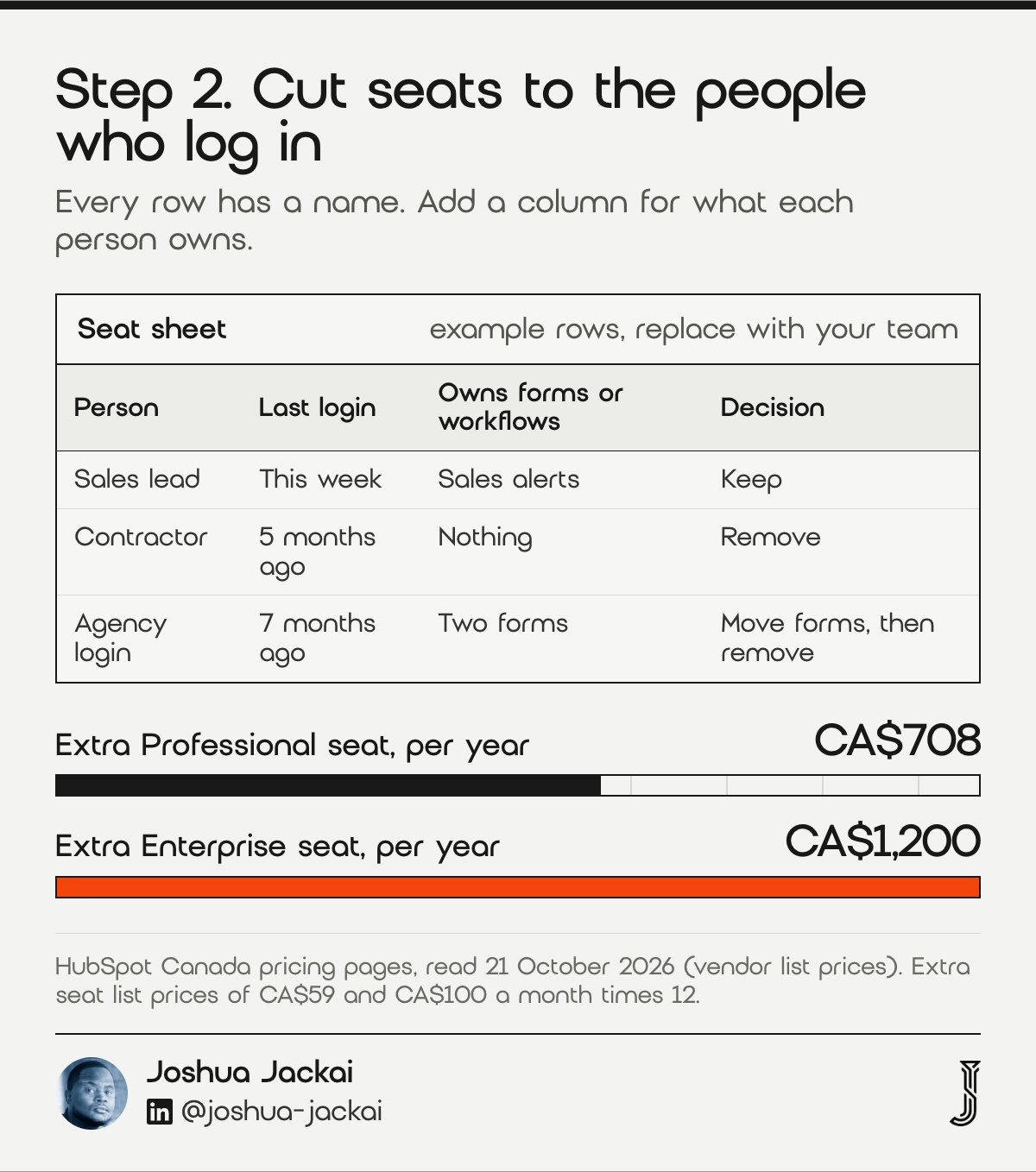
A seat is a paid user. List the people on the account, note each person’s last login, and remove anyone who has not logged in for 90 days. On HubSpot’s list prices, each extra Professional seat costs CA$59 a month, CA$708 a year, and each extra Enterprise seat costs CA$100 a month, CA$1,200 a year.
- Time: one hour, plus a short chat with each manager
- You need: the user list with last login dates
- Output: a keep, remove or downgrade decision for every seat
- Check: how many seats exceed the three included with Professional
- Do not: remove a seat that owns forms or workflows before moving them
The seat list is the quickest audit because every row has a name. The pricing page includes 3 core seats with Professional and 5 with Enterprise, so the count that matters is the number beyond those. HubSpot’s own downgrade guide tells you to manage seats before you change tier, because lower tiers have lower seat limits. According to the same article, 3 things can be reduced before you move down: tier, seats and marketing contacts.
Four unused extra Professional seats at list price come to CA$2,832 a year. That is a small number next to the plan, but it is also the saving with the least risk, because nobody loses a feature. Before you remove a seat, check who owns the forms, workflows and reports built under that login, and reassign them. Add a column called “owns anything” to the seat sheet. It stops the one real mistake in this step: removing the person whose workflow sends the sales alerts.
“Manage seats to account for any decreases in seat limits,” HubSpot’s downgrade guide stated.
3. Shrink the marketing contact tier: best for databases that only grow
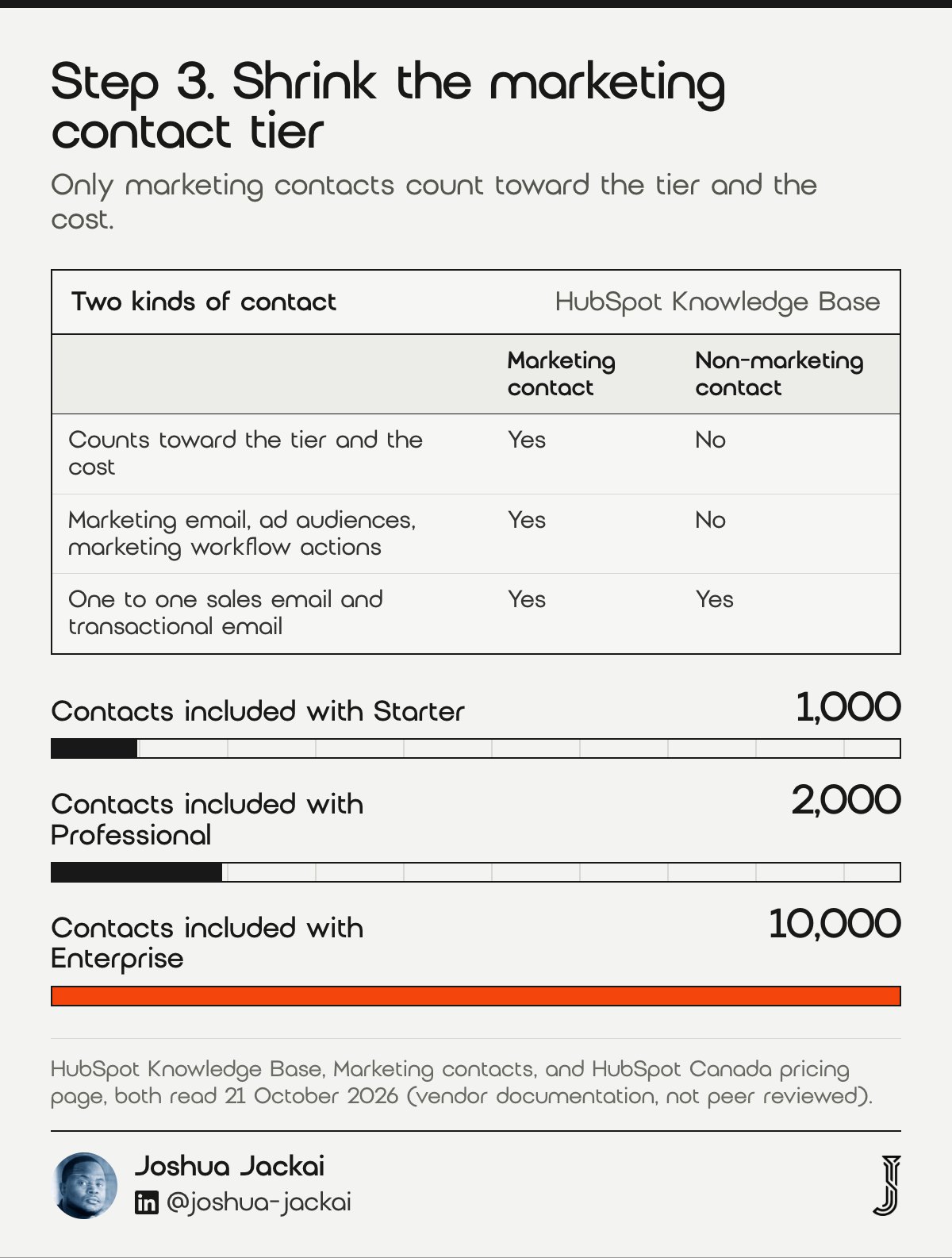
Marketing contacts are the ones you plan to market to, and only they count toward your tier and your cost. Contacts you set as non-marketing are not billed. Export your database, segment out bounced, old and non-consenting contacts, and ask whether each group needs marketing email. Smaller tiers apply at renewal.
- Time: half a day for a first pass
- You need: a contact export with last engagement and consent date
- Output: a list of contacts to set as non-marketing
- Limit: marketing emails, ad audiences and marketing workflow actions work only for marketing contacts
- Do not: delete contacts before you check what billing counts
HubSpot’s help article is clear on the rule, and I quote it at the end of this step. The same page says non-marketing contacts can still receive one to one sales email and transactional email. The pricing page includes 1,000 marketing contacts with Starter, 2,000 with Professional and 10,000 with Enterprise. The help article does not say how unengaged or unsubscribed contacts are billed, so read the separate marketing contacts billing article for that before you touch a list.
Canada gives you a second reason to clean. Under the Canadian anti-spam law, an inquiry made in the six months before your message supports implied consent to send a commercial message. A contact who asked a question two years ago and never opened an email is a cost to you and a risk if you keep mailing them. Ask a Canadian lawyer where your list stands. My website lead tracking guide explains how to store the inquiry date so the check takes a minute.
“Only marketing contacts count toward your contact tier and impact the cost of your subscription,” the HubSpot Knowledge Base stated.
4. Drop the hub you do not use: best for a second subscription
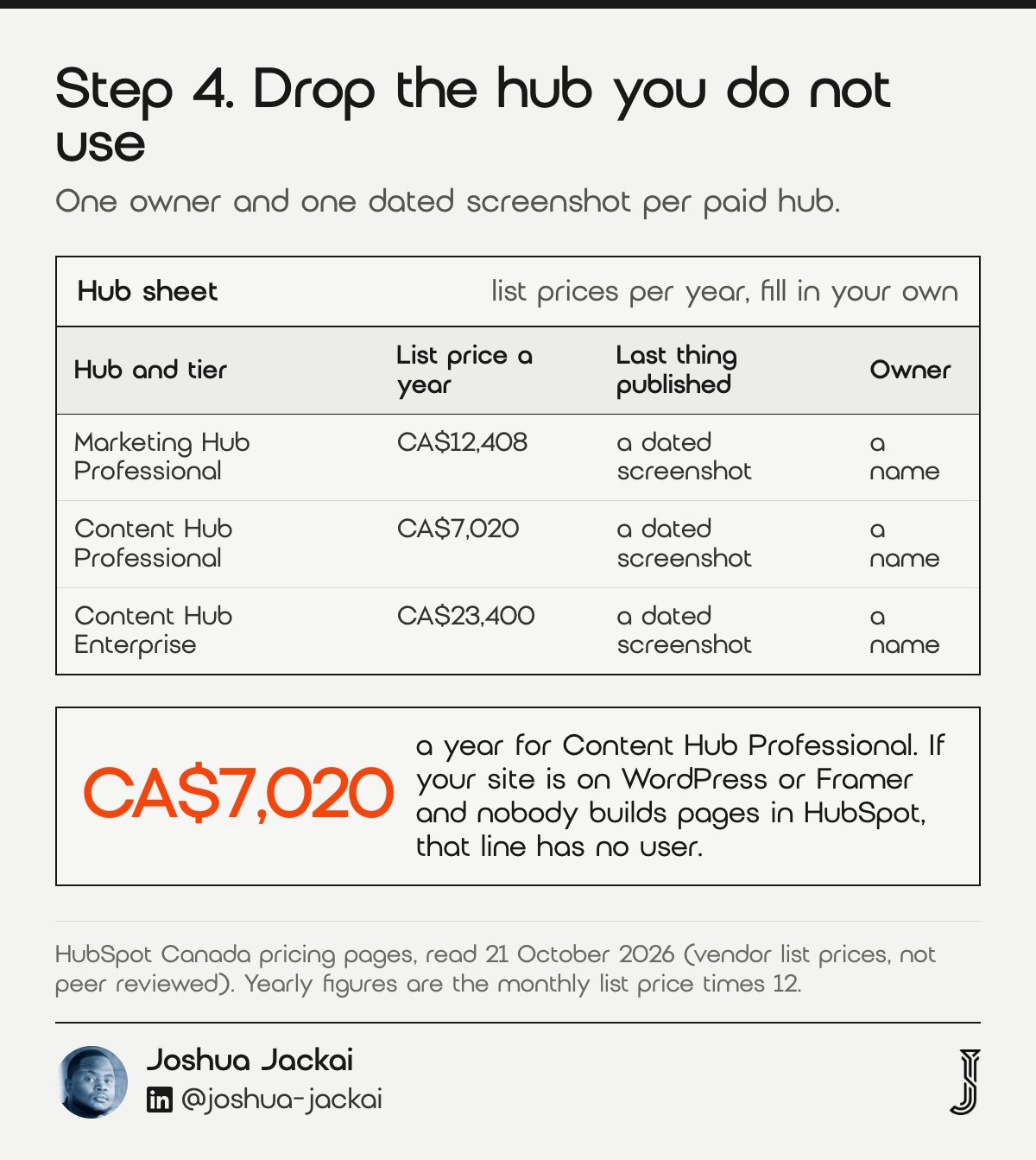
An account can carry two paid hubs when different teams bought them at different times. List every hub and name the person who used it in the last month. A hub with no named user is a candidate to drop at renewal. Content Hub Professional lists at CA$585 a month, CA$7,020 a year.
- Time: 20 minutes for the list, a week to confirm with each team
- You need: the subscriptions page and the name of one owner per hub
- Output: keep or drop for every paid hub
- Check: is your website built and hosted in the CMS you pay for
- Do not: drop Content Hub if your live pages are served from it
The first question to ask is simple: where does the website live? HubSpot lists Content Hub Professional at CA$585 a month on annual billing and CA$650 on monthly billing, with 3 core seats. Enterprise lists at CA$1,950 a month. If your site is on WordPress or Framer and nobody builds pages in HubSpot, that line is CA$7,020 a year for a tool that nobody opens. If your site is on HubSpot, the line is your hosting and page tools, and step 7 decides what to do with it.
Check the feature list on the Marketing Hub pricing page, then confirm the team uses at least one paid feature before you assume the tier is earning its keep. Ask each owner for the last thing they published or sent from the hub. A screenshot with a date answers the question faster than a meeting. If nobody can produce one, the hub goes on the drop list for the next renewal.
5. Downgrade one tier after listing what breaks: best for Professional users who need less
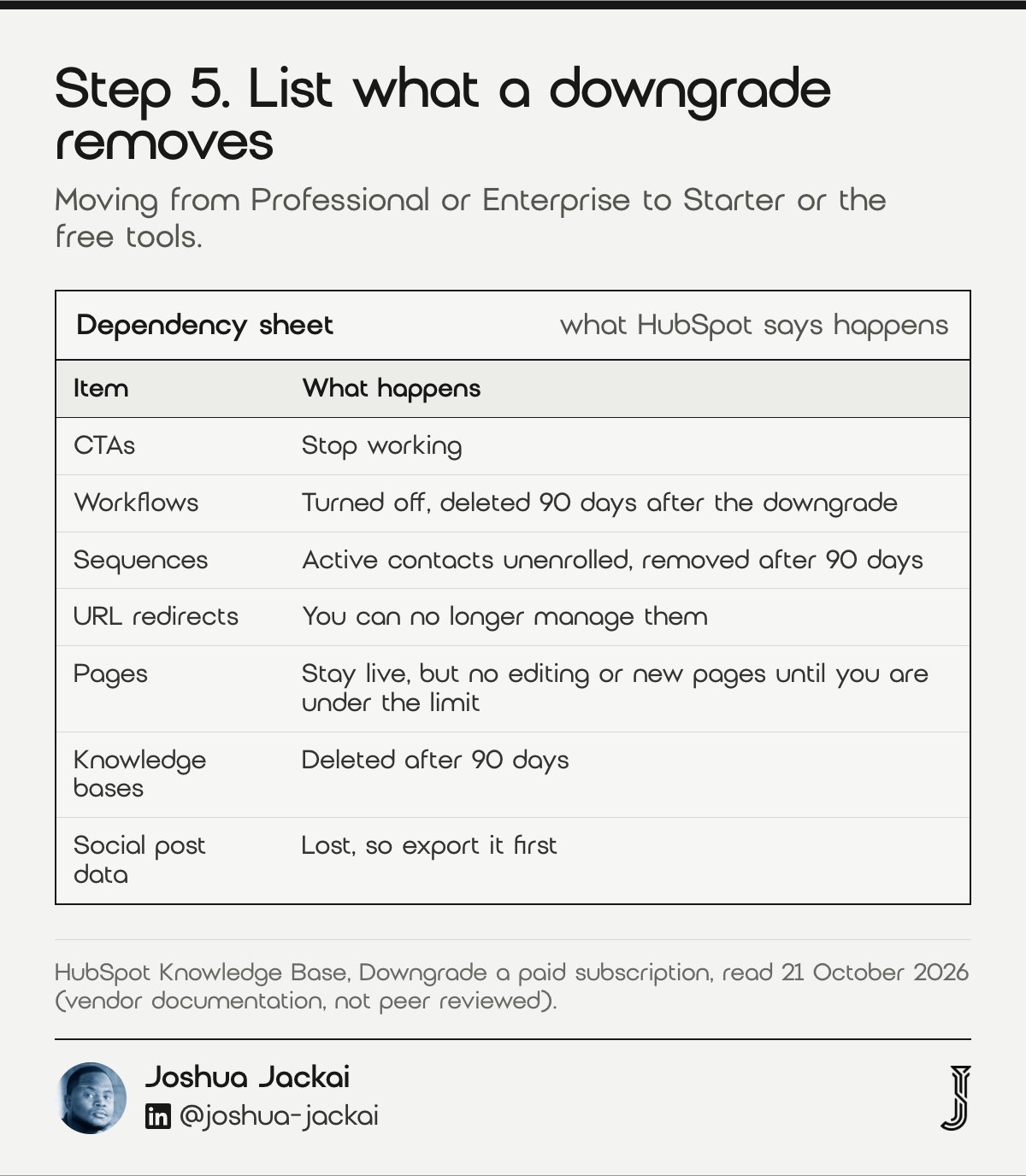
A downgrade removes features, so list what you use before you ask for one. HubSpot says you may lose access to certain tools, workflows are turned off and later deleted, CTAs stop working on lower tiers, and you can no longer manage URL redirects. Write each dependency down, then choose the tier that keeps them.
- Time: two hours for the inventory
- You need: a list of workflows, CTAs, sequences, redirects and reports
- Output: a dependency sheet with keep or rebuild for each item
- Warning: workflows are deleted 90 days after the downgrade
- Do not: downgrade to save money and discover the site forms are gone
HubSpot’s downgrade article lists the losses. Existing pages stay live, but you cannot edit or create new content until you delete pages to get under your limit. Knowledge bases are deleted after 90 days. Sequences unenroll active contacts and are removed after 90 days. HubSpot Payments subscriptions keep billing for 30 days. CTAs stop working if you move Marketing Hub Professional or Enterprise to Starter or the free tools. Social post data is lost, so export it first. The pricing page also lists 500 HubSpot Credits with Starter and 3,000 with Professional, so check any credit-based tools you use.
The gap between tiers is large, which is why this step needs a list. Starter starts at CA$10 per seat a month on the pricing page, and Professional starts at CA$1,034 a month. Coltman, Devinney and Midgley studied CRM capability as a firm practice, not HubSpot as a product, so read the finding as support for keeping the discipline, not a tool. Protect the capability and cut the shelf space around it. A tidy dependency sheet is how you tell the two apart.
“Our results reveal a positive and significant path between a superior CRM capability and firm performance,” Coltman and colleagues wrote in the Journal of Information Technology.
6. Calendar the renewal and the notice: best for avoiding another locked year
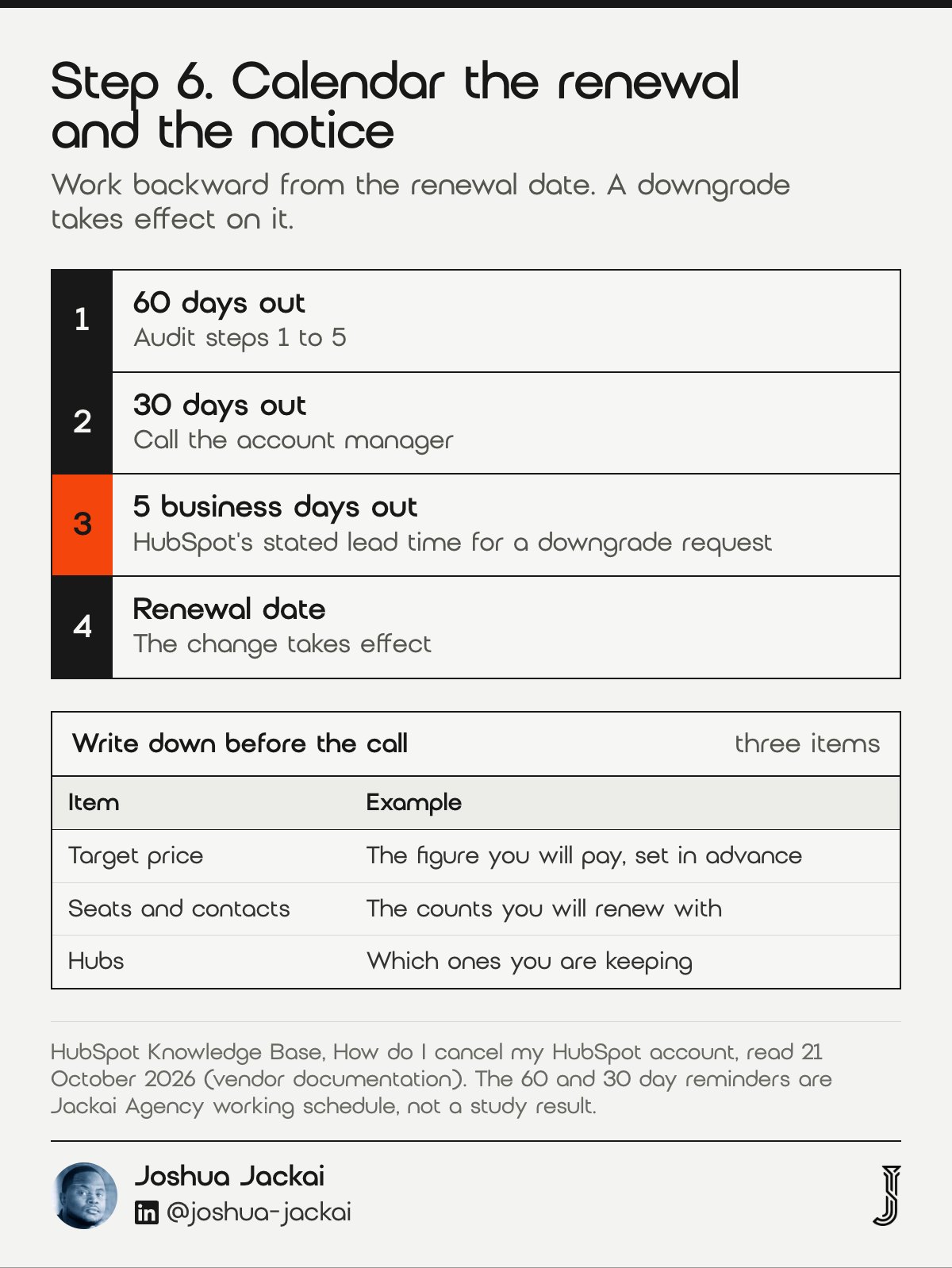
Find the renewal date on the billing page, then work backward. HubSpot says a downgrade takes effect on the renewal date, not immediately, and it asks you to contact it at least five business days before. Turn auto-renew off only if you mean to cancel. Write a target price before the call.
- Time: 15 minutes to calendar, one call to negotiate
- You need: the renewal date and a billing admin login
- Output: three dated reminders and a written target number
- Rule: mid-contract cancellations are not permitted
- Do not: assume you can change the plan the week you decide to
The rules come from HubSpot’s cancellation article. Turning off auto-renew means the subscription is cancelled on the renewal date, “not immediately”. A notice of non-renewal goes to the billing admin. According to the article, a downgrade request needs 5 business days of lead time. After the cancellation date the account moves to HubSpot’s free tools. The article does not state a notice period for cancellations, and I did not find one elsewhere in HubSpot’s help pages, so ask the account manager in writing and keep the reply. Set three reminders: 60 days out for the audit, 30 days out for the call, and 10 business days out as the last safe moment for a downgrade request.
Set the number before the call. Lee, Keil and Kasi ran an experiment with 349 IT professionals and found that specific budget goals can limit software project escalation. Their setting was software projects, not renewals, so borrow the habit and not the claim: write the figure you will pay, then judge every offer against it.
“Mid-contract cancellations are not permitted,” HubSpot stated in its cancellation article.
“Both very difficult and very specific goals for budget and schedule can limit software project escalation,” Lee, Keil and Kasi wrote in the Journal of Management Information Systems.
7. Keep, downgrade or leave the website: best for the one decision that costs real money
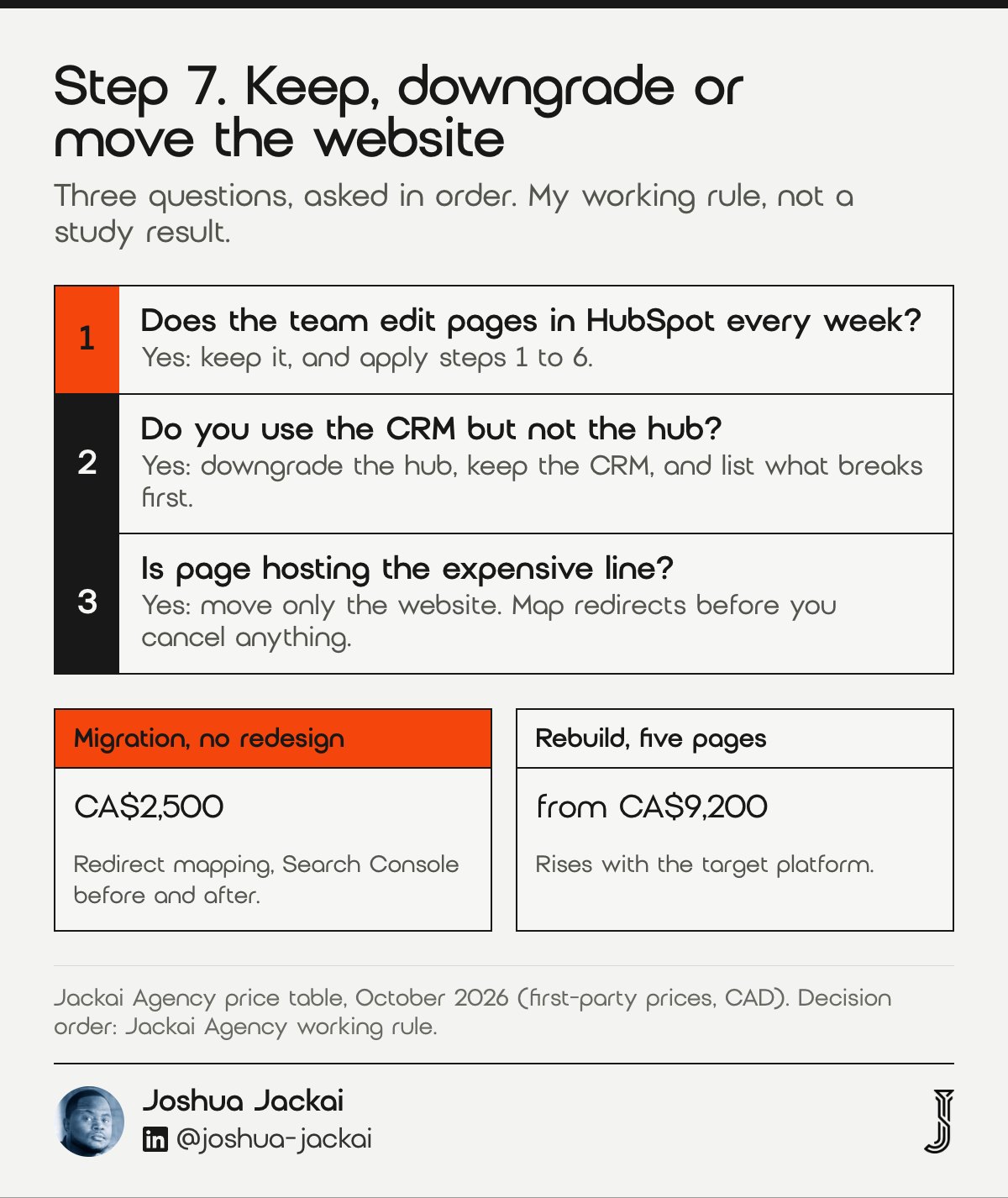
Leaving HubSpot is a rebuild question when your website runs on HubSpot CMS, and an account question when it does not. Keep it if the team edits pages weekly and the invoice has been trimmed. Downgrade if you use the CRM but not the hub. Leave only the website if page hosting is the expensive line.
- Time: one call to scope, two to six weeks to move a site
- You need: the steps 1 to 6 sheets and the page list
- Output: one of three decisions with a break-even month
- Exit work: forms, tracking code, CMS pages, redirects and the blog
- Do not: cancel before redirects are mapped
I build on HubSpot CMS when it fits. For Snappy Kraken, a B2B fintech company selling to financial advisors, I took a design from Figma to production on HubSpot CMS in 3 weeks, and the marketing team edits inside the design system afterwards. The work influenced seven figures of annual recurring revenue, influenced and not attributed, because sales, pricing and product also moved in that period. See the Snappy Kraken case study. For an owner whose pages rarely change, the answer can be to move the site and keep the CRM.
What stops people is not the arithmetic. Decision research shows that people prefer the current state. Camilleri and Sah tested 302 physicians and 733 members of the public, and all groups showed the bias. Wang and Keil pooled 20 sunk cost experiments and found stronger effects for IT projects. Decide with a break-even month on paper, using the tool near the end of this guide. If the site sits on Content Hub Enterprise, HubSpot lists it at CA$1,950 a month, which is CA$23,400 a year. A migration with no redesign, covering redirect mapping and Search Console checks, is CA$2,500 from me. A rebuild starts at CA$9,200 for five pages and rises with the target platform.
“The status quo bias (SQB) is the tendency to prefer the current state of affairs,” Camilleri and Sah wrote in Applied Cognitive Psychology.
Compare the seven fixes and filter by effort and risk
This matrix lists each fix with the effort it takes and the risk it carries. Filter by either one, and rows are hidden rather than deleted. Start with the low effort, low risk rows, which are the first four, and leave the website decision for last. Savings use list prices, so check them against your invoice.
| Fix | Effort | Risk | What it can save at list prices |
|---|---|---|---|
| 1. Read the invoice | Low | None | Finds the real annual total |
| 2. Cut seats | Low | Low | CA$708 a year per extra Professional seat |
| 3. Shrink contacts | Medium | Low | A lower contact tier at renewal |
| 4. Drop a hub | Low | Low | CA$7,020 a year for Content Hub Professional |
| 5. Downgrade with a list | Medium | High | The gap between two tiers |
| 6. Calendar the renewal | Low | None | Avoids another locked year |
| 7. Decide on the website | High | High | The hosting line, if the site moves |
Work out your break-even month before you decide
This calculator turns three numbers into a break-even month. Enter what you pay each month now, what you would pay after the change, and the one-off cost of making it. The defaults are placeholders, not your numbers, and the result ignores tax and the time your team spends.
Break-even month
Frequently asked questions
Is HubSpot too expensive?
It depends on what you use. On Canadian list prices, Marketing Hub Starter starts at CA$10 per seat a month and Professional at CA$1,034 a month, so the jump between tiers is the usual cause. Audit seats, marketing contacts and hubs first (HubSpot Canada).
Why is HubSpot so expensive?
HubSpot charges for several things at once: paid seats, a marketing contact tier, each hub and a required onboarding fee on higher tiers. On the Canadian price page, Professional lists at CA$1,034 a month with CA$3,700 onboarding. The total rises when any one of those lines grows (HubSpot Canada).
How much does HubSpot cost in Canada?
For Marketing Hub on 21 October 2026, list prices were Starter from CA$10 per seat a month, Professional from CA$1,034 a month and Enterprise from CA$4,700 a month. Professional is CA$12,408 a year billed annually. Onboarding adds CA$3,700 or CA$9,100 (HubSpot Canada).
Can I downgrade HubSpot?
Yes, but a downgrade takes effect on your renewal date, not immediately, and HubSpot asks you to contact it at least five business days before that date. Mid-contract cancellations are not permitted. Put the renewal date in your calendar now (HubSpot Knowledge Base).
How much does HubSpot CMS (Content Hub) cost per month?
Content Hub Professional listed at CA$585 a month on annual billing and CA$650 a month on monthly billing, with 3 core seats. Enterprise listed at CA$1,950 a month. Starter starts at CA$10 per seat a month. Confirm the figures on your account before budgeting (HubSpot Canada).
Who sets this up for you
I design, build and migrate websites for Canadian B2B companies, from Vancouver, with fixed quotes, including HubSpot CMS builds. The CA$995 website audit is credited in full if a project starts within 30 days. A migration with no redesign, covering redirect mapping and Search Console checks before and after, is CA$2,500. Lead Source Reporting is CA$2,600.
If you are weighing HubSpot against WordPress for the website, read my WordPress versus HubSpot comparison. If you decide to stay, my HubSpot website redesign service builds on it properly. If you decide to move, see website migration services.
Sources
Peer reviewed
- Wang, J. and Keil, M. (2007). A meta-analysis comparing the sunk cost effect for IT and non-IT projects. Information Resources Management Journal. doi.org/10.4018/irmj.2007070101
- Camilleri, A. R. and Sah, S. (2021). Amplification of the status quo bias among physicians making medical decisions. Applied Cognitive Psychology. doi.org/10.1002/acp.3868
- Gourville, J. T. and Soman, D. (1998). Payment depreciation: the behavioral effects of temporally separating payments from consumption. Journal of Consumer Research. doi.org/10.1086/209533
- Lee, J. S., Keil, M. and Kasi, V. (2012). The effect of an initial budget and schedule goal on software project escalation. Journal of Management Information Systems. doi.org/10.2753/mis0742-1222290102
- Coltman, T., Devinney, T. M. and Midgley, D. F. (2011). Customer relationship management and firm performance. Journal of Information Technology. doi.org/10.1057/jit.2010.39
Industry, vendor and government (not peer reviewed)
- HubSpot. Marketing Hub pricing, Canada (CAD), read 21 October 2026, vendor list prices. hubspot.com
- HubSpot. Content Hub pricing, Canada (CAD), read 21 October 2026, vendor list prices. hubspot.com
- HubSpot Knowledge Base. Downgrade a paid subscription, read 21 October 2026. knowledge.hubspot.com
- HubSpot Knowledge Base. How do I cancel my HubSpot account, read 21 October 2026. knowledge.hubspot.com
- HubSpot Knowledge Base. Marketing contacts, read 21 October 2026. knowledge.hubspot.com
- Government of Canada. An Act to promote the efficiency and adaptability of the Canadian economy (CASL), section 10(10), read 20 October 2026. laws-lois.justice.gc.ca
- Jackai Agency price table, October 2026 (first-party prices, CAD). Snappy Kraken: approved case study, influenced and not attributed.