7 Website Lead Tracking Steps for Canada: 2026 Field Guide
How to track where website leads come from in Canada: seven steps from a fixed source list to PIPEDA consent, CASL follow-up and a weekly review.
 Joshua Jackai
17 min read
Joshua Jackai
17 min read
Published 21 October 2026 · Last updated and fact-checked 21 October 2026
Short answer: Website lead tracking means saving where each lead came from. I do it in seven steps: fix a source list, tag links, tell visitors, save the source in every form, send it to your CRM, follow up within Canada’s Anti-Spam Legislation (CASL), and review weekly. Canada adds PIPEDA consent and a six month window for email follow-up.
On 20 October 2026 I searched this topic the way a Canadian marketing manager would. Page one was software vendors and WordPress form plugin guides. The ones I opened covered UTM tags. I did not find a guide that connects the tracking setup to the two Canadian rules that decide what you may collect and who you may email afterwards. This guide does that. It draws on the federal privacy regulator, the federal anti-spam statute, Google and WebKit documentation, one vendor guide and five peer-reviewed studies. Two small tools near the end check your unknown-source share and your email window. It is legal information, not legal advice.
In this guide
Key takeaways
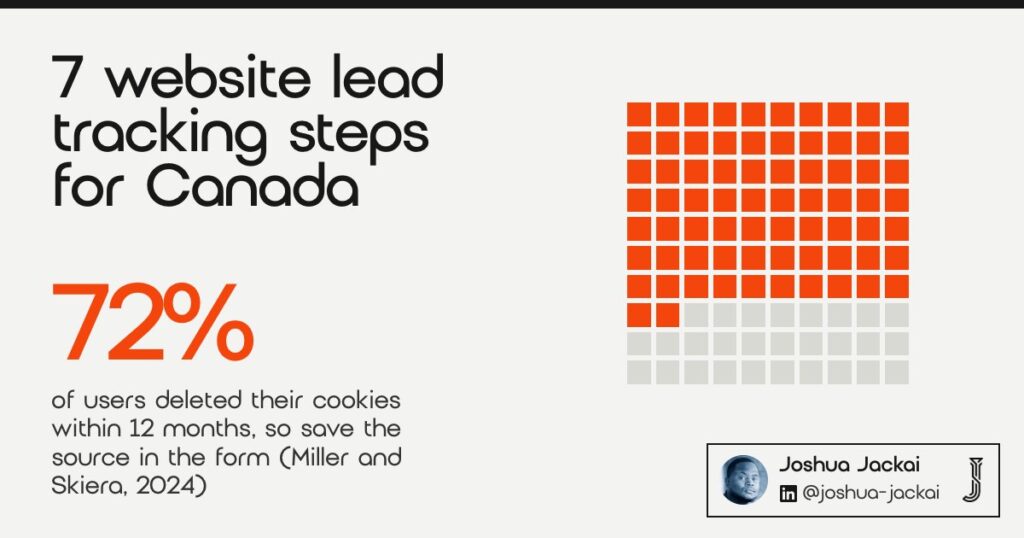
- Cookies do not last. In a study of 54,127 users, 72% deleted their cookies within 12 months, so source data must be saved when the form is submitted (Miller and Skiera, 2024).
- Safari deletes cookies created in JavaScript after 7 days without a visit, and caps them at 24 hours when a link carries a tracking decoration (WebKit).
- The Office of the Privacy Commissioner of Canada says collecting web browsing activity needs the person’s knowledge and consent (OPC, modified 2025-08-11).
- Under CASL, an inquiry made in the six months before your message supports implied consent to follow up (CASL, section 10(10)).
- Last touch credit alone misleads, so I report first source and latest source side by side (Berman, 2018).
| Step | What you do | Where it lives | Who can do it |
|---|---|---|---|
| 1. Define leads and sources | Write the lead definition and a seven name source list | A shared sheet | Marketing owner |
| 2. Tag your links | Add source, medium and campaign to every link you control | Ads, email, social, partners | Marketing |
| 3. Tell visitors | Publish a plain privacy notice and a choice before tracking runs | Site and policy | Owner with a privacy lawyer |
| 4. Save source in the form | Fill hidden form fields from the URL at submit | Website forms | Developer |
| 5. Send it to the CRM | Store each field as a CRM property, first and latest | CRM | Developer or admin |
| 6. Follow up lawfully | Record consent basis and date, count the six months | CRM and email | Sales with a lawyer |
| 7. Review weekly | One page of leads by source, plus a monthly test lead | Report | Marketing |
1. Define a lead and fix your source list: best for ending the source called direct
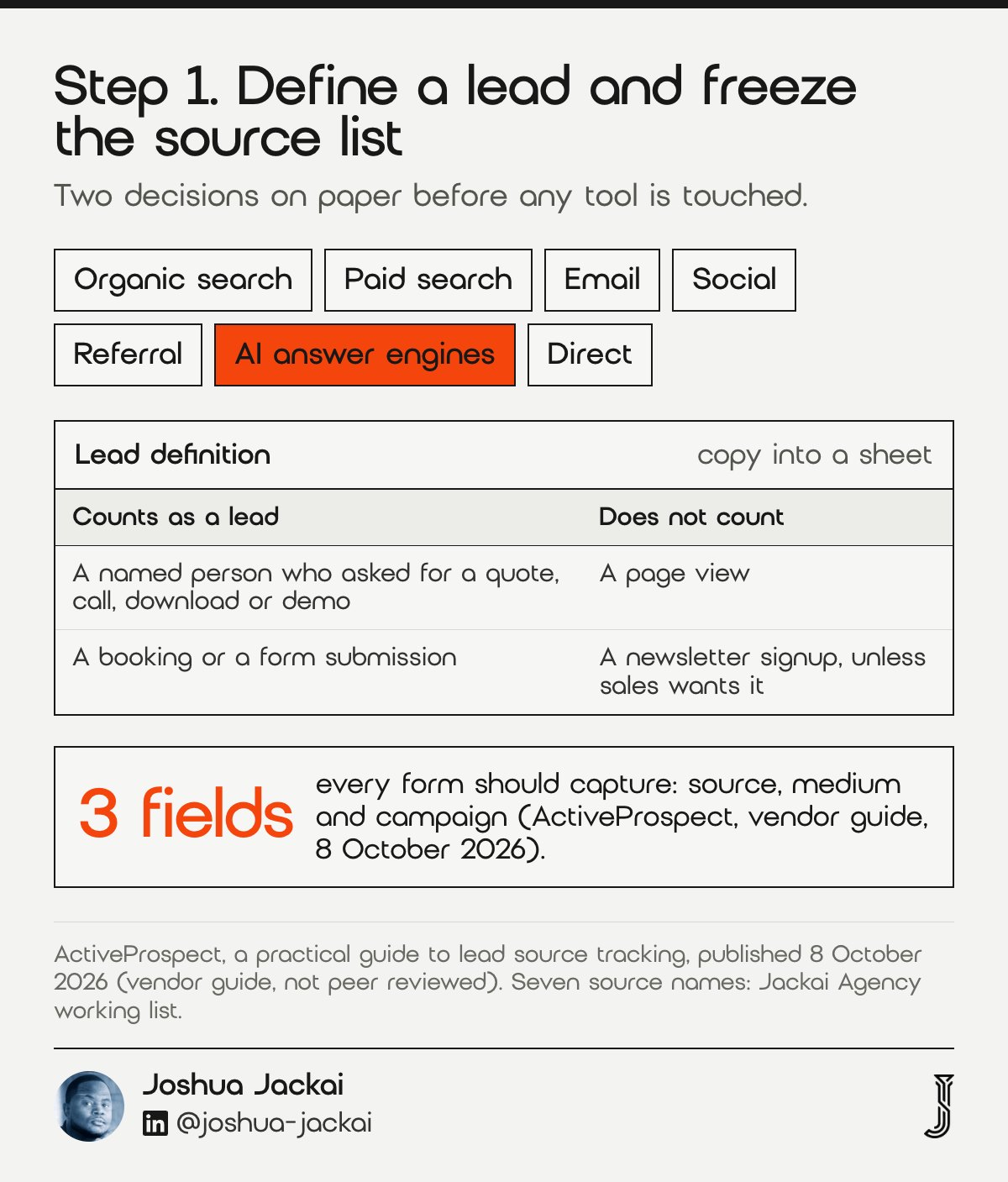
Lead tracking starts with two decisions made on paper: what counts as a lead, and which source names are allowed. I use one fixed list of seven sources: organic search, paid search, email, social, referral, AI answer engines and direct. Every report then compares like with like. ActiveProspect, a lead data vendor, advises strict picklists for the same reason.
- Time: about an hour
- You need: a list of every form, booking link and phone number on the site
- Output: one sheet with the lead definition and the seven source names
- Owner: the person who reads the weekly report
- Do not: add a new source name in the middle of a quarter
A lead, in this guide, is a named person who asked for something: a quote, a call, a download or a demo. A page view is not a lead and neither is a newsletter signup unless sales wants it. Write that down, because the count of leads is the denominator for everything else. Then freeze the source names. If marketing writes “LinkedIn” in one month and “social” in the next, the report splits one channel into two and no one notices.
I add “AI answer engines” so visits from chat tools do not disappear into the referral bucket. A separate name lets you see them. The same sheet should say who may edit the source on a lead record after it is created. I answer “nobody except an admin”, which matches the vendor advice that the original source field be read-only for most users. The same guide, published on 8 October 2026, lists three fields every form should capture: source, medium and campaign. Those three fields become the columns of the sheet in step 2, so decide the spelling now rather than after the first campaign goes out. Keep the sheet short enough that a new hire can read it in five minutes.
“If reps can overwrite the Original Source, the data will drift,” ActiveProspect wrote in its guide to lead source tracking.
2. Tag every link you control: best for paid, email and social traffic
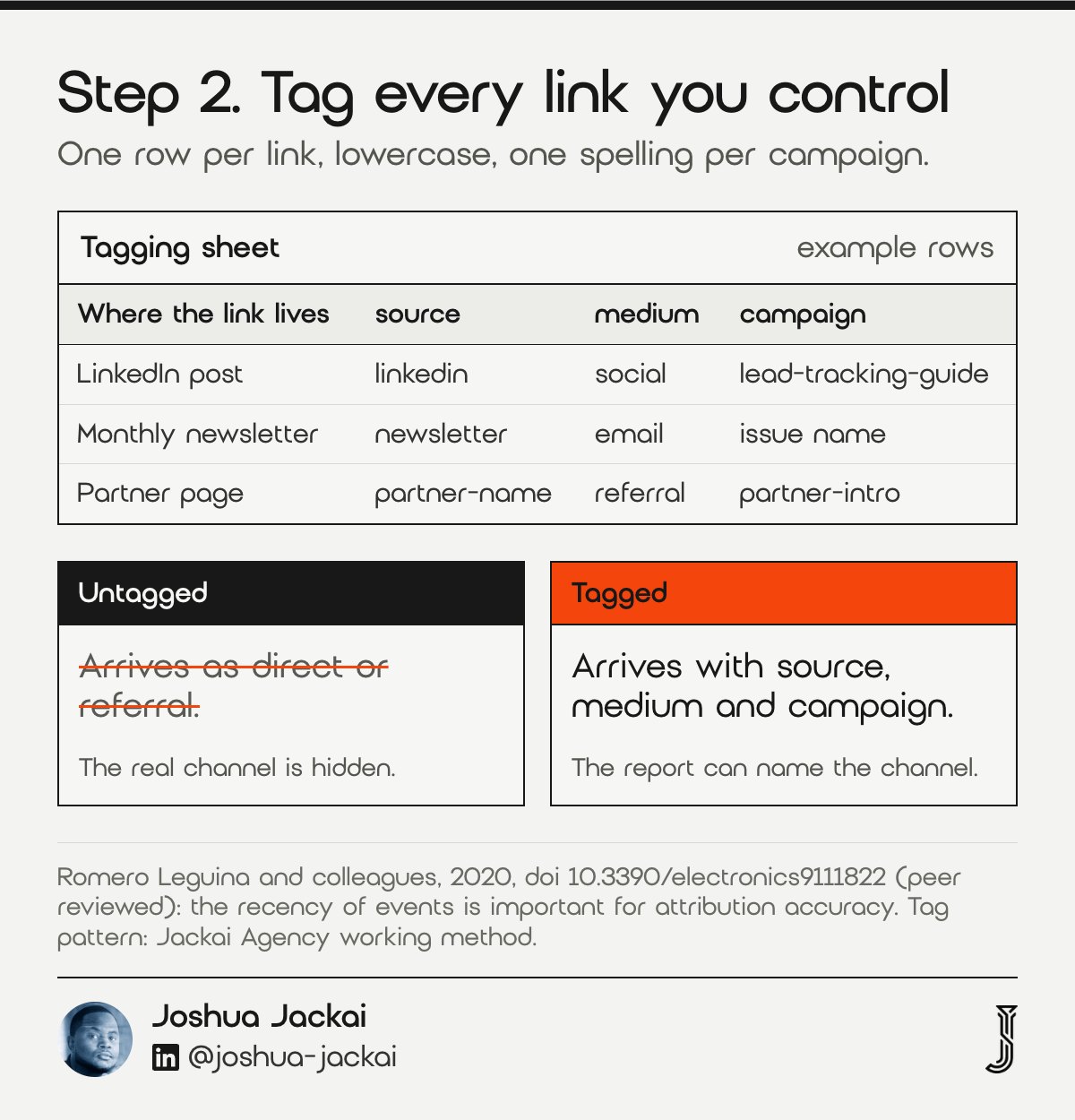
A UTM tag is text added to a link so analytics can name the campaign behind a visit. Tag every link you control: ads, email, social bios, partner pages and PDFs. Use source, medium and campaign in lowercase, spelled the same every time. Untagged links arrive as direct or referral and hide the real channel.
- Time: two hours for the first pass
- You need: the source list from step 1
- Output: a tagging sheet with one row per link
- Rule: lowercase, no spaces, one spelling per campaign
- Do not: tag links that stay inside your own site, because it overwrites the original source
Here is a concrete pattern. A LinkedIn post links to a guide with source “linkedin”, medium “social” and campaign “lead-tracking-guide”. A monthly newsletter uses source “newsletter”, medium “email” and the issue name. A partner page uses source “partner-name” and medium “referral”. The seven names from step 1 are the channel groups I report on. The UTM source is the finer label, such as linkedin, and it rolls up into one of the seven. Keep the sheet in a shared file so nobody invents a fourth spelling of “email”. I budget 2 hours for the first tagging audit of a client’s links, starting with email footers, social bios and old PDFs.
Tags only matter if the tag survives to the lead, which is step 4. Even then, the date of each touch matters. Romero Leguina and colleagues studied more than 95 million user paths from real hotel campaigns and found that the recency of events is important for attribution accuracy. I store the date of the first tagged visit and the date of the latest one, so the report can tell an old touch from a fresh one. The same team found that user paths of around 12 events were enough to build accurate models. That finding is about modelling, not about spreadsheets. I treat two dates as a practical minimum, not as proof that two touches tell the whole story.
“The recency of events considered in the user-paths is important for the accuracy of the model,” Romero Leguina and colleagues wrote in Electronics, 2020.
3. Tell visitors what you collect: best for staying inside PIPEDA
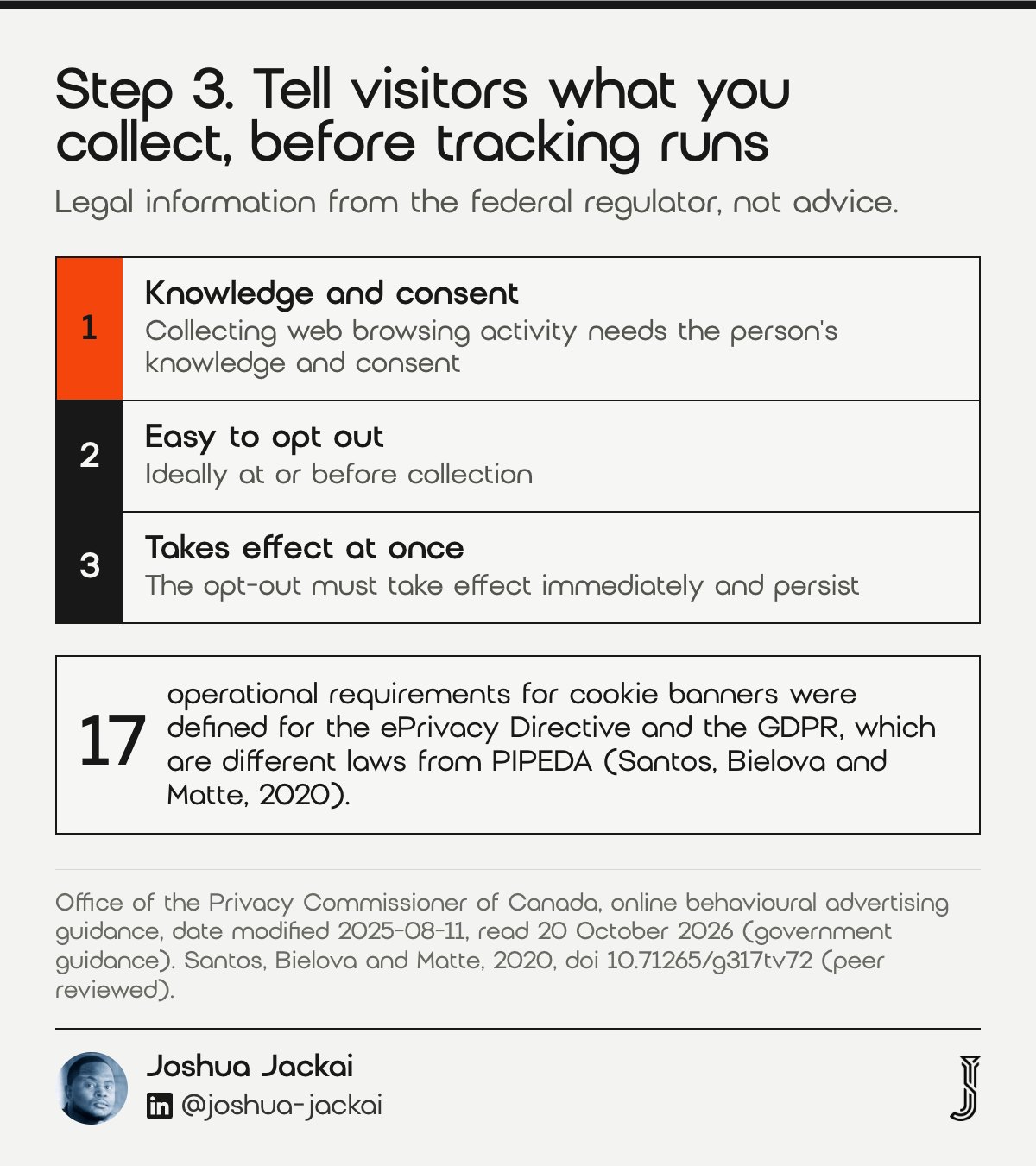
In Canada, tracking visitors is not banned, but the Office of the Privacy Commissioner of Canada (OPC), which oversees PIPEDA, says any collection or use of web browsing activity needs the person’s knowledge and consent. Say what you collect, why, and how to say no, before the tracking code runs. Provincial laws may add duties, so check yours.
- Time: a day with your lawyer, or an afternoon for a first draft
- You need: a list of every tool that sets cookies or receives visitor data
- Output: a plain language notice and a working choice
- Regulator: the Office of the Privacy Commissioner of Canada
- Do not: copy a European cookie banner and call it done
The regulator’s guidance on online behavioural advertising states its position that information gathered through online tracking and targeting will generally constitute personal information. That guidance says opt-out consent can be reasonable only when conditions are met. People must be able to opt out easily, ideally at or before collection, and the opt-out must take effect immediately and persist. I read the same logic into lead tracking: tell people first, and make the choice real.
European banners are a poor template. Santos, Bielova and Matte defined 17 operational requirements for banners that comply with the ePrivacy Directive and the GDPR, which are different laws from PIPEDA. Ask a Canadian privacy lawyer which choices your tools need, then configure the banner to match. I will not tell you here that analytics alone is exempt, because I have not found the regulator saying so. The page I read was last modified on 2025-08-11, so I recheck it each quarter, and I write the date I checked into the privacy notice workfile.
“Any collection or use of an individual’s web browsing activity must be done with that person’s knowledge and consent,” the Office of the Privacy Commissioner of Canada wrote.
4. Save the source inside the form: best for beating cookie loss
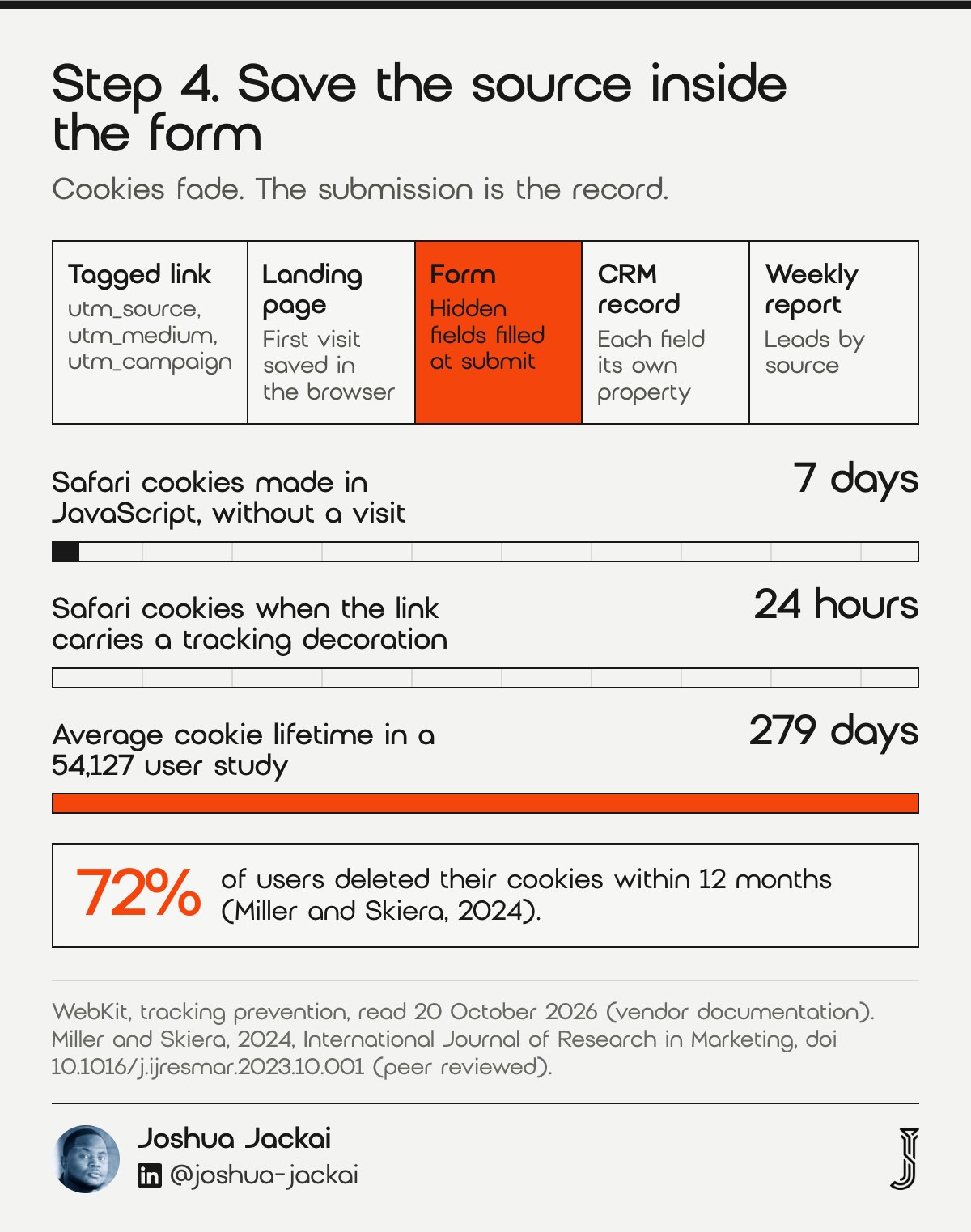
The form is the one moment you know a named person and the visit that produced them. Add hidden fields for source, medium, campaign, landing page and referrer, fill them from the URL when the page loads, and save them with the submission. Do not wait for a cookie to remember them, because cookies disappear.
- Time: half a day for a developer
- You need: the form tool and the tagging sheet
- Hidden fields: utm_source, utm_medium, utm_campaign, landing page, referrer, first visit date
- Test: open a tagged link in a private window and submit
- Do not: rely on a cookie set long before the visitor returns
A second visit shows the problem. Someone clicks your tagged ad on Monday, reads the site, and comes back directly the next week to fill in the form. If nothing stored Monday’s tag, the lead is “direct”. Browsers make this worse. WebKit says Safari deletes cookies created in JavaScript after 7 days without a visit, and caps them at 24 hours when the landing page link carries a tracking decoration such as a click identifier. For your form, store the first tagged visit in the browser when it happens and write it into the hidden fields at submit.
The wider evidence agrees that cookies are short lived. Miller and Skiera followed 54,127 users across about 128 million ad impressions and found an average cookie lifetime of 279 days, with most users deleting cookies within a year. Treat any cookie as a helpful hint and the form submission as the record. Name the hidden source fields in your privacy notice, and ask your lawyer whether they need the same choice as a cookie.
“72% (85%) of the users delete their cookies within 12 (24) months,” Miller and Skiera wrote in the International Journal of Research in Marketing.
5. Send it to the CRM, first source and latest source: best for honest credit
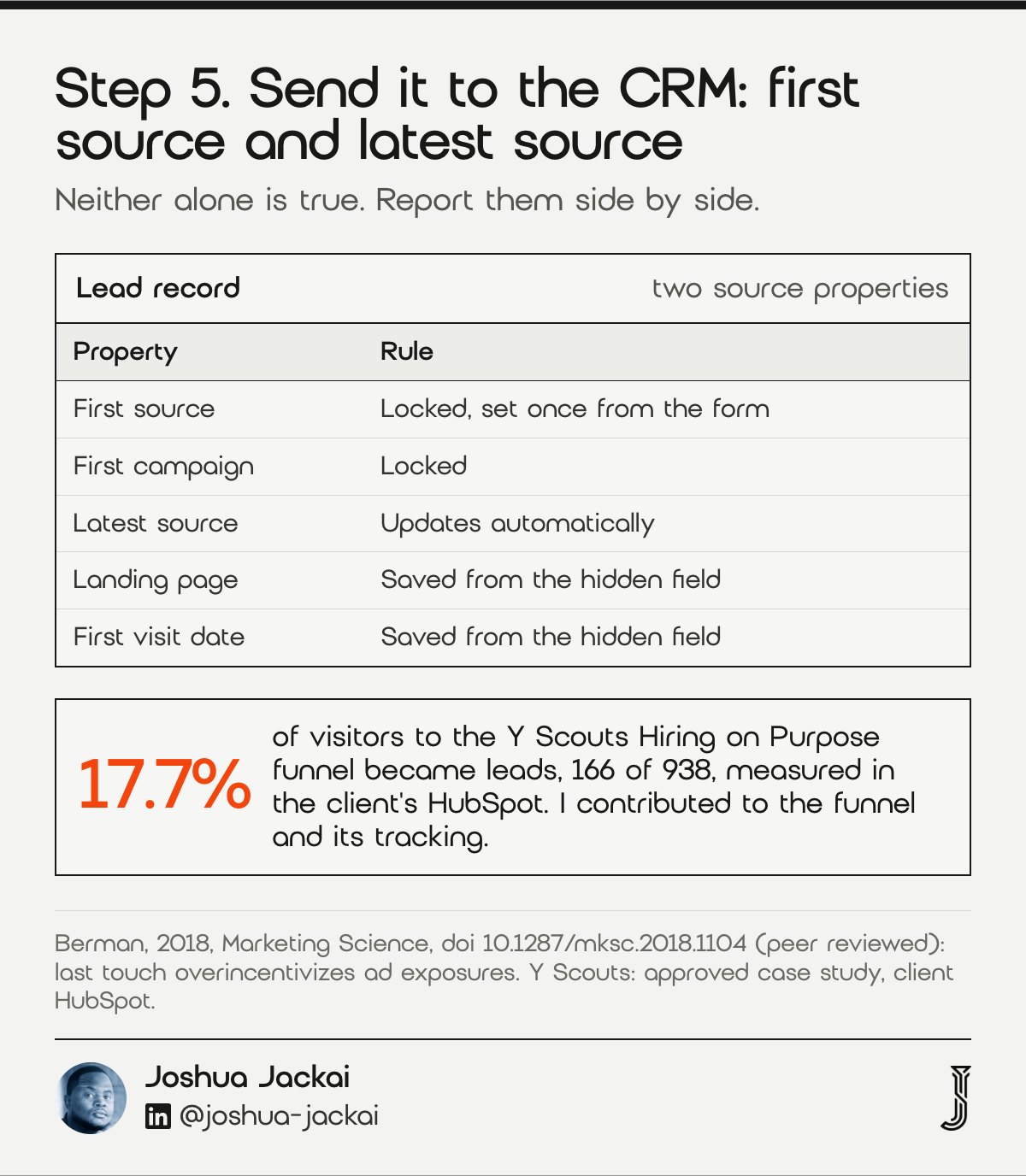
Send every captured field to the CRM as its own property, never into a notes box. Keep a first source that nobody edits and a latest source that updates, then report them side by side. A peer-reviewed study by Berman (Marketing Science, 2018) found the popular last touch method overincentivizes ad exposures, so one number alone misleads.
- Time: one to two days, depending on the CRM
- You need: admin access to the CRM and the form tool
- Properties: first source, first campaign, latest source, landing page, first visit date
- Edit rule: first source locked, latest source automatic
- Do not: type a source into a lead by hand
The test of a good setup is that a salesperson can open a lead and read where it came from without asking marketing. In HubSpot I map the hidden form fields to contact properties and report original source and latest source in the same view. The first shows what started the relationship, and the latest shows the most recent visit before the form, which may not be what closed it. Neither alone tells the whole story. Berman compared last touch credit with the Shapley value, a method that splits credit across touches, and found that the Shapley value achieved higher advertiser profits in his model. A lead table with both sources shows you where the two views disagree, though it does not calculate a Shapley value. My weekly report shows 2 columns for every lead, first source and latest source.
My own proof of this is small and specific. For Y Scouts, an executive search firm in Scottsdale, the Hiring on Purpose funnel converted visitors to leads at 17.7%, 166 of 938, measured in the client’s own HubSpot. I contributed to that funnel and its tracking, and I do not claim I caused the result. The number exists because the lead and its source landed in one system. See the Y Scouts case study.
“The popular last-touch method is shown to overincentivize ad exposures,” Berman wrote in Marketing Science.
6. Can I email a web form lead? Best for following up under CASL
Canada’s anti-spam law covers commercial electronic messages, including a sales follow-up to a web form lead. Section 6 requires consent, express or implied. A recent inquiry about your services can support implied consent for six months. Record the date, the form and the wording, because you must be able to show what you relied on.
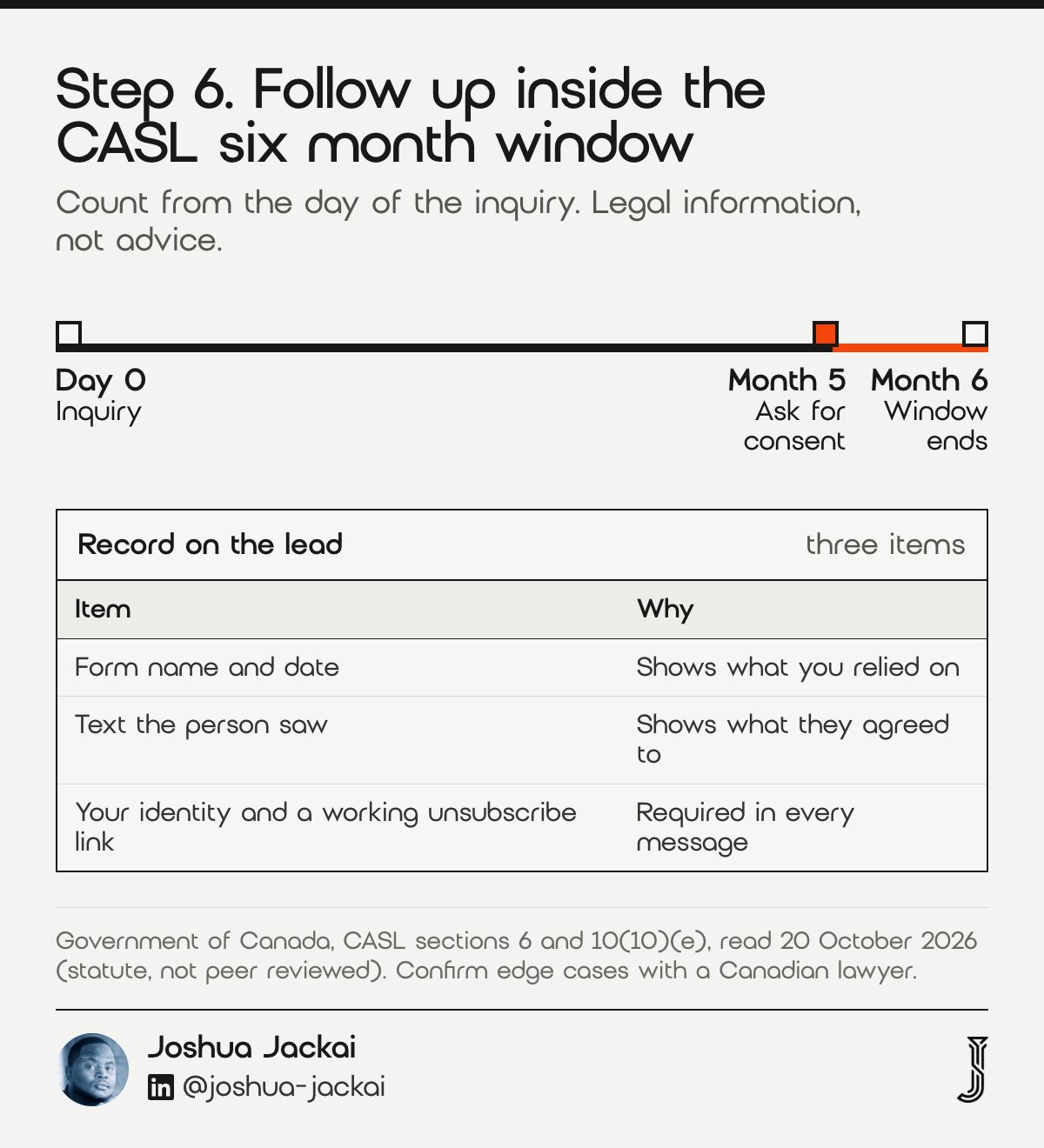
- Window: six months from the inquiry, by the statute’s wording
- You need: the form submission date stored on the lead
- Record: the form name, the date and the text the person saw
- After six months: stop emailing unless the person asks again or agrees
- Also required: identify yourself and include a working unsubscribe link
The statute names the case directly. Under section 10(10), an existing business relationship can arise from an inquiry or application made by the person within the six months before the day the message was sent. I count the six months from the day of the original inquiry and treat anything longer as a decision for a lawyer. If a lead is still warm at five months, I ask for express consent in the next message instead of hoping the window stretches. A lead who asked on 20 April 2026 sits at the edge of the window on 20 October 2026, so I treat the day before as the last safe day.
Do not buy a list and email it on the strength of “they have a business email”. The statute’s consent rule in section 6 applies to the message, and the rest of the law is a matter for a Canadian privacy or communications lawyer. This step is the reason the CRM must store the inquiry date from step 5.
“An inquiry or application, within the six-month period immediately before the day on which the message was sent,” the Government of Canada wrote in section 10(10)(e) of CASL.
7. Review weekly and test monthly: best for catching broken tracking early
Review one page every week: leads by first source, leads by latest source, and the count with no source. Once a month, submit a test lead through every form with a tagged link, in Safari and in Chrome. GA4 keeps event data for 2 or 14 months, so export the lead table before that window closes.
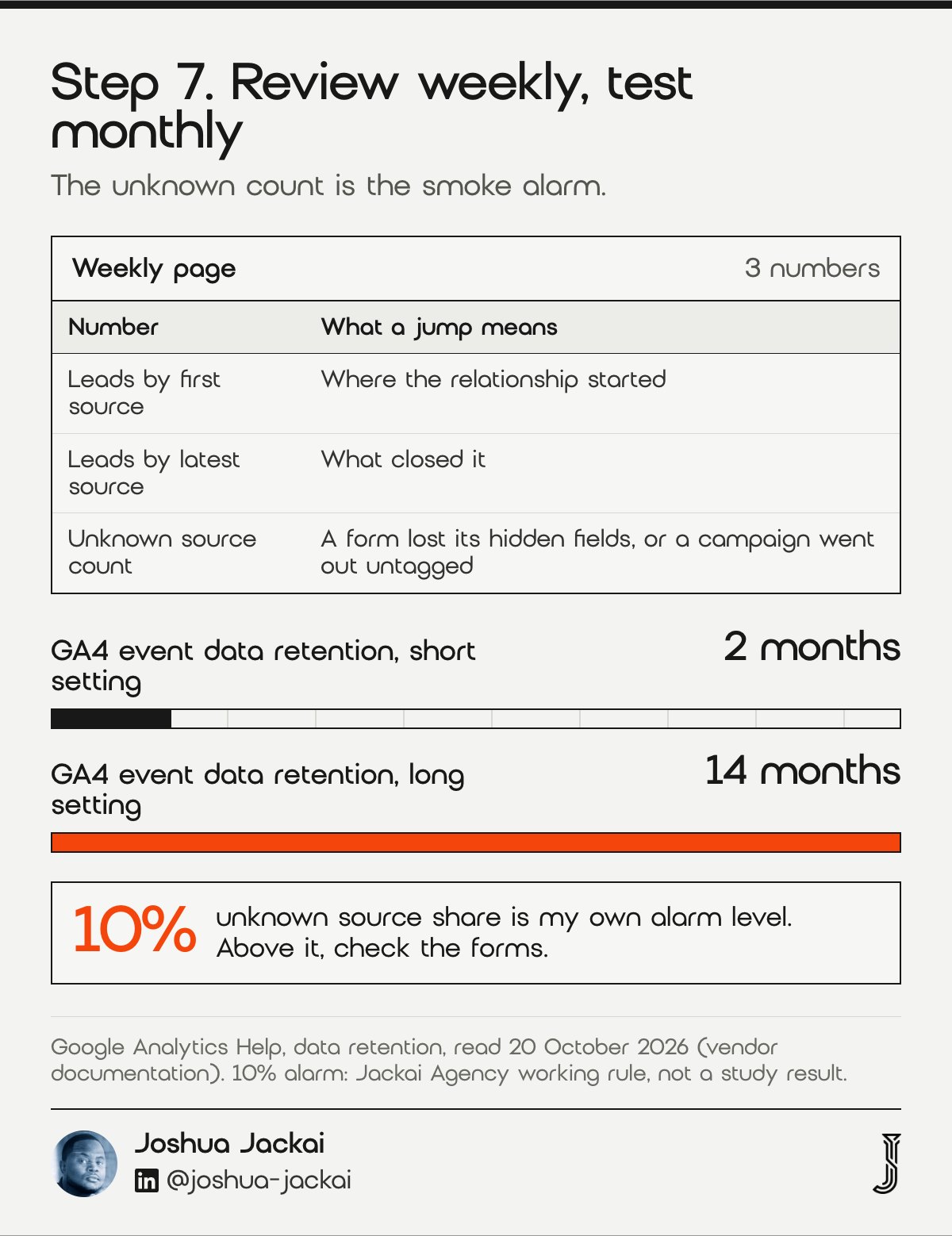
- Weekly page: leads by first source and by latest source, plus unknown count
- Monthly test: a tagged link through every form, in two browsers
- Alarm: unknown source above 10% of leads, which is my own working rule
- Export: copy the lead table out of analytics before retention expires
- Owner: one named person
The weekly report is one page with 3 numbers: leads by first source, leads by latest source and the unknown count. The unknown count is the smoke alarm. When it jumps, a form lost its hidden fields, a plugin update broke a script, or a new campaign went out untagged. Without the weekly look you learn about it at the quarterly review, three months of leads later. Google says the retention period for event data tied to cookies and user identifiers can be set to 2 months or 14 months on standard properties, so older detail is gone unless you saved the table. Google’s help page also notes that 360 properties can choose 26, 38 or 50 months, but most small sites will not be on that plan. A saved export costs nothing and survives a change of tool.
Handover is the other weak point. Terho, Salonen and Yrjänen interviewed 13 people from eight business to business firms about lead funnels and describe lead research, engagement and handover as the processes that matter. That study does not mention source fields, so this part is my own practice: the source must travel with the lead when it moves from marketing to a salesperson. I send my clients a weekly one page report built for the meeting they already run.
“The sales development processes of lead research, engagement and handover vary depending on the nature of the lead management context,” Terho and colleagues wrote in the Journal of Business and Industrial Marketing.
Compare the seven steps and filter by what you need
This matrix lists each step with the system it lives in and who can do it. Filter by system or by person, and rows are hidden rather than deleted. The privacy and email steps are legal information from public sources, not advice, and one person may carry several steps.
| Step | Where it lives | Who can do it | Record to keep |
|---|---|---|---|
| 1. Define leads and sources | A shared sheet | Marketing | The lead definition and the seven source names |
| 2. Tag your links | Ads, email, social | Marketing | A tagging sheet with one row per link |
| 3. Tell visitors | Website and policy | Marketing or A privacy lawyer | The privacy notice, the choice offered and the date you last checked the regulator’s page |
| 4. Save source in the form | Website and policy | A developer | The hidden field list and a dated test submission |
| 5. Send it to the CRM | CRM and email | A developer | The property map: first source, latest source, landing page, first visit date |
| 6. Follow up lawfully | CRM and email | Sales or A privacy lawyer | Inquiry date, form name, wording shown, and the date the six months end |
| 7. Review weekly | Report | Marketing | The weekly page and the monthly test lead log |
Check your unknown-source share and your email window
These two tools turn three inputs into a result. The first shows what share of leads has no source and what to fix. The second adds six months to an inquiry date. The defaults are placeholders, not your numbers, and the date result is a starting point to confirm with a lawyer.
Unknown-source share and email window (placeholder answers, edit them)
Frequently asked questions
What is website lead tracking?
Website lead tracking records where each lead came from and what it did before asking. It saves the source, campaign and landing page with the lead record. The goal is to name the channel behind every lead, not only count form submissions (ActiveProspect).
How do I track where my website leads come from?
Tag your links with UTM fields, save them in hidden form inputs, and send them to your CRM as separate properties. Report first and latest source side by side. I test every form monthly in Safari and Chrome, because Safari deletes JavaScript cookies after 7 days without a visit (WebKit).
Is website tracking legal in Canada?
In Canada, tracking is not banned, but the Office of the Privacy Commissioner of Canada says collecting web browsing activity needs the person’s knowledge and consent under PIPEDA. Tell visitors what you collect and offer a real choice. Provincial rules may add duties, so ask a lawyer (OPC).
Can I email someone who filled in my web form?
Often yes, for a limited time. CASL allows implied consent after an inquiry about your services in the six months before your message. Keep the date and form, and identify yourself in each message. Ask a lawyer about edge cases (CASL section 10(10)).
Can I track leads in a spreadsheet instead of a CRM?
A spreadsheet works while one person handles every lead and the volume is small. It breaks when two people edit it or when sales needs the source on the record. I move to a CRM when the source must follow the lead to a salesperson, as step 5 sets out.
Who sets this up for you
I set up lead capture forms, source tracking and the weekly report for Canadian B2B websites, from Vancouver, with fixed quotes. Lead Source Reporting starts at CA$2,600 and takes two weeks on the site you already have. My GA4 lead tracking guide covers the analytics side in more depth.
If you are not sure where your leads come from today, a free AI Visibility Report shows how answer engines see your company, and the CA$995 website audit is credited within 30 days if a project follows.
Sources
Peer reviewed
- Miller, K. M. and Skiera, B. (2024). Economic consequences of online tracking restrictions: evidence from cookies. International Journal of Research in Marketing. doi.org/10.1016/j.ijresmar.2023.10.001
- Berman, R. (2018). Beyond the last touch: attribution in online advertising. Marketing Science. doi.org/10.1287/mksc.2018.1104
- Romero Leguina, J., Cuevas, A. and Cuevas, R. (2020). Digital marketing attribution: understanding the user path. Electronics. doi.org/10.3390/electronics9111822
- Terho, H., Salonen, A. and Yrjänen, M. (2022). Toward a contextualized understanding of inside sales: the role of sales development in effective lead funnel management. Journal of Business and Industrial Marketing. doi.org/10.1108/jbim-12-2021-0596
- Santos, C. T., Bielova, N. and Matte, C. (2020). Are cookie banners indeed compliant with the law? Technology and Regulation. doi.org/10.71265/g317tv72
Industry, vendor and government (not peer reviewed)
- Office of the Privacy Commissioner of Canada. Guidance on covert online tracking and online behavioural advertising, date modified 2025-08-11, read 20 October 2026. priv.gc.ca
- Government of Canada. An Act to promote the efficiency and adaptability of the Canadian economy (CASL), sections 6 and 10(10), read 20 October 2026. laws-lois.justice.gc.ca
- WebKit. Tracking prevention in WebKit, read 20 October 2026. webkit.org
- Google. Analytics Help, data retention, read 20 October 2026. support.google.com
- ActiveProspect. A practical guide to lead source tracking, published 8 October 2026, vendor guide. activeprospect.com
- Jackai Agency price table, October 2026 (first-party prices, CAD). Y Scouts result: approved case study, measured in the client’s HubSpot.