7 Signs WordPress Keeps Breaking: Fix, Care Plan or Rebuild?
A five-question self-test that tells a Canadian owner whether a WordPress site that keeps breaking needs a fix, managed care or a rebuild, with CAD prices for each path.
 Joshua Jackai
18 min read
Published 10 November 2026 · Last updated and fact-checked November 2026
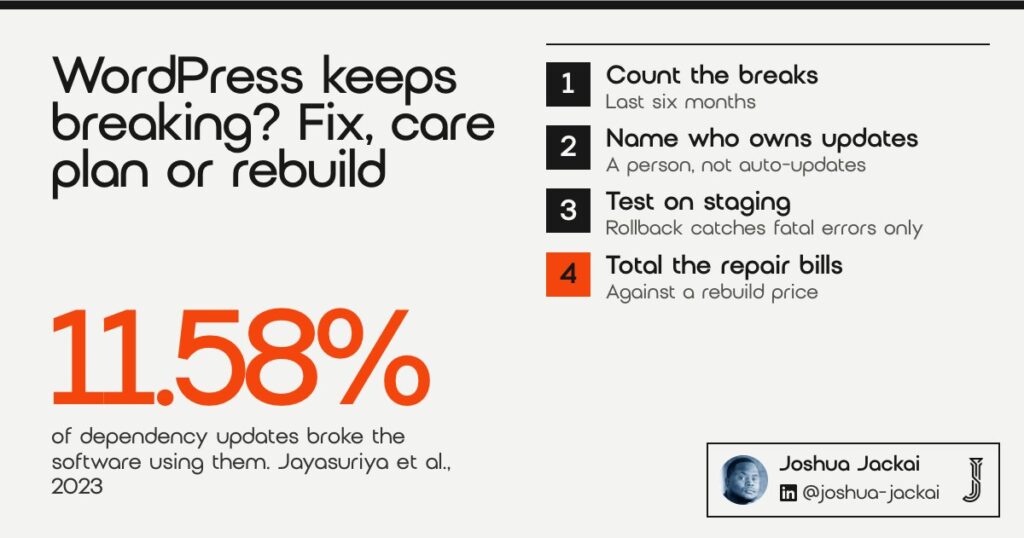
Short answer: If WordPress keeps breaking, count first. One break after an update is normal. In one study, 11.58% of library updates broke the software that used them (Jayasuriya et al., 2023). Repeated breaks are a decision. This post gives you a five-question self-test that points to fix, managed care or rebuild, with my CAD prices for each path.
A marketing lead at a 20-person engineering firm in Surrey (a composite, not a client) opens the company site on a Monday. The contact form is gone. Last month it was the menu. The month before, a white screen that the hosting company fixed overnight. She types “wordpress keeps breaking” into Google and gets troubleshooting steps for a developer.
She isn’t a developer. Her question isn’t how to debug a plugin. It’s whether to keep paying someone to patch this site, hand it to a care plan, or start again. That’s the decision this guide is for.
On 10 November 2026 I read the pages that rank for this search. They explain causes and fixes, and some sell a care plan. None of them gives an owner a rule for choosing between the three paths, and none prices them in Canadian dollars. My sister site Demand Designer covers the causes for US readers in 8 reasons WordPress updates keep breaking your site. This post is the Canadian owner’s decision.
Key takeaways
- In a study of 18,415 Maven artifacts, 11.58% of dependency updates broke the client software (Jayasuriya et al., 2023), so some breakage comes with every update habit.
- 81.5% of 4,600 studied GitHub projects kept outdated dependencies (Kula et al., 2018). Updates slip when nobody owns them.
- WordPress rolls back a plugin auto-update only when a PHP fatal error shows on the homepage (WordPress Core, 2024). A broken form stays live.
- Patchstack reported that 46% of WordPress vulnerabilities had no developer fix by public disclosure in 2025 (Patchstack, 2026).
- My care plan is CA$279 an hour. A small business rebuild is CA$4,950 or CA$5,950, and a custom B2B site starts at CA$7,450.
In this guide
| # | Sign | What it points to | Evidence type |
|---|---|---|---|
| 1 | It broke more than twice in six months | Count before you decide | Peer reviewed |
| 2 | Nobody owns the updates | Managed care | Peer reviewed and WordPress docs |
| 3 | No staging copy on your host | Fix, then care | WordPress docs |
| 4 | Nobody can name every plugin | Fix | WordPress docs |
| 5 | Some plugins are abandoned | Fix or rebuild | Peer reviewed and Patchstack |
| 6 | A page builder holds every page | Rebuild | Peer reviewed, indirect |
| 7 | Repair bills are closing on a rebuild price | Rebuild | My prices and your invoices |
1. It broke more than twice in six months: count before you decide
A pattern, not bad luck, is what turns a repair into a decision. This sign suits any owner who has lost count. One break after an update is ordinary: researchers found 11.58% of dependency updates broke the software using them (Jayasuriya et al., 2023). Three breaks in six months is a different problem.
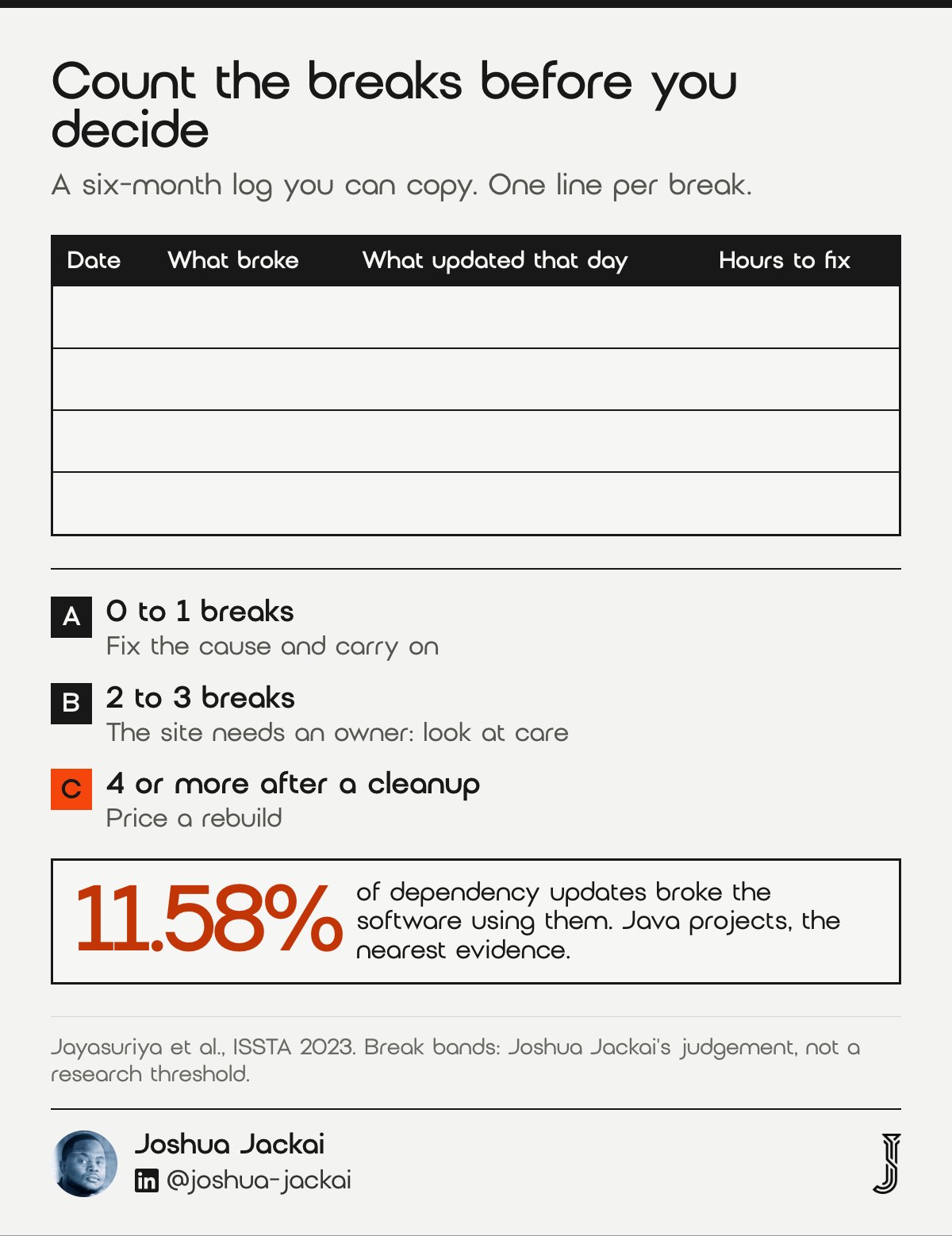
- Log: date, what broke, what updated that day, hours to fix
- Window: the last six months
- 0 to 1 breaks: fix the cause and carry on
- 2 to 3 breaks: the site needs an owner, so look at care
- 4 or more after a cleanup: price a rebuild
My counting rule is my judgement, not a research threshold. I haven’t found a study that sets one for WordPress sites. The point of the log is that memory lies in both directions. An owner who had a bad week remembers the site as cursed. An owner who pays a developer to quietly fix things may not know it broke at all.
Write each break on one line. What broke matters less than what changed that day, because the cause is almost always the last thing that moved: a plugin update, a theme update, a PHP version change at the host.
The Jayasuriya team studied Java projects, not WordPress, so treat it as the nearest evidence rather than a WordPress figure. What carries over is the shape. Most updates are harmless, a minority break something, and a site that updates often will meet that minority on a schedule.
If the log shows one break in six months, you don’t have a WordPress problem. You have a WordPress site.
“11.58% of the dependency updates contain breaking changes that impact the client,” wrote Dhanushka Jayasuriya and colleagues (ISSTA, 2023).
2. Nobody owns the updates: best handled by a care plan
If you can’t name the person who updates the site and checks it afterwards, that’s the sign. It suits firms where the original builder left. In one study, 81.5% of 4,600 projects kept outdated dependencies, and developers saw updating as extra work (Kula et al., 2018).
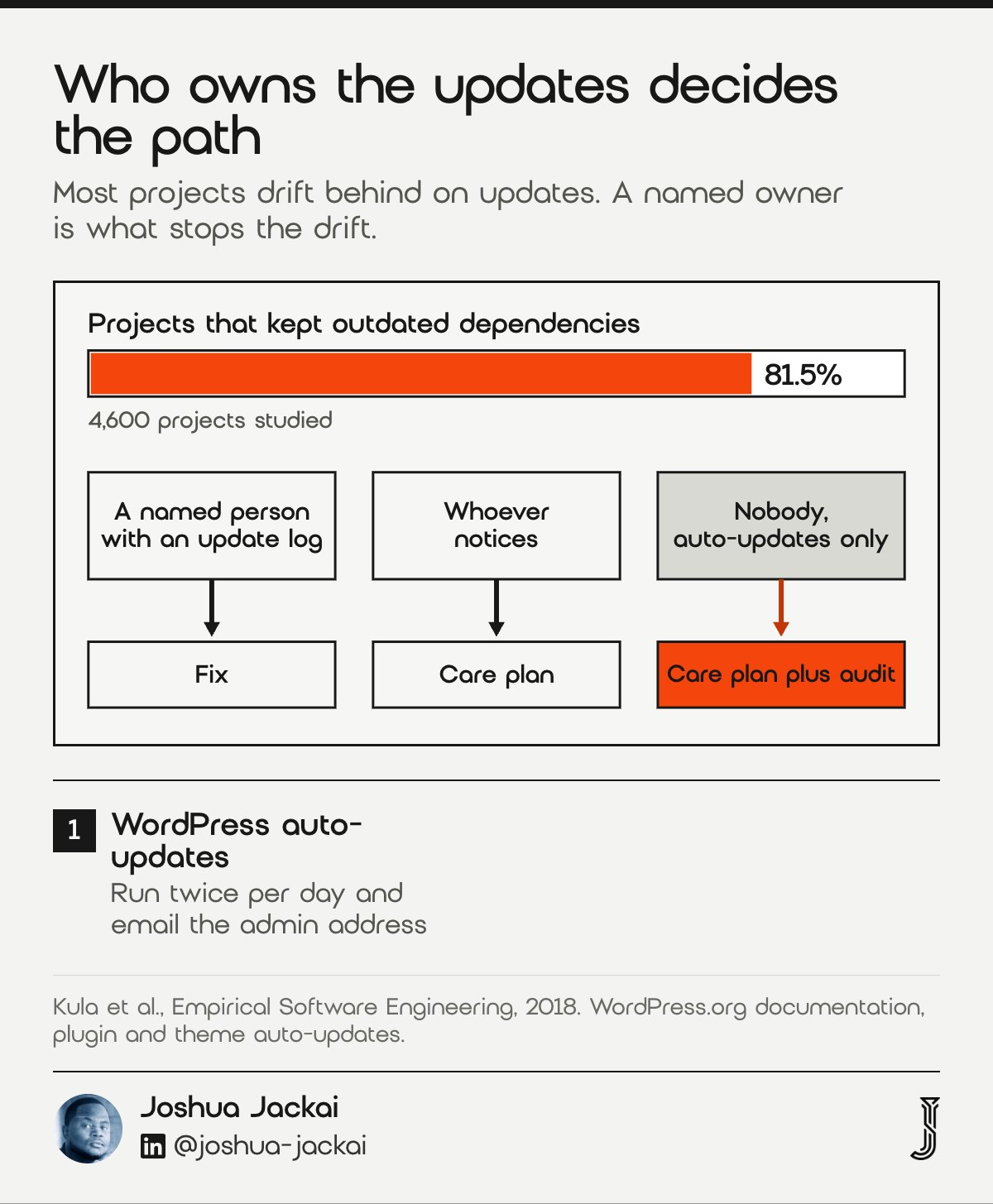
- Ask: who updated the site last, and when
- Default schedule: WordPress runs auto-updates twice a day
- Default alert: an email after each auto-update attempt
- Who reads that email: often a former employee’s inbox
- My care plan: CA$279 an hour, every account in your name
WordPress is built to update itself. Its documentation says it runs auto-updates twice per day and sends the owner an email about each attempt. That only helps if the email goes to someone who reads it and knows what to do next.
Kula and colleagues found the same gap among developers. Developers also said updating felt like extra workload and responsibility, so it lost out to other work. If professionals let updates slide, a marketing coordinator with nine other jobs will too.
So this sign doesn’t point to a rebuild. A new site with nobody looking after it will drift the same way within a year. It points to a person. That can be someone inside the firm with an hour a month and a written routine, or a care plan.
I’d change the admin email to a shared inbox before anything else. It costs nothing, and the next warning reaches a human.
“69% of the interviewees claimed to be unaware of their vulnerable dependencies,” wrote Raula Gaikovina Kula and colleagues (Empirical Software Engineering, 2018).
3. There’s no staging copy on your host: fix that before anything else
A staging copy is a private clone of your site where updates get tested before the public sees them. This sign suits owners who update live and hope. WordPress’s own safety net is narrow: it rolls back an auto-update only after a PHP fatal error on the homepage.
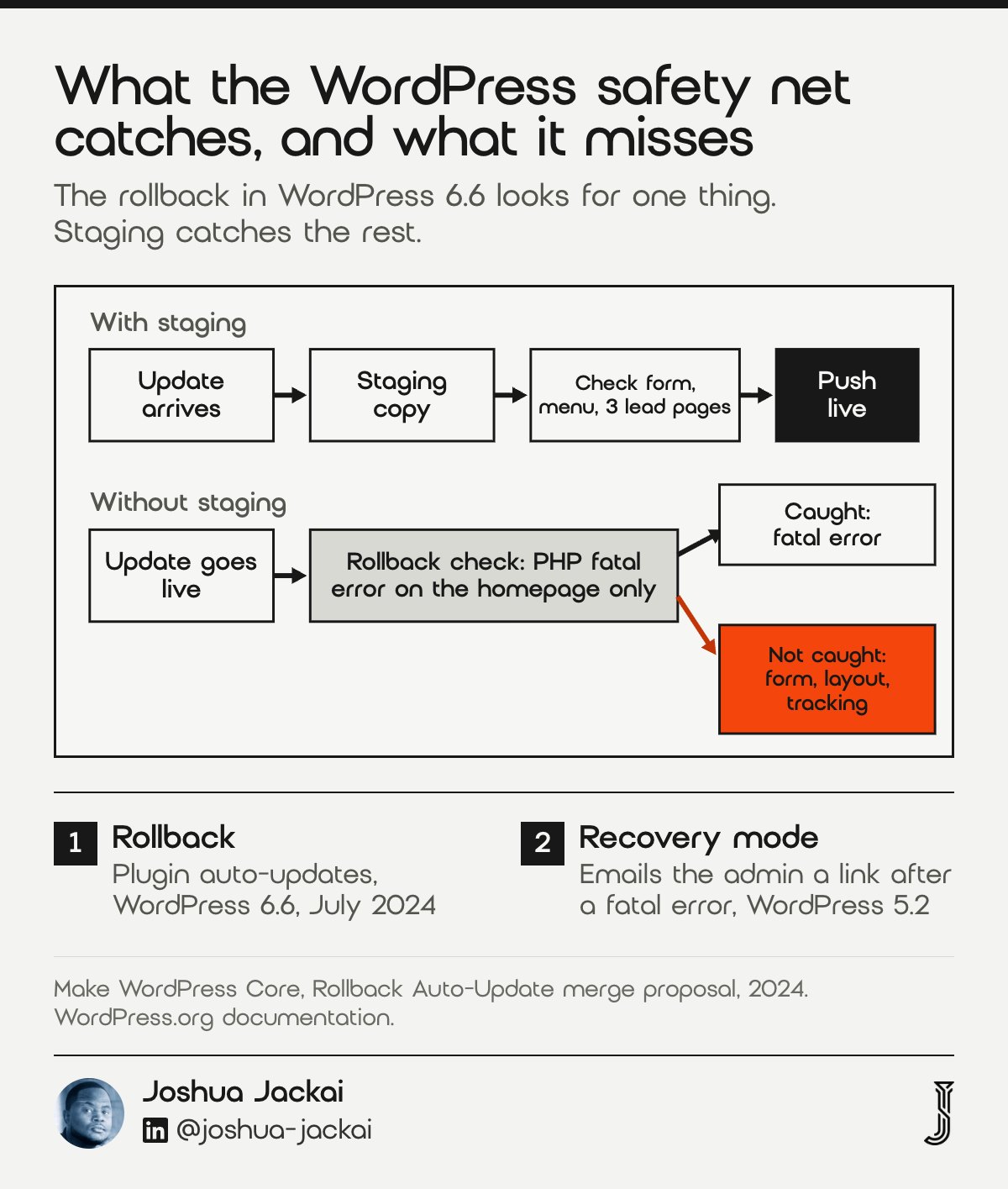
- Check: your host’s dashboard for a staging or clone button
- Test on staging: the contact form, the menu, the three pages that bring leads
- WordPress rollback: plugin auto-updates, fatal errors only
- Not caught: broken forms, layouts, tracking, checkout steps
- Recovery mode: emails the admin a link after a fatal error
This is the sign people underrate. Since WordPress 6.6 in July 2024, a plugin auto-update that throws a fatal error on the homepage gets rolled back. That’s useful. It also means a form that stops sending, or a layout that collapses on phones, stays live until a person notices.
WordPress also has recovery mode, added in version 5.2. After a fatal error it emails the admin a link that pauses the broken plugin for that person, so they can get into the dashboard. It’s a way back in, not a fix, and visitors still see the broken site.
Plenty of hosts include a staging button, so check yours before buying anything. If it has one, the fix is a habit, not a purchase. If it doesn’t, that alone may be a reason to move hosts before you pay anyone to repair the site.
In my experience a tested update adds minutes, not hours. That’s the answer to whether you have to check your site every hour: no, you check it once, on staging, before the update reaches the public.
The feature “aims to detect PHP fatal errors during automatic plugin updates,” wrote the WordPress core team (Make WordPress Core, 2024).
4. Nobody can name every plugin on the site: a fix, not a rebuild
When nobody can say what each plugin does, conflicts are a matter of time. This sign suits sites that grew by adding a plugin per request. Finding the culprit is usually a fix, and WordPress’s free Health Check & Troubleshooting plugin lets you switch plugins off for your session only while visitors see the normal site.
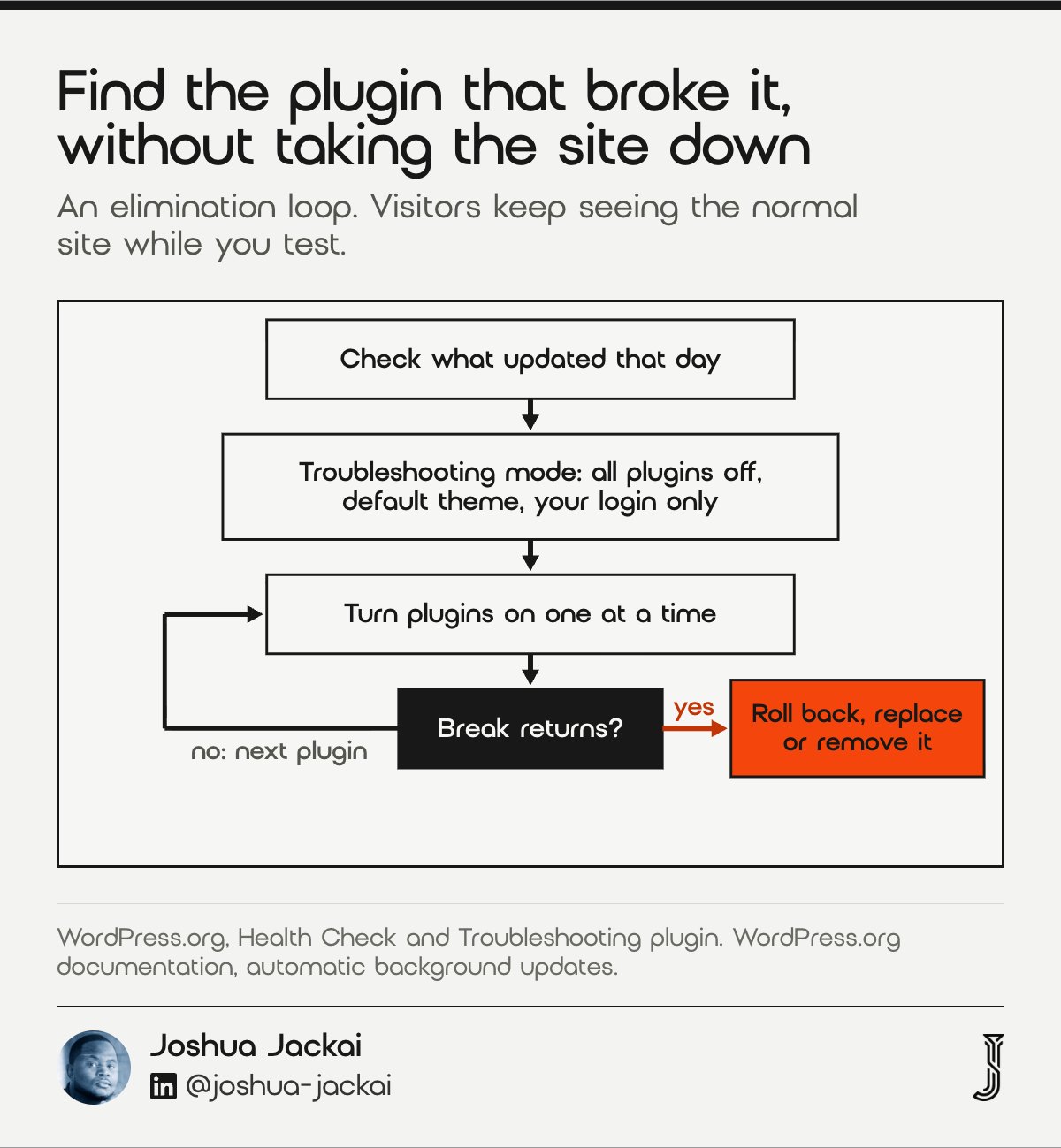
- Count: active plugins on the Plugins screen
- Label: one line each on what it does and who asked for it
- Find a conflict: Health Check troubleshooting mode, one plugin at a time
- Remove: anything nobody can explain
- Prefer: one plugin that does a job over three that overlap
How do you figure out which plugin is causing a conflict? WordPress’s own documentation gives the old method: deactivate every plugin, then turn them back on one by one. On a live site that takes the site down while you work. Troubleshooting mode does the same thing for your login only.
Every plugin also brings its own code libraries. Jayasuriya’s team found that changes in those indirect dependencies were a major cause of breaking changes. In plain terms, a plugin can break your site because something it depends on changed, and nobody on your team will ever see that line in a changelog.
That’s why I care more about overlap than raw count. Two form plugins, two SEO plugins and a caching plugin fighting the host’s cache is a site that will break on a schedule. Cleaning that up is a few hours of work. It doesn’t need a new website.
If you’ve already been hacked rather than broken, the order changes, so read what to do when a WordPress site is hacked in Canada first.
“a clean WordPress session, where all plugins are disabled, and a default theme is used,” wrote WordPress.org of troubleshooting mode (Health Check & Troubleshooting).
5. Some plugins are abandoned: fix if you can replace them, rebuild if you can’t
An abandoned plugin is one its developer stopped updating. This sign suits older sites where a key feature depends on one. Patchstack reported that 46% of WordPress vulnerabilities in 2025 had no developer fix by public disclosure (Patchstack, 2026), so an unmaintained plugin can’t be patched at all.
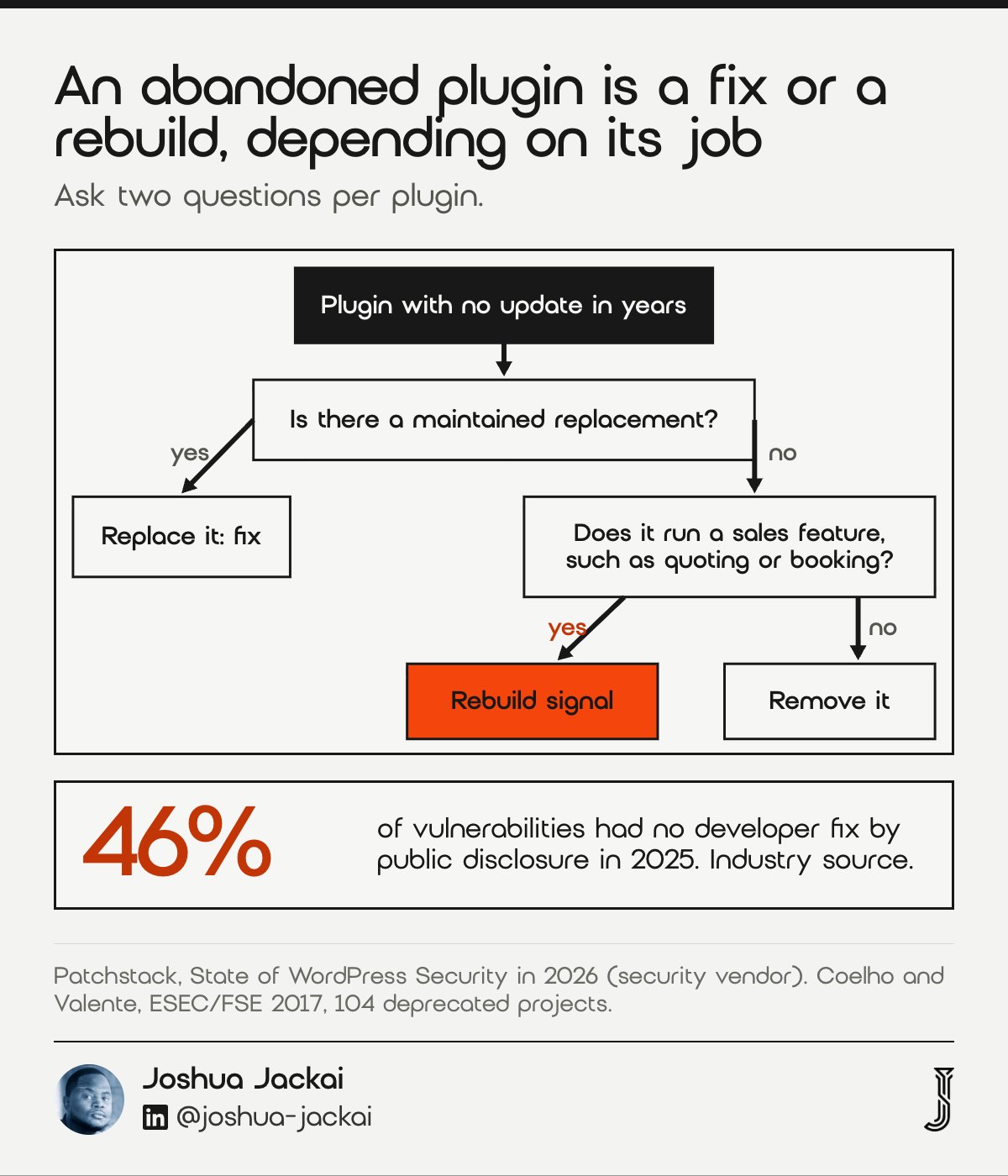
- Check: each plugin’s page on WordPress.org for its last update
- Ask: what stops working if this plugin goes
- Replaceable: swap it, a fix
- Not replaceable and core to sales: that’s a rebuild signal
- Premium plugins: check the vendor’s changelog, not the directory
Open your Plugins screen and click through to each plugin’s WordPress.org page. If it hasn’t been updated in years, write it down. Then ask one question: does a maintained plugin do the same job?
Usually one does, and replacing it is a fix. The hard case is the plugin that runs something your sales team uses daily, a quote builder or a booking flow, with no replacement and custom work built around it. You can’t patch it and you can’t remove it. That’s the strongest rebuild signal on this list.
Coelho and Valente surveyed the maintainers of 104 popular open source projects that had been deprecated, and they report nine reasons for those failures. Their point applies here: free code is written by people, and people stop.
Patchstack is a security vendor, so its report is an industry source, not peer reviewed. It’s still the most direct number on how often WordPress code goes unpatched.
“46% of vulnerabilities did not receive a fix from the developer in time for public disclosure,” wrote Patchstack (State of WordPress Security in 2026).
“these projects are also facing unprecedented mortality rates,” wrote Jailton Coelho and Marco Tulio Valente (ESEC/FSE, 2017).
6. A page builder holds every page: a rebuild signal when the add-ons pile up
A page builder is a visual editor plugin, such as Elementor or Divi, that stores your layouts in its own format. This sign suits sites where every page depends on it plus add-on packs. Decan and Mens found semver compliance varies by ecosystem, so version numbers can’t promise an update is safe.
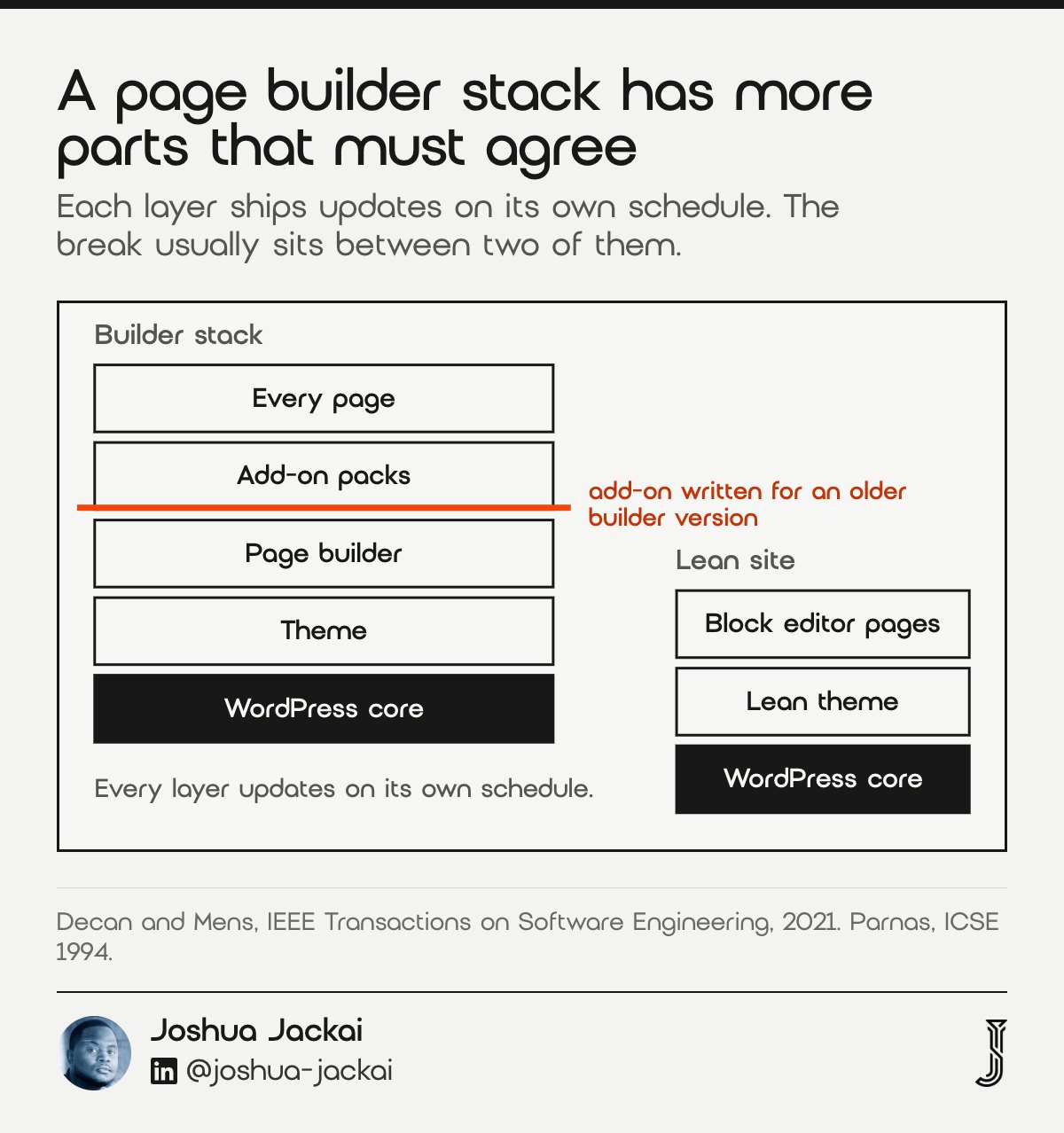
- Check: does every page open in the builder, not the block editor
- Count: add-on packs that extend the builder
- One builder, no add-ons: usually fine with care
- Builder plus 2 or more add-on packs: the stack is the cause
- Rebuild path: fewer moving parts, block editor or a lean theme
Is this what WordPress is like, and do you need something better? Not quite. A lean WordPress site on the block editor with a dozen maintained plugins can run for years with routine care. The sites that break every month tend to be builder stacks: a builder, two or three add-on packs from other developers, and a theme built for the builder.
Each layer updates on its own timetable. Decan and Mens studied how packages in four ecosystems, including Packagist for PHP, use version numbers to signal breaking changes. An owner clicking Update in the dashboard sets no version limits at all. Every layer moves when its developer says so.
Parnas made the general point in 1994: software ages. A builder stack ages faster because it has more parts that must agree. When every page is stored in one builder’s format, leaving it means rebuilding every page anyway, which is why this sign points to a rebuild rather than more repair.
“Programs, like people, get old,” wrote David Parnas (ICSE, 1994).
7. Repair bills are closing in on a rebuild price: do the arithmetic
Add up what you paid for repairs over the last 12 months and compare it with a rebuild price. This sign suits owners who’ve been paying invoices without totalling them. At my care rate of CA$279 an hour, 18 hours of repair is CA$5,022, more than a CA$4,950 small business rebuild on my published offers.
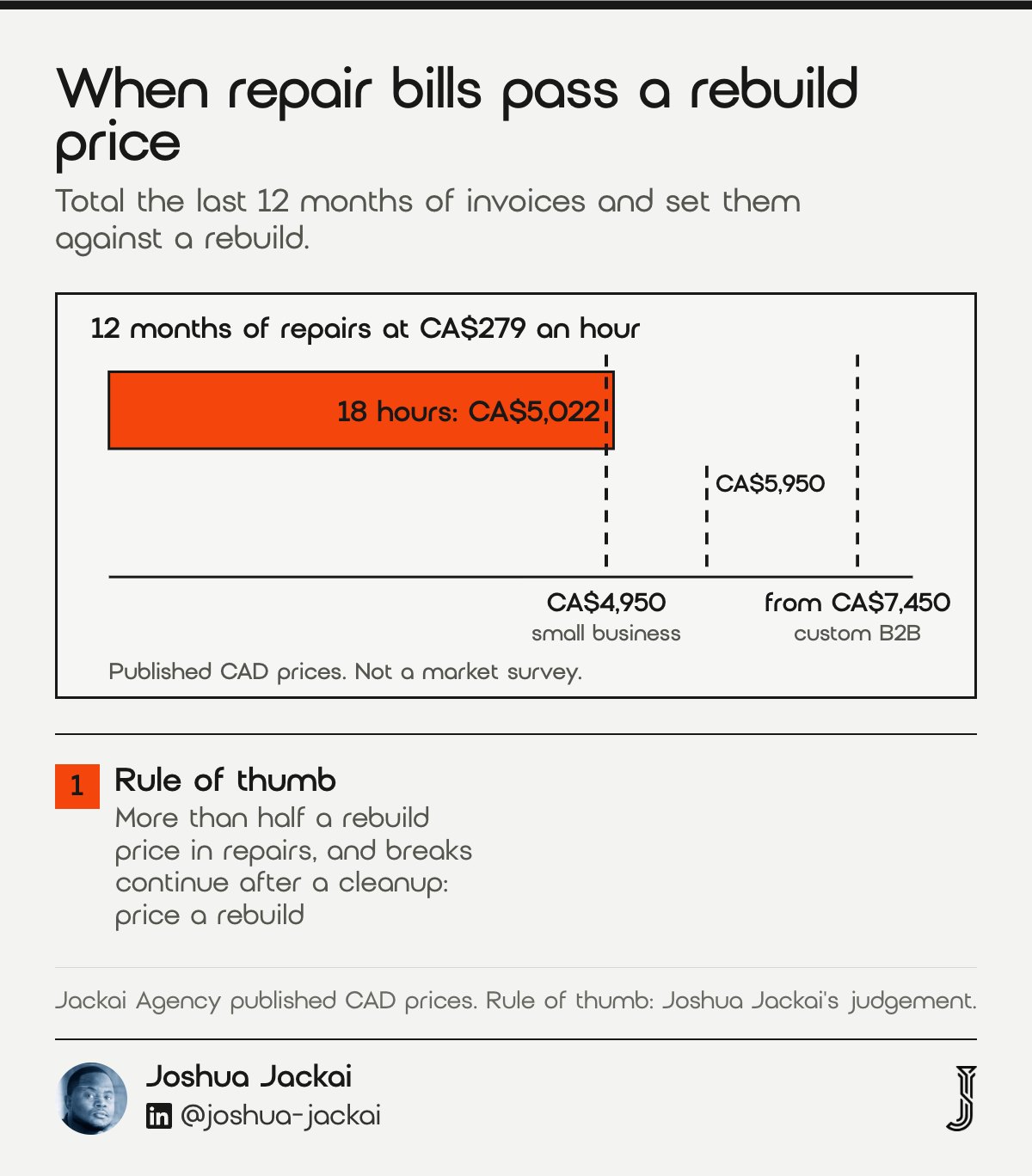
- Care plan: CA$279 an hour
- Website Audit: CA$995, credited if a project starts within 30 days
- Small business site: CA$4,950 or CA$5,950
- Custom B2B site: from CA$7,450
- Migration only: CA$2,500
Here is my rule, and it is a rule of thumb, not a study. If the self-test points to care and the break log is short, pay for care. If 12 months of repairs come to more than half a rebuild price and the breaks keep coming after a cleanup, the repair money is buying the same old site again.
The arithmetic leaves out what the breaks cost you. A contact form that is down for a week loses enquiries you’ll never see. Only your own lead numbers can price that, and the calculator further down this guide lets you add it.
Kruchten, Nord and Ozkaya describe technical debt as a way to explain to non-technical people why old code needs work. Repair invoices are the interest payments on that debt. A rebuild pays off the principal.
If you rebuild, keep your rankings. My guide to rebuilding WordPress without losing SEO covers redirects and the checks before launch.
“81.5% of the studied systems still keep their outdated dependencies,” wrote Kula and colleagues (Empirical Software Engineering, 2018).
Which path fits your site? Filter the three options
Three paths cover nearly every WordPress site that keeps breaking: fix the cause, pay for managed care, or rebuild. Filter by the sign you recognise and the budget you have, and each row shows the trade you accept. The prices are my published CAD prices. The fit ratings are my judgement, not a measured figure.
Showing 5 of 5 options
Fix, managed care or rebuild for a WordPress site that keeps breaking
| Path | Fits these signs | Price (CAD) | Who owns updates after | The trade you accept |
|---|---|---|---|---|
| Fix it yourself: staging, plugin cleanup, shared admin inbox | Too many plugins, no staging, first breaks | Your time | A named person on your team | Your hours, and the habit has to stick |
| Website Audit, then a fix list any developer can follow | Any sign, when you are unsure | CA$995, credited if a project starts within 30 days | You choose after the audit | A week before anything changes |
| Managed care at an hourly rate | Nobody owns updates, two or three breaks | CA$279 an hour | Me, with every login in your name | An ongoing cost that never pays off the old stack |
| Rebuild a small business site | Builder stack, abandoned core plugin, high repair bills | CA$4,950 or CA$5,950 | Me for 30 days of fixes, then you or care | A project now, in exchange for fewer moving parts |
| Rebuild a custom B2B site | Same signs, with quoting, gated content or integrations | From CA$7,450 | Me for 30 days of fixes, then you or care | The largest spend, sized to what the site has to do |
Score your site: the five-question self-test
Answer five questions about plugin count, abandoned plugins, page builder, staging and who owns updates. The test scores your site from 0 to 10 and names a path. It then compares your last 12 months of repair hours, at my CA$279 hourly rate, with my CA$4,950 rebuild price. The thresholds are my judgement, so treat them as a starting point.
What I could not find, and what it means for you
I found no peer-reviewed study that measures how often WordPress sites break after updates, or what owners pay to keep them running. The studies I cite measure dependency updates in Java and other ecosystems, abandoned open source projects, and software ageing. Each was done for another purpose, and I’ve said where I used one as the nearest evidence.
I also found no Canadian survey of WordPress repair or care prices. The only CAD figures in this post are my own published prices. My break counts and self-test thresholds are judgement from practice, not research.
Patchstack is a security vendor. Its 2026 report covers vulnerabilities, not breakage, so I use it only for the risk of switching updates off and the risk of abandoned plugins.
“there is little research on how these breaking changes impact the client projects in the wild,” wrote Jayasuriya and colleagues (ISSTA, 2023).
Questions about why WordPress keeps breaking, answered
These are the questions owners ask once a site has broken more than once. They cover testing, auto-updates, finding a bad plugin, whether WordPress is the problem, and what a Canadian care plan costs. Each answer is short enough to forward to a partner or a board member.
Am I supposed to be testing my sites every hour to make sure they are working fine?
No. Test once, on a staging copy, before each update goes live, then add a free uptime monitor that emails you when the site goes down. Check your contact form weekly. WordPress’s own rollback only catches fatal errors on the homepage, so forms need a human check.
Is this what WordPress is like and do I need to find something better?
Not usually. A lean WordPress site with maintained plugins and someone who owns updates can run for years. Sites that break monthly tend to be page builder stacks with abandoned add-ons. Fix the stack, or rebuild leaner, before you decide the platform itself is the problem.
Is it really that risky to enable auto-updates on a production WordPress site?
Turning them off is riskier. Patchstack reported that 46% of 2025 vulnerabilities had no developer fix by disclosure, and patches that do exist need applying fast. Keep security updates automatic, test major plugin updates on staging first, and make sure a person reads the update emails.
How do you figure out which plugin is causing a conflict when your site breaks?
Check what updated that day first. Then install WordPress’s Health Check & Troubleshooting plugin and enter troubleshooting mode, which disables plugins for your login only. Turn them back on one at a time until the break returns. Roll back, replace or remove that plugin.
What does a WordPress maintenance plan cost in Canada?
Prices vary by provider and by what is included, so ask what a person checks each month. My optional care plan is CA$279 an hour, with every account in your name. New builds include 30 days of fixes, and a CA$995 Website Audit tells you which path fits.
Who looks after a site when WordPress keeps breaking
I’m a Vancouver web designer, and I run Jackai Agency on my own. If you aren’t sure which path your site needs, start with the CA$995 Website Audit, credited if a project starts within 30 days. It covers plugins, staging, ownership of updates and a written recommendation: fix, care or rebuild.
If the audit says fix, I’ll say so, and you can hand the list to any developer. Care is CA$279 an hour, with every login in your name. A rebuild is CA$4,950 or CA$5,950 for a small business site and from CA$7,450 for a custom B2B site. For what a care plan should include, read my guide to website maintenance in Vancouver.
Sources
Peer-reviewed research
- Coelho, J., and Valente, M. T. (2017). Why modern open source projects fail. Proceedings of the 2017 11th Joint Meeting on Foundations of Software Engineering (ESEC/FSE), ACM, 186-196.
- Decan, A., and Mens, T. (2021). What Do Package Dependencies Tell Us About Semantic Versioning? IEEE Transactions on Software Engineering, 47(6), 1226-1240.
- Jayasuriya, D., Terragni, V., Dietrich, J., Ou, S., and Blincoe, K. (2023). Understanding Breaking Changes in the Wild. Proceedings of the 32nd ACM SIGSOFT International Symposium on Software Testing and Analysis (ISSTA), 1433-1444.
- Kruchten, P., Nord, R. L., and Ozkaya, I. (2012). Technical Debt: From Metaphor to Theory and Practice. IEEE Software, 29(6), 18-21.
- Kula, R. G., German, D. M., Ouni, A., Ishio, T., and Inoue, K. (2018). Do developers update their library dependencies? Empirical Software Engineering, 23(1), 384-417.
- Parnas, D. L. (1994). Software aging. Proceedings of the 16th International Conference on Software Engineering (ICSE), IEEE, 279-287.
WordPress documentation, industry and vendor sources (not peer reviewed)
- WordPress.org documentation. Plugin and themes auto-updates, read 10 November 2026.
- WordPress.org documentation. Configuring automatic background updates, read 10 November 2026.
- Make WordPress Core. Merge Proposal: Rollback Auto-Update, 19 April 2024, read 10 November 2026.
- WordPress.org News. WordPress 6.6 “Dorsey” release post, July 2024, read 10 November 2026.
- Make WordPress Core. Fatal Error Recovery Mode in 5.2, 16 April 2019, read 10 November 2026.
- WordPress.org plugin directory. Health Check & Troubleshooting, read 10 November 2026.
- Patchstack (industry source, security vendor). State of WordPress Security in 2026, 2026, read 10 November 2026.
- Jackai Agency price table, first-party prices in CAD, read 10 November 2026. Jackai Agency offers.