7 WordPress Site Hacked Steps in Canada: 2026 Field Guide
What to do when a WordPress site is hacked in Canada: seven steps from confirming the hack to PIPEDA duties, clean or rebuild, Google review and prevention.
 Joshua Jackai
16 min read
Joshua Jackai
16 min read
Published 20 October 2026 · Last updated and fact-checked October 2026
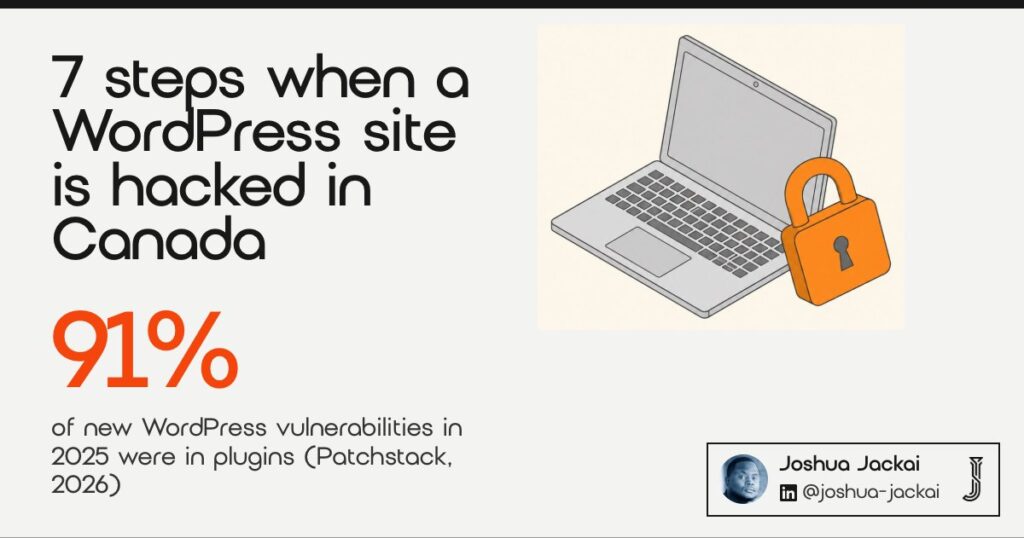
Short answer: If your WordPress site is hacked, work in seven steps: confirm it, contain it, find the entry point, check your Canadian privacy duties, choose clean, restore or rebuild, repair search damage, then prevent a repeat. Patchstack found that 91% of the 11,334 new WordPress vulnerabilities in 2025 were in plugins, so the plugin list is where I look first (Patchstack).
On 20 October 2026 I searched this problem the way a worried owner would. Page one was cleanup vendors, a Canadian hosting knowledge base and security company summaries. I did not find a page that explained in plain language when a hacked business site in Canada triggers a privacy report. Nor did I find one on how to choose between cleaning, restoring and rebuilding, or what to check in Google afterwards. This guide covers those gaps. It draws on federal privacy guidance, two Google help pages, one vendor dataset and four peer-reviewed studies. A tool near the end turns your answers into a recommendation. It is legal information, not legal advice.
In this guide
Key takeaways
- Plugins carried 91% of new WordPress vulnerabilities in 2025, themes 9%, and only 6 were in core (Patchstack, vendor data, February 2026).
- The median time to mass exploitation for heavily exploited vulnerabilities was 5 hours, and 46% of vulnerabilities had no developer fix at public disclosure (Patchstack).
- In a sample of about 200,000 webservers, those running WordPress were more likely to be hacked than those running no CMS (Vasek, Wadleigh and Moore, 2016).
- Under the Personal Information Protection and Electronic Documents Act (PIPEDA) you report breaches that pose a real risk of significant harm, notify the people affected, and keep breach records for two years (Office of the Privacy Commissioner of Canada).
- Google says a security review after cleanup can take from a few days to a few weeks (Search Console Help).
| Step | What you do | When | Who can do it |
|---|---|---|---|
| 1. Confirm and copy | Check Google, Security issues, save files | First hour | You or a developer |
| 2. Contain | Change every login, pause the site, call the host | First day | You and the host |
| 3. Find the entry | Review plugins, themes, users, logs | First day | Developer or host |
| 4. Privacy duties | Assess harm, report, notify, keep records | As soon as feasible | You, with a lawyer if unsure |
| 5. Clean, restore or rebuild | Pick one route with a rule | First week | Developer |
| 6. Repair search | Remove spam pages, request a review | First weeks | You or a developer |
| 7. Prevent a repeat | Update fast, cut plugins, back up offsite | Ongoing | You or a care plan |
1. Confirm the hack and save a copy: best for knowing what you are dealing with
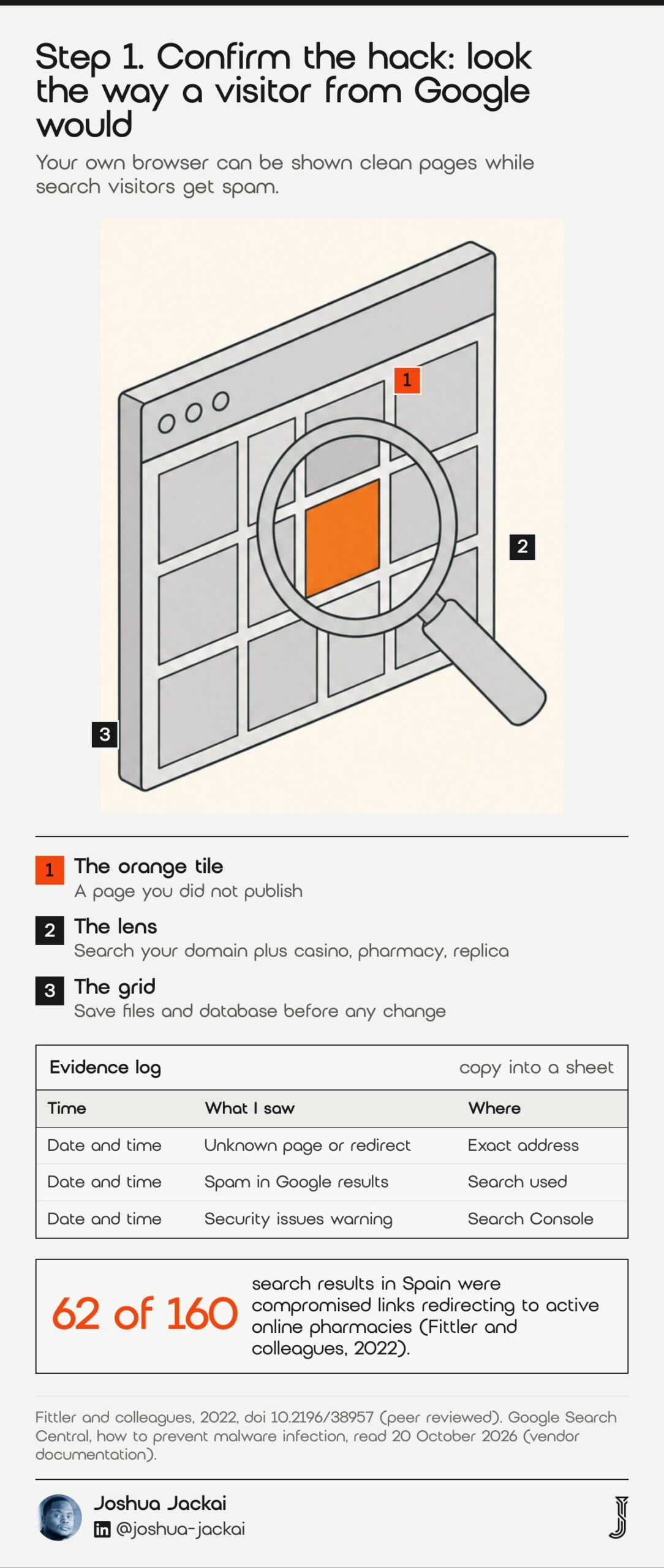
Confirming a hack means proving the site serves content you did not publish, then keeping a full copy before anything changes. Search Google for your domain plus unrelated keywords, open the Search Console Security issues report, and download the files and database. Some malware shows clean pages to you and spam to search visitors, so test from search.
- Time: the first hour
- You need: Search Console access and a hosting login
- Keep: a full file and database copy with the date and time
- Do not: delete files or reinstall WordPress yet
- Watch for: pages that only appear when you arrive from Google
The copy matters for two reasons. It is the evidence your host, a developer or a regulator may ask for, and it is the only way to learn how the attacker got in after the site is cleaned. Google’s own guidance is plain about the test for strangers on your site.
“If you see unknown pages on your site, or topics that you didn’t write, you may have been hacked,” Google wrote in its Search Central malware guidance.
Cloaking is why your own browser can fool you. Patchstack describes the dominant attack families as serving different content depending on who visits, so search bots see keyword-stuffed spam while owners see clean pages (Patchstack, 2026). A peer-reviewed study of search redirection found compromised links redirecting to active online pharmacies in the results of every country it checked, with 62 of 160 results affected in Spain (Fittler and colleagues, 2022). So I search the site name plus words like casino, pharmacy and replica before trusting a clean homepage. Then I save the copy and write down what I saw, with times.
2. Contain the damage: best for stopping reinfection while you investigate
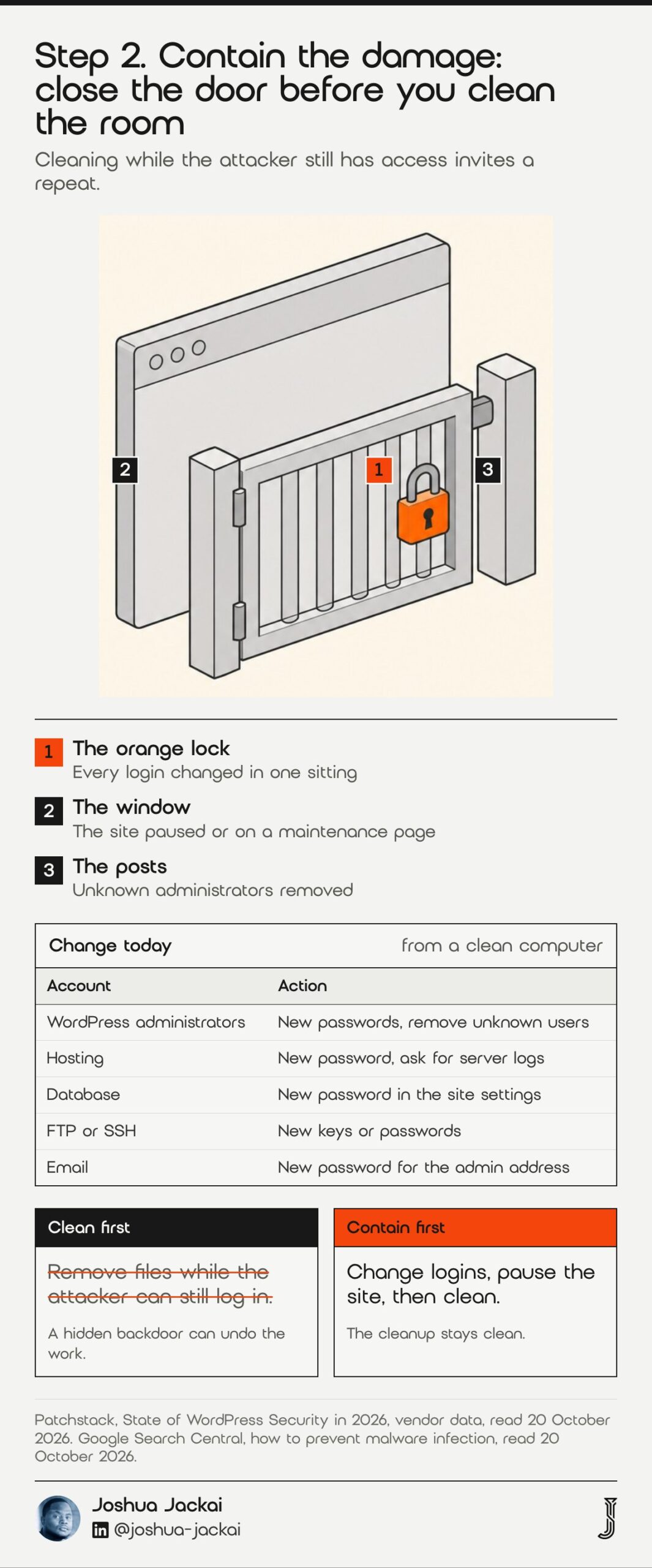
Containing the damage means cutting the attacker’s access before you clean. Change the WordPress, hosting, database, FTP and email passwords from a computer you trust, remove unknown administrator accounts, and ask your host to isolate the site or put up a maintenance page. If you clean first, a hidden backdoor can undo the work within hours.
- Time: the first day
- Change: WordPress admins, hosting, database, FTP or SSH, and email
- Ask the host: about server logs, other infected sites on the account and malware scans
- Check: your own computer, because stolen logins often start there
- Pause: forms, checkout and newsletters that send customer data
Order matters here. Patchstack reports malware families that run in server memory and rewrite files such as index.php and .htaccess the moment you restore them, so cleaning the files alone repeats the cycle (Patchstack, 2026). Google also recommends keeping the computers you use to work on a site free of malware, and choosing third-party providers carefully (Google Search Central). I use a clean computer for every step, change the passwords in one sitting, and remove any user who has an administrator role and no reason to be there. I also ask the host whether other sites on the same account show the same files. A shared account can reinfect a site you have just cleaned. I write down every change with a time, so the record is complete if someone asks later. If the site takes payments or logins, I also tell the payment provider before I reopen it, because that is a business conversation you want to start yourself.
“If you clean first, a hidden backdoor can undo the work within hours,” Joshua Jackai wrote above.
3. Find the entry point: best for making sure it does not happen again
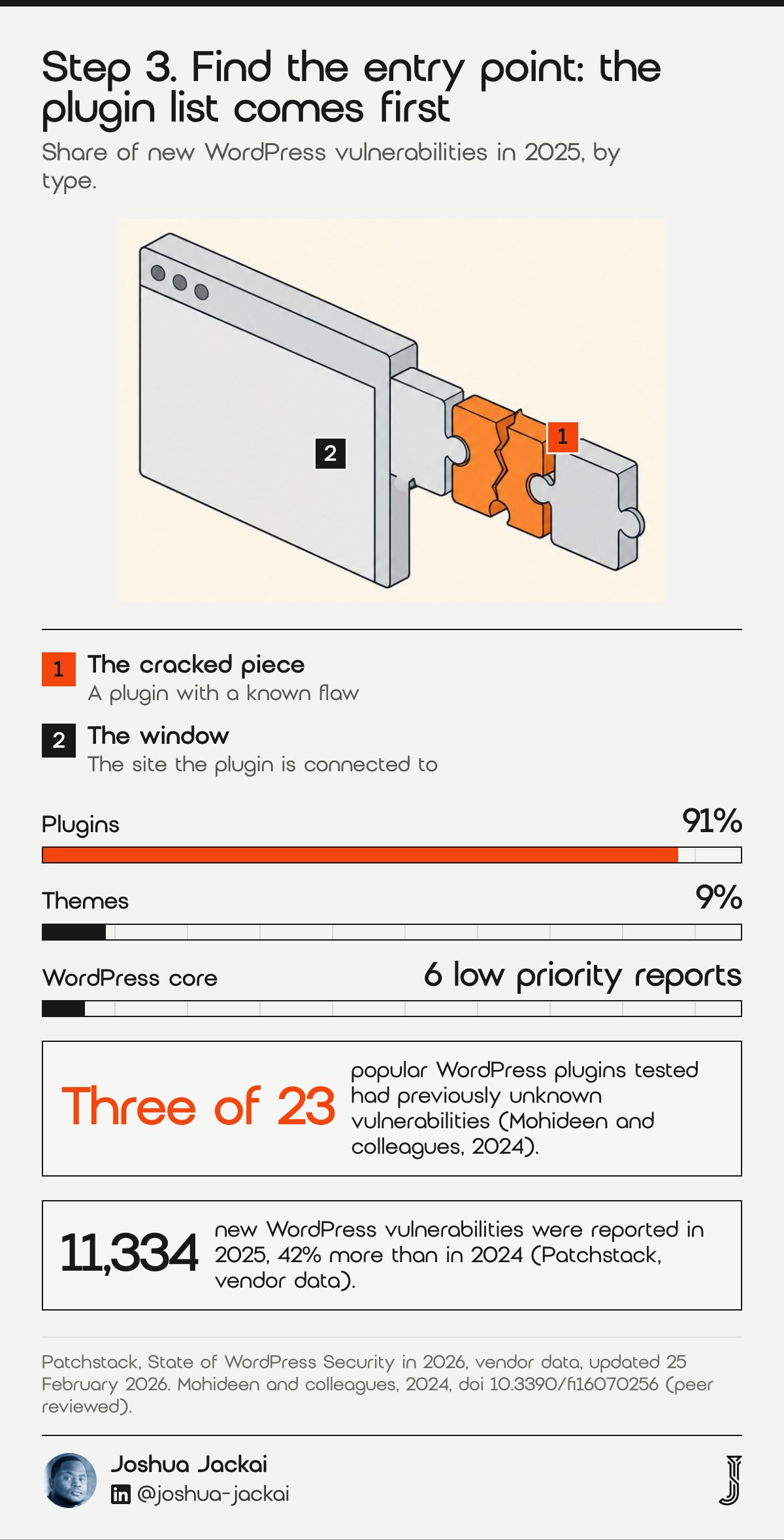
Finding the entry point means working out which weakness the attacker used, because cleaning without it invites a repeat. Start with plugins, then themes, then user accounts and the host. Patchstack counted 91% of new WordPress vulnerabilities in plugins in 2025, and a peer-reviewed test found unknown flaws in three of 23 popular plugins (Mohideen and colleagues, 2024).
- Time: the first day, with the file copy from step 1
- Check first: abandoned plugins, nulled themes and plugins with no recent update
- Compare: modified file dates against your last known good backup
- Review: user accounts, scheduled tasks and the web server log
- Result: one written cause, even if the answer is “unknown”
The numbers explain why the plugin list comes first. Patchstack reported 11,334 new vulnerabilities in 2025, a 42% increase on 2024, with 91% in plugins, 9% in themes and 6 in core (Patchstack, 2026). It also found that 46% of vulnerabilities had no developer fix at public disclosure, which means updating is not always enough. A peer-reviewed study tested 23 popular plugins and found previously unknown vulnerabilities in three of them, so even well known plugins carry surprises (Mohideen and colleagues, 2024). Earlier research on about 200,000 webservers found that WordPress and Joomla sites were more likely to be hacked than servers running no CMS. It also tied several specific plugins to compromise (Vasek, Wadleigh and Moore, 2016). That does not make WordPress unsafe by nature. It makes an unmanaged WordPress site a target. In practice I list every plugin and theme with its version and last update date. I mark anything abandoned and compare modified file dates with the backup. That way the written cause rests on evidence and not on a guess. If the evidence points to nothing, I say so and plan for a rebuild.
“Our testing uncovered previously unknown zero-day vulnerabilities in three of these plugins,” Mohideen and colleagues wrote in Future Internet, 2024.
4. Do I have to report a hacked website under PIPEDA? Best for sites that hold customer data
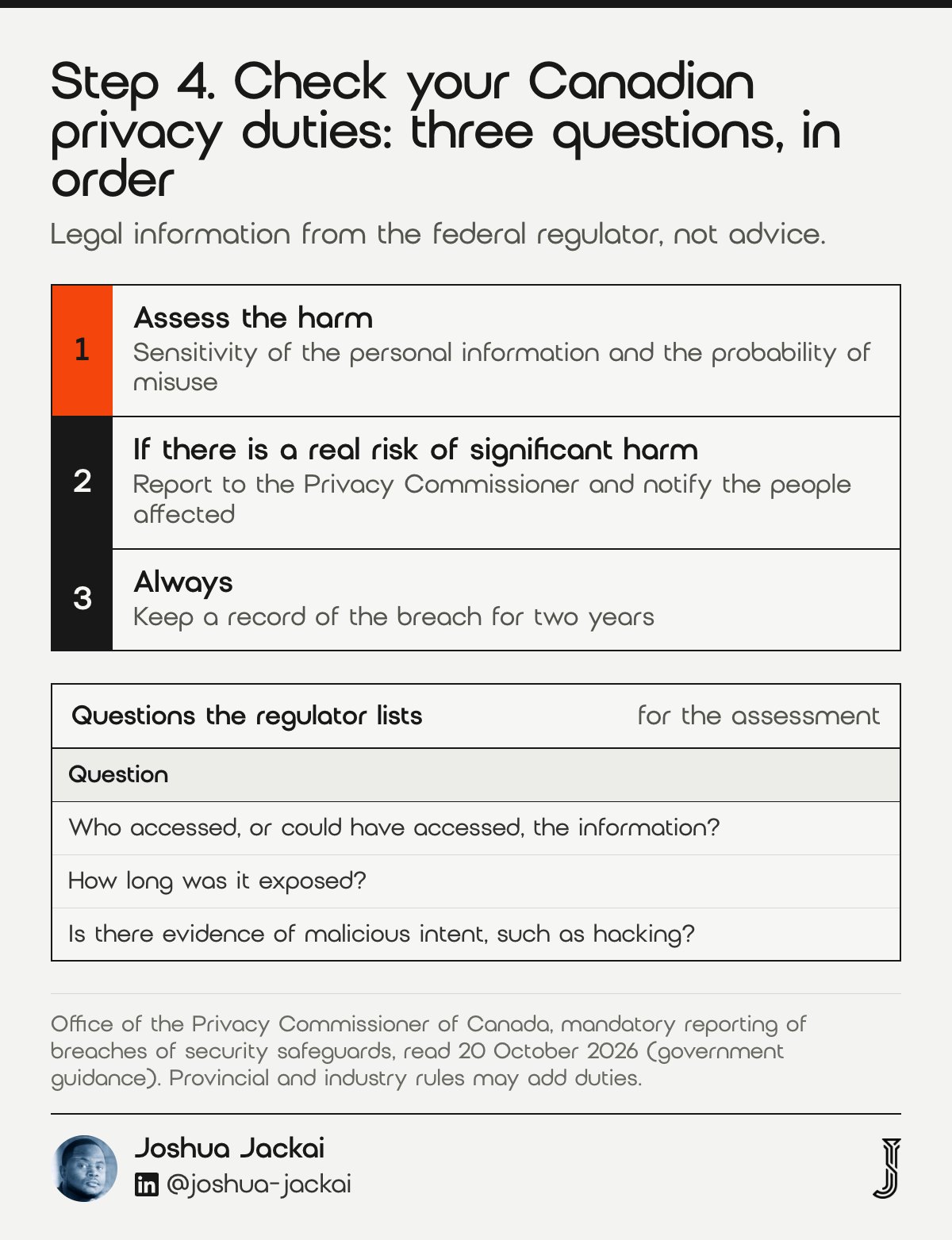
Yes, if the hacked site exposed personal information and the breach creates a real risk of significant harm. Then PIPEDA requires a report to the Office of the Privacy Commissioner of Canada, notice to the people affected and a breach record. This is legal information, and your province or industry may add rules.
- Time: as soon as feasible once you know there was a real risk
- Federal source: the Office of the Privacy Commissioner of Canada guidance
- Always keep: a breach record, even if you do not report
- Record length: two years under the federal rules
- Unsure: ask a privacy lawyer or the regulator before you decide
A brochure site with no forms, logins or orders carries less exposure than a store, a clinic site or a membership site, because less personal information could have been reached. The Commissioner’s guidance sets out what has to be reported and recorded.
“You must determine the real risk of significant harm by assessing the sensitivity of the personal information, as well as the probability of misuse,” the Office of the Privacy Commissioner of Canada wrote.
The same guidance says breaches must be reported when they pose that real risk, individuals must be notified, and breach records must be kept for two years. It also lists questions for assessing harm. Who could have accessed the information? How long was it exposed? Is there evidence of malicious intent such as hacking? (Office of the Privacy Commissioner of Canada). My own practice is to write the answers down on the day, because the log from step 1 is what makes them possible. My website maintenance guide covers the breach regulations in more detail. My page on who owns your website in Canada matters too, because you need the hosting and domain logins to answer any of this.
5. Clean, restore or rebuild: best for choosing one route and sticking to it
Cleaning removes the infection from the current site, restoring replaces it with a clean backup, and rebuilding starts on fresh software and moves your content across. I choose by four facts: whether the entry point is known, whether a clean backup exists, whether it came back after a cleanup, and whether the host is trusted.
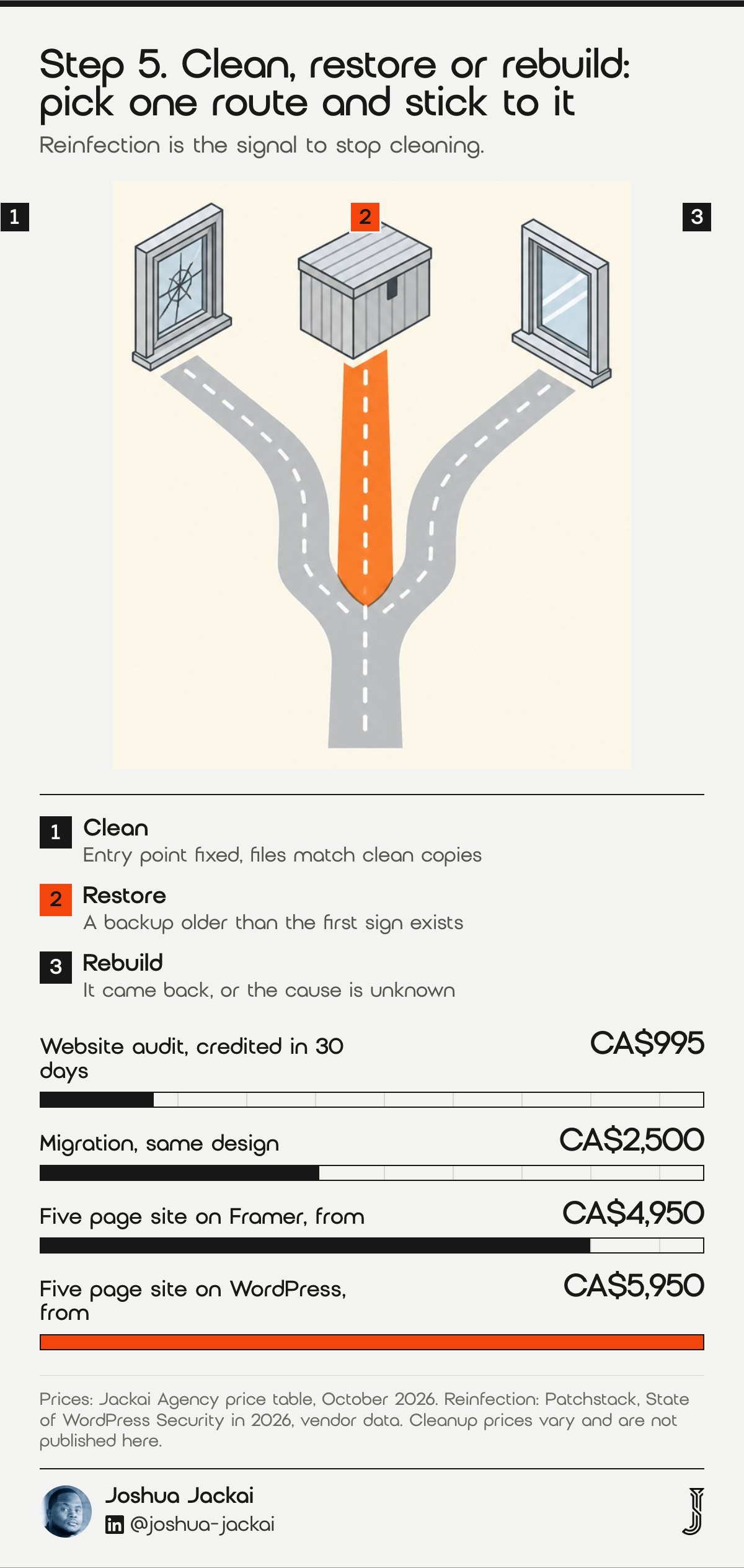
- Clean when: the entry point is known, fixed and the files match clean copies
- Restore when: a backup older than the first sign of compromise exists
- Rebuild when: it came back after a cleanup, or the cause is unknown
- Move host when: other sites on the account are infected
- Rebuild with me: CA$4,950 on Framer or CA$5,950 on WordPress for five pages, CA$2,500 for a migration only
I treat reinfection as the deciding signal. Patchstack describes campaigns designed to return and maintain access after an initial cleanup, which raises the chance of a repeat (Patchstack, 2026). If a site has been cleaned once and is infected again, I stop cleaning. I rebuild from a fresh WordPress install and carry over only the content, media and settings I can verify. That is also the point where an audit pays for itself. My CA$995 website audit is credited within 30 days if a project follows, and it tells you what is worth keeping.
If the old URLs are staying, I keep the redirect map and the search settings from my WordPress rebuild without losing SEO guide. Cleanup quotes vary widely, and I do not publish a cleanup price I have not sourced. For the cleanup itself, ask your host or a security specialist for a quote that names the entry point, what was removed and what is promised against reinfection.
“I treat reinfection as the deciding signal,” Joshua Jackai wrote above.
6. Repair search damage: best for sites that show spam pages or a Google warning
Repairing search damage means removing the spam pages the attacker created, fixing the cause, then asking Google to review the site. Search Console’s Security issues report shows what Google found and lets you request a review once the problem is fixed. Google says a review can take from a few days to a few weeks, so start the request soon.
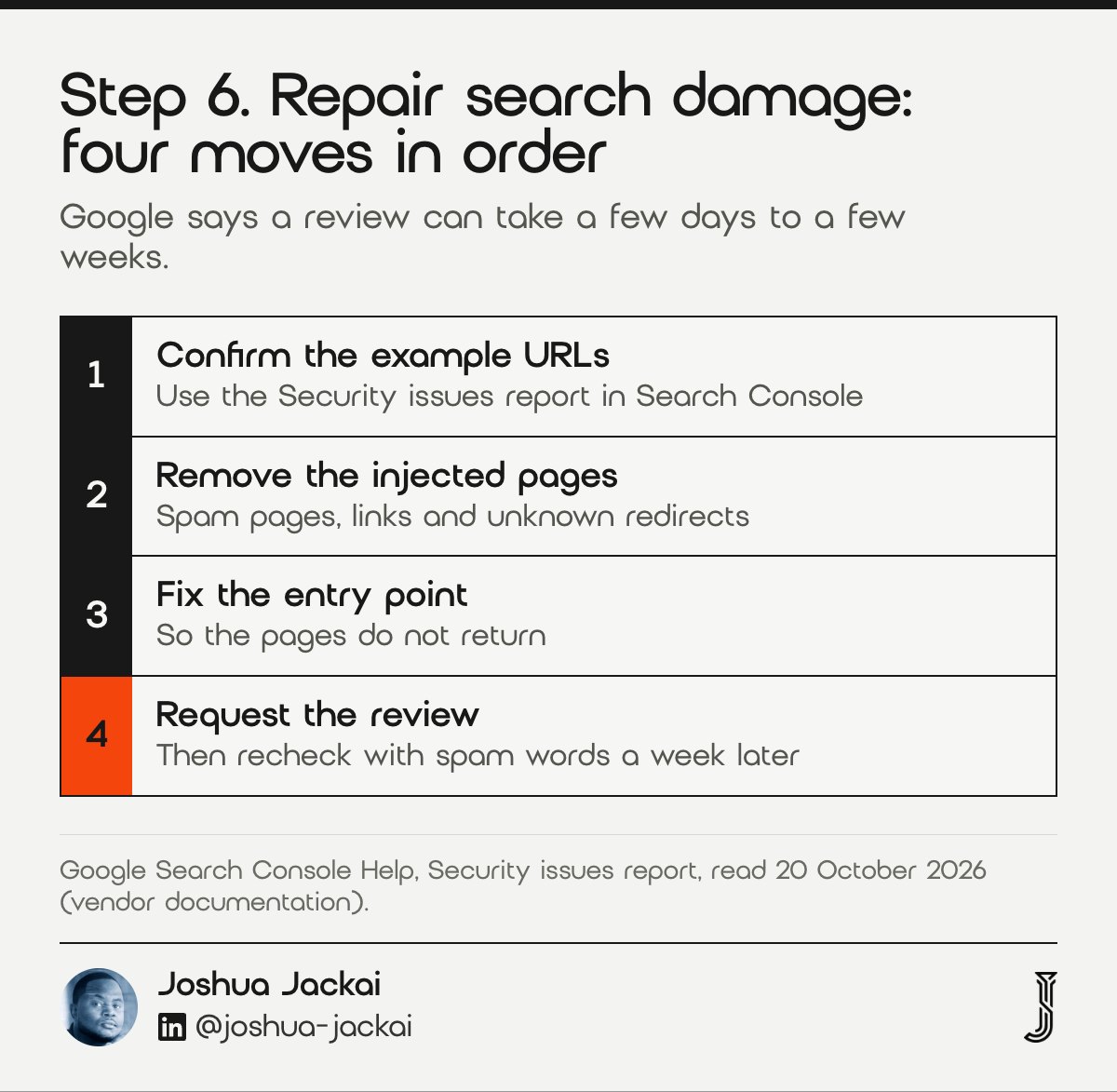
- Check: the Security issues and Manual actions reports in Search Console
- Remove: injected pages, spam links and unknown redirects
- Then: request the review once you confirm the fix
- Wait: a few days to a few weeks for the result
- Recheck: a site search with spam words after each change
Hacked sites are often used to promote unrelated products. Search-redirection attacks, where hacked sites send visitors to unlicensed online pharmacies, have been analysed as a crime process in peer-reviewed work (Leontiadis and Hutchings, 2015). The practical lesson is that injected pages can keep ranking after the malware is gone, so cleaning the files is only half of the repair.
“A review can take from a few days to a few weeks to complete,” Google wrote in the Security issues report help.
Google separates hacked content, malware and social engineering in the report, and tells you to confirm the issue on the example URLs before you request a review (Search Console Help). I do the same in order: confirm the example URLs, remove the pages, fix the entry point, then request the review. If you recently bought the site, Google says to mention that in the request. A week after the review I search the site name with words like casino, pharmacy and replica again. Injected pages sometimes return when a backdoor was missed, and a second round of spam is the clearest sign that the cleanup was incomplete.
7. Prevent a repeat: best for keeping the site clean after the emergency
Preventing a repeat means shrinking what can be attacked and speeding up your response. Remove unused plugins, update the rest within a day, turn on two step login for administrators, keep backups off the server, and name one person who owns updates. Patchstack reports a 5 hour median to mass exploitation, so a monthly routine is too slow.
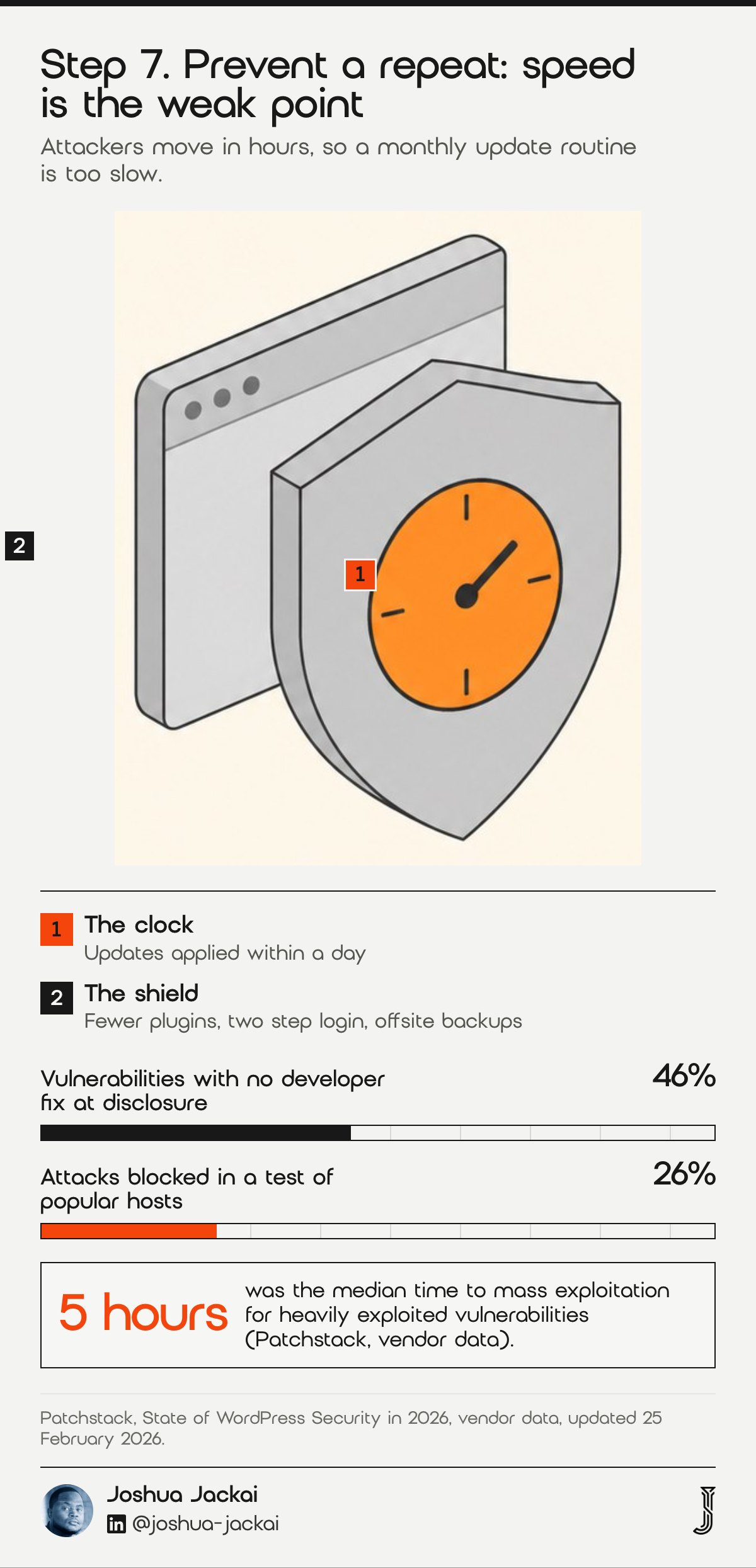
- Plugins: delete unused ones and replace abandoned ones
- Updates: apply security releases within a day
- Logins: unique passwords and two step login for every administrator
- Backups: stored away from the server, with a tested restore
- Owner: one named person for updates, or a care plan
Speed is the problem. Patchstack found that about half of high impact vulnerabilities were exploited within 24 hours, and a weighted median of 5 hours for the most heavily exploited ones (Patchstack, 2026). In its test of popular hosting companies, only 26% of vulnerability attacks were blocked (Patchstack, 2026), so a host’s firewall is not a substitute for updates. Where a vendor cannot ship a fix in time, the practical option is to remove the plugin. I also keep a short list of what each plugin does, so that deleting one is a decision and not a fear. I test the restore from a backup once, on a staging copy, before I need it in a real emergency.
“46% of vulnerabilities did not receive a fix from the developer in time for public disclosure,” Patchstack wrote in its 2026 security whitepaper.
Canadian care plans exist for this job, and my website maintenance guide lists the published ranges. I would pick the one that names its response time and its restore test over the cheapest one.
Compare the seven steps and filter by what you need
This matrix lists each step with when it happens, who can do it and what you keep as a record. Filter by timing or by who is available, and rows are hidden rather than deleted. The privacy step is legal information from the federal regulator, not advice, and your host or developer may take on several steps at once.
| Step | When | Who can do it | Record to keep |
|---|---|---|---|
| 1. Confirm and copy | First hour | You or A developer | A dated full file and database copy, screenshots of what you saw |
| 2. Contain | First day | You or Your host | The list of passwords changed and accounts removed, with times |
| 3. Find the entry | First day | A developer or Your host | One written cause, or the words unknown cause |
| 4. Privacy duties | As soon as feasible | You or A privacy lawyer | A breach record kept for two years, plus any report or notice sent |
| 5. Clean, restore or rebuild | First week | A developer | What was removed or replaced, and the recheck date |
| 6. Repair search | First weeks | You or A developer | Search Console review request and its answer |
| 7. Prevent a repeat | Ongoing | You or A developer or Your host | The update owner, the update rule and the restore test date |
Decide whether to clean, restore or rebuild
This tool turns five answers into a route and a starting price from my published table. The defaults are placeholders, not a diagnosis. Use it after you have saved a copy of the site, and treat the result as a starting point to confirm with a developer who has read your logs.
Clean, restore or rebuild (placeholder answers, edit them)
Frequently asked questions
What should I do first if my WordPress site is hacked?
Save a full copy of the files and database, change every login from a clean computer, and ask your host to isolate the site. Do not delete files or reinstall WordPress yet. A copy is your evidence, and containing the attacker comes before cleaning (Google Search Central).
Do I have to report a hacked website under PIPEDA?
You must report a breach to the federal Privacy Commissioner when personal information was involved and there is a real risk of significant harm. You also notify the people affected and keep records for two years. A site with no personal data may not trigger this, so assess first (OPC).
Should I clean or rebuild a hacked WordPress site?
Clean when you know the entry point, have fixed it and can match files to clean copies. Rebuild when the infection returns, the cause is unknown or the host is compromised. Patchstack describes malware built to return after cleanup, so a repeat infection is my signal to rebuild (Patchstack).
Why does my hacked WordPress site keep coming back?
Usually the entry point is still open, or a hidden backdoor or memory resident script rewrites files after you clean them. Patchstack reports one family that reinfects index.php and .htaccess as soon as they are restored. Change every login and rebuild from fresh software if it repeats (Patchstack).
How long does Google take to remove a hacked warning?
After you fix the problem and request a review in Search Console, Google says it can take from a few days to a few weeks. Confirm the issue on the example URLs first, remove the injected pages and request the review only when the site is clean (Search Console Help).
Who sets this up for you
I design, rebuild and migrate WordPress and Framer sites for Canadian B2B companies in Vancouver, with fixed quotes and you owning the site, domain and hosting. If your site was hacked and you are deciding whether to rebuild, start with the CA$995 website audit, credited within 30 days if a project follows.
A free AI Visibility Report shows how answer engines see your company today, which is worth checking after any security incident.
Sources
Peer reviewed
- Vasek, M., Wadleigh, J. and Moore, T. (2016). Hacking is not random: a case-control study of webserver-compromise risk. IEEE Transactions on Dependable and Secure Computing. doi.org/10.1109/tdsc.2015.2427847
- Mohideen, M. A. M., Nadeem, M. S., Hardy, J. and colleagues (2024). Behind the code: identifying zero-day exploits in WordPress. Future Internet. doi.org/10.3390/fi16070256
- Fittler, A., Paczolai, P., Ashraf, A. R. and colleagues (2022). Prevalence of poisoned Google search results of erectile dysfunction medications redirecting to illegal internet pharmacies: data analysis study. Journal of Medical Internet Research. doi.org/10.2196/38957
- Leontiadis, N. and Hutchings, A. (2015). Scripting the crime commission process in the illicit online prescription drug trade. Journal of Cybersecurity. doi.org/10.1093/cybsec/tyv006
Industry, vendor and government (not peer reviewed)
- Patchstack. State of WordPress Security in 2026, security whitepaper, updated 25 February 2026, vendor data, read 20 October 2026. patchstack.com
- Office of the Privacy Commissioner of Canada. What you need to know about mandatory reporting of breaches of security safeguards, read 20 October 2026. priv.gc.ca
- Google Search Central. How to prevent malware infection, read 20 October 2026. developers.google.com
- Google Search Console Help. Security issues report, read 20 October 2026. support.google.com
- Jackai Agency price table, October 2026 (first-party prices, CAD).