7 Checks: Is HubSpot or WordPress Better for B2B Websites?
Seven checks for a Canadian B2B team choosing between HubSpot CMS and WordPress: who edits, CRM fit, three-year CAD cost, lead routing, upkeep, lock-in and BC PST, with a worked example and a cost calculator. Prices read 16 November 2026.
 Joshua Jackai
16 min read
Published 16 November 2026 · Last updated and fact-checked November 2026
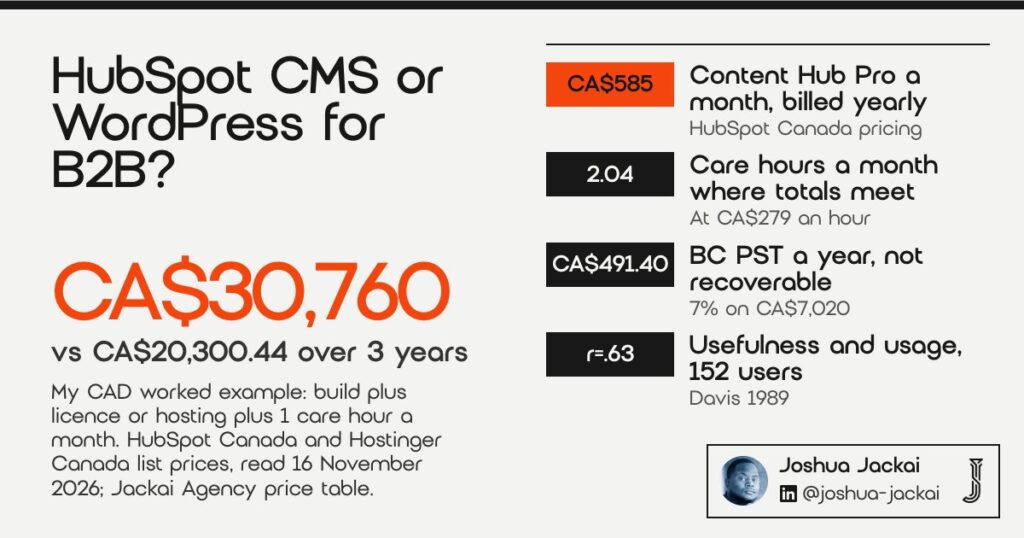
Short answer: HubSpot CMS is better for a B2B website when marketers edit pages every week and HubSpot CRM already holds your leads. WordPress is better when the site changes rarely and cost matters most. On my CAD worked example, three years of HubSpot come to CA$30,760 against CA$20,300.44 for WordPress with one hour of care a month.
I wrote this for a Canadian B2B team that has to pick one platform and live with it for years. My older WordPress vs HubSpot comparison answers five general questions. This guide is narrower. It runs seven checks in the order I use on a discovery call, prices everything in Canadian dollars from pages I read on 16 November 2026, and ends with a break-even number you can test on your own invoice. I build on both platforms, so neither answer earns me more.
In this guide
Key takeaways
- HubSpot Content Hub Professional lists at CA$585 a month on annual billing, which is CA$21,060 over three years before tax (HubSpot Canada pricing, read 16 November 2026).
- WordPress hosting on Hostinger’s Cloud Startup plan renews at CA$36.29 a month, CA$1,306.44 over three years (Hostinger Canada, read 16 November 2026).
- On my worked example, WordPress stays cheaper until care passes about 2 hours a month at my published CA$279 an hour.
- 11.58% of dependency updates in one large study broke the software that used them (Jayasuriya et al., 2023), which is the upkeep cost WordPress owners carry.
- Fred Davis found perceived usefulness correlated with usage at r=.63 against r=.45 for ease of use across 152 users (MIS Quarterly, 1989): the editor your team will actually open matters.
- HubSpot says BC and Saskatchewan PST is not recoverable, so 7% on CA$7,020 of Content Hub is CA$491.40 a year (HubSpot Knowledge Base).
| Check | Favours HubSpot CMS when | Favours WordPress when | Key number |
|---|---|---|---|
| 1. Who edits the pages | Marketers publish weekly | A developer or I make changes | r=.63 usefulness vs r=.45 ease of use |
| 2. CRM fit | HubSpot CRM is your system of record | You use another CRM or none | Content Hub Pro CA$585 a month |
| 3. Three-year cost in CAD | Licence is already budgeted | Pages change rarely | CA$30,760 vs CA$20,300.44 |
| 4. Lead source and routing | You want forms in the CRM natively | You can maintain a form integration | Free HubSpot plugin for WordPress |
| 5. Plugin and security upkeep | Nobody owns updates | Someone owns updates monthly | 11.58% of updates broke clients |
| 6. Lock-in and leaving later | You plan to stay 5+ years | You want hosting choice | 500 redirects per bulk upload |
| 7. Canadian tax and currency | You pay in CAD, recover GST or HST | Your licence bill is small | 7% BC PST, CA$491.40 a year |
1. Who edits the pages each week: best for teams with in-house marketers
The first check is people, not software. If two marketers publish landing pages and blog posts every week, HubSpot’s drag and drop editor usually wins because they never touch a plugin. If pages change a few times a year, WordPress costs less. Davis found usefulness predicted usage more strongly than ease, r=.63 against r=.45.
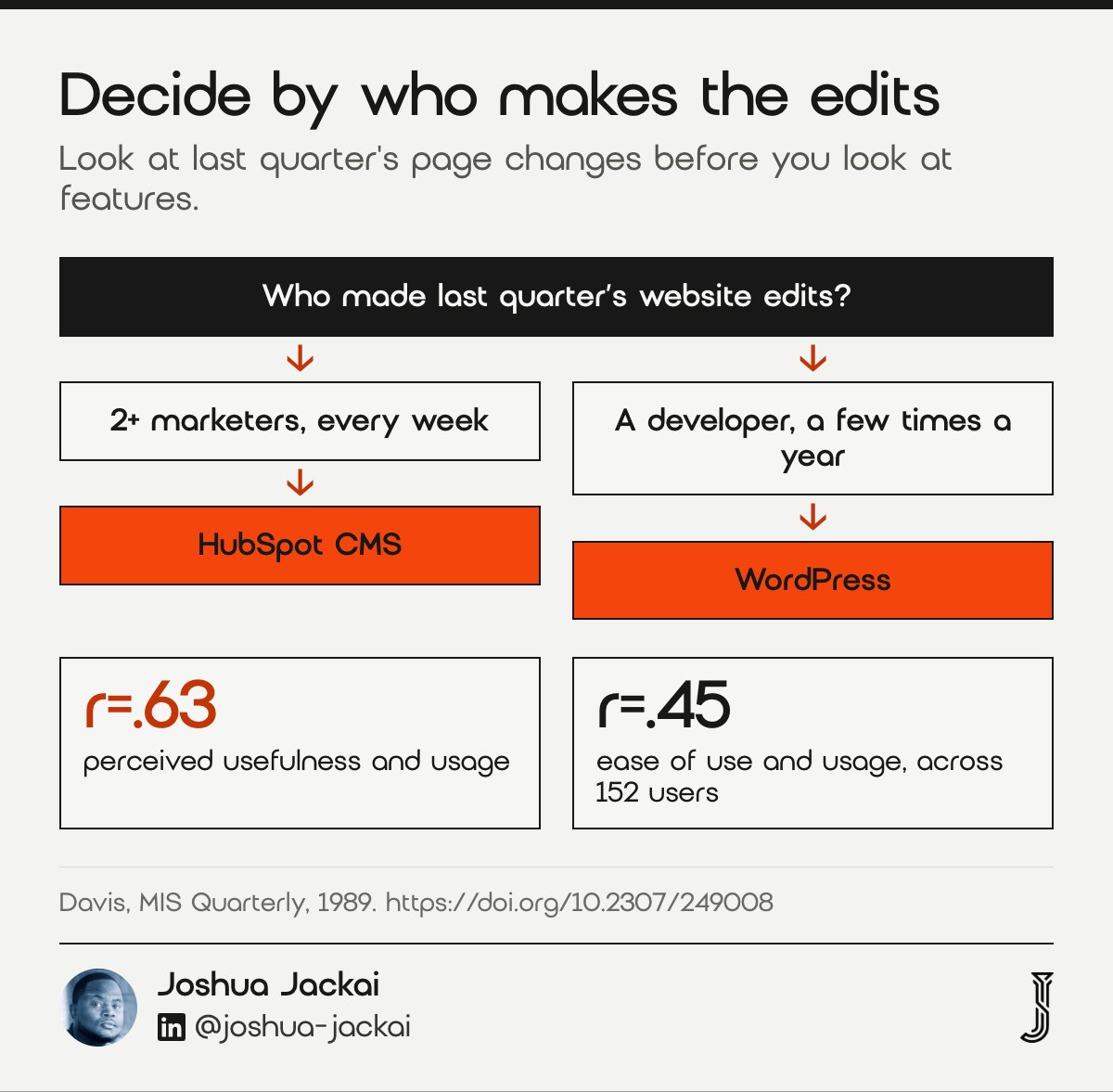
- Ask: how many page edits did your team make last quarter, and who made them
- HubSpot fits: 2 or more marketers who publish without a developer
- WordPress fits: a site that changes a few times a year
- Study: Davis, 152 users, four application programs
- Do not: pick by the demo; pick by last quarter’s edit log
Fred Davis built the scales most technology adoption research still uses, and his result surprises buyers. Across 152 users, perceived usefulness correlated with current usage at r=.63, while ease of use correlated at r=.45. Ease mattered, but mostly because it made a tool feel useful. For a website, useful means your marketer can ship the page the campaign needs today. A HubSpot editor bundled with the CRM and email is useful to that person. A WordPress block editor is useful to a team that leans on a developer anyway. So I ask for the edit log before anything else. If it shows 40 small changes made by two marketers, the editor question decides most of the answer. If it shows four changes, each made by an agency, the editor barely matters and cost takes over. The study measured office software in 1989, not website builders, so I read it as a prompt to measure real usage rather than as proof about either platform.
“In both studies, usefulness had a significantly greater correlation with usage behavior than did ease of use,” Fred Davis wrote in MIS Quarterly.
2. Whether HubSpot CRM is already your system of record: best for firms that run sales in HubSpot
When HubSpot CRM already holds your contacts, deals and email, a HubSpot CMS site puts forms, pages and reporting in one account. When your CRM is Salesforce, Pipedrive or a spreadsheet, that advantage shrinks to a connector. Content Hub Professional lists at CA$585 a month, so the integration has to be worth that line.
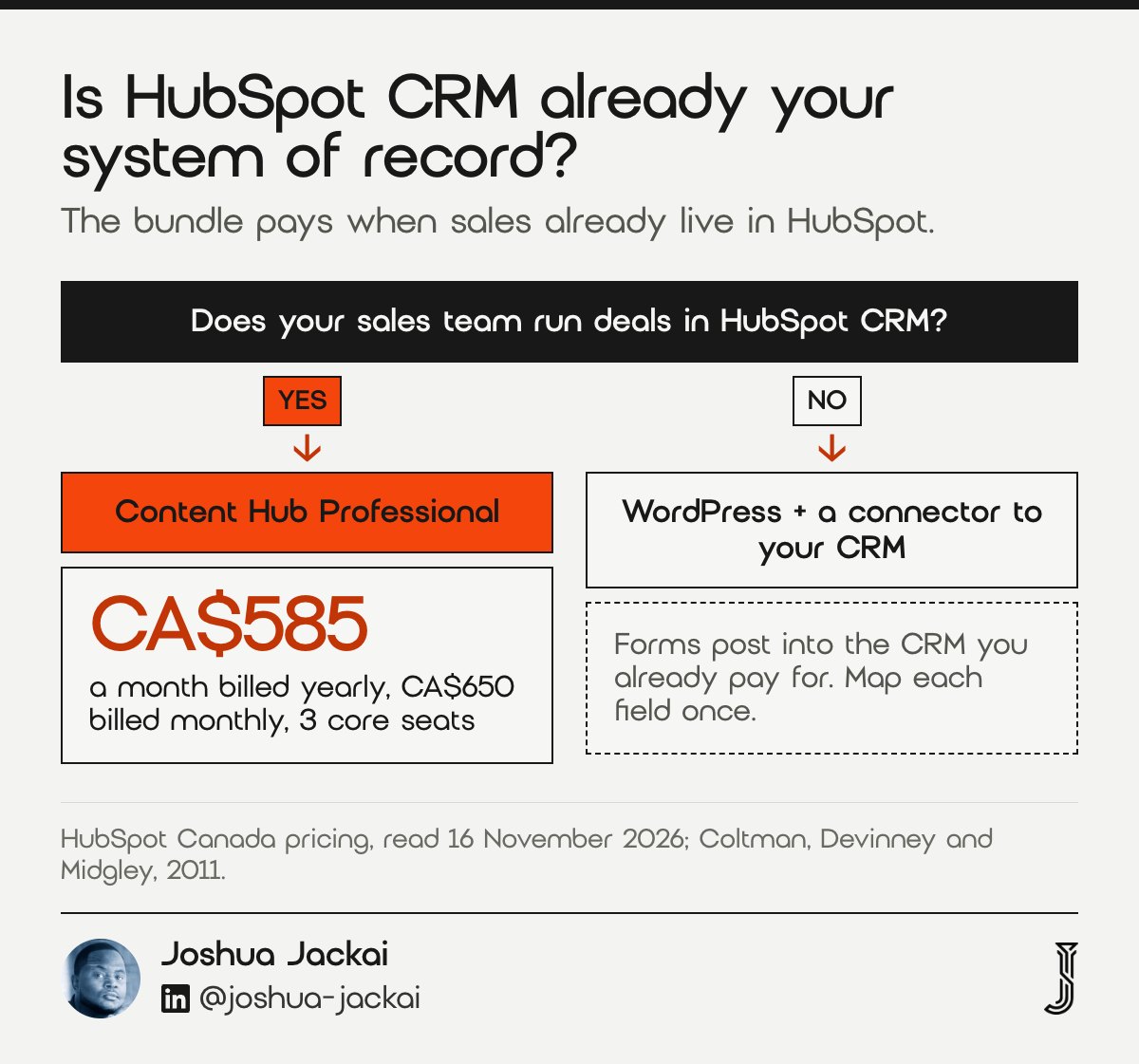
- Content Hub Professional: CA$585 a month annual, CA$650 a month monthly, 3 core seats
- Content Hub Enterprise: CA$1,950 a month
- Content Hub Starter: from CA$10 per seat a month
- Extra Professional core seat: from CA$59 a month
- Check first: which CRM your sales team opens every morning
The CRM question is where HubSpot earns its price or loses it. HubSpot’s Canadian price page, read on 16 November 2026, lists Content Hub Professional at CA$585 a month on annual billing and CA$650 a month on monthly billing, with 3 core seats. If your sales team already lives in HubSpot, the site’s forms create contacts in the same database, page views appear on the contact record, and the follow-up email goes out from the same account. Nobody has to keep two systems in step. If your sales team lives in another CRM, a HubSpot site adds a second database you have to sync, and WordPress plus a direct connector to your real CRM is usually simpler. Coltman, Devinney and Midgley studied CRM capability as a firm practice and linked it to performance. They studied the capability, not any vendor, so I read their finding as a reason to protect one clean customer record. Pick the website platform that keeps that record whole.
“Our results reveal a positive and significant path between a superior CRM capability and firm performance,” Coltman and colleagues wrote in the Journal of Information Technology.
3. What each platform costs over three years in CAD: best for owners who sign the budget
Compare three years, not one, because the build is paid once and the licence repeats. On my published prices, a five-page custom B2B build is CA$8,950 on WordPress and CA$9,700 on HubSpot. Add three years of Content Hub Professional at list and HubSpot reaches CA$30,760. WordPress with hosting and one care hour a month reaches CA$20,300.44.
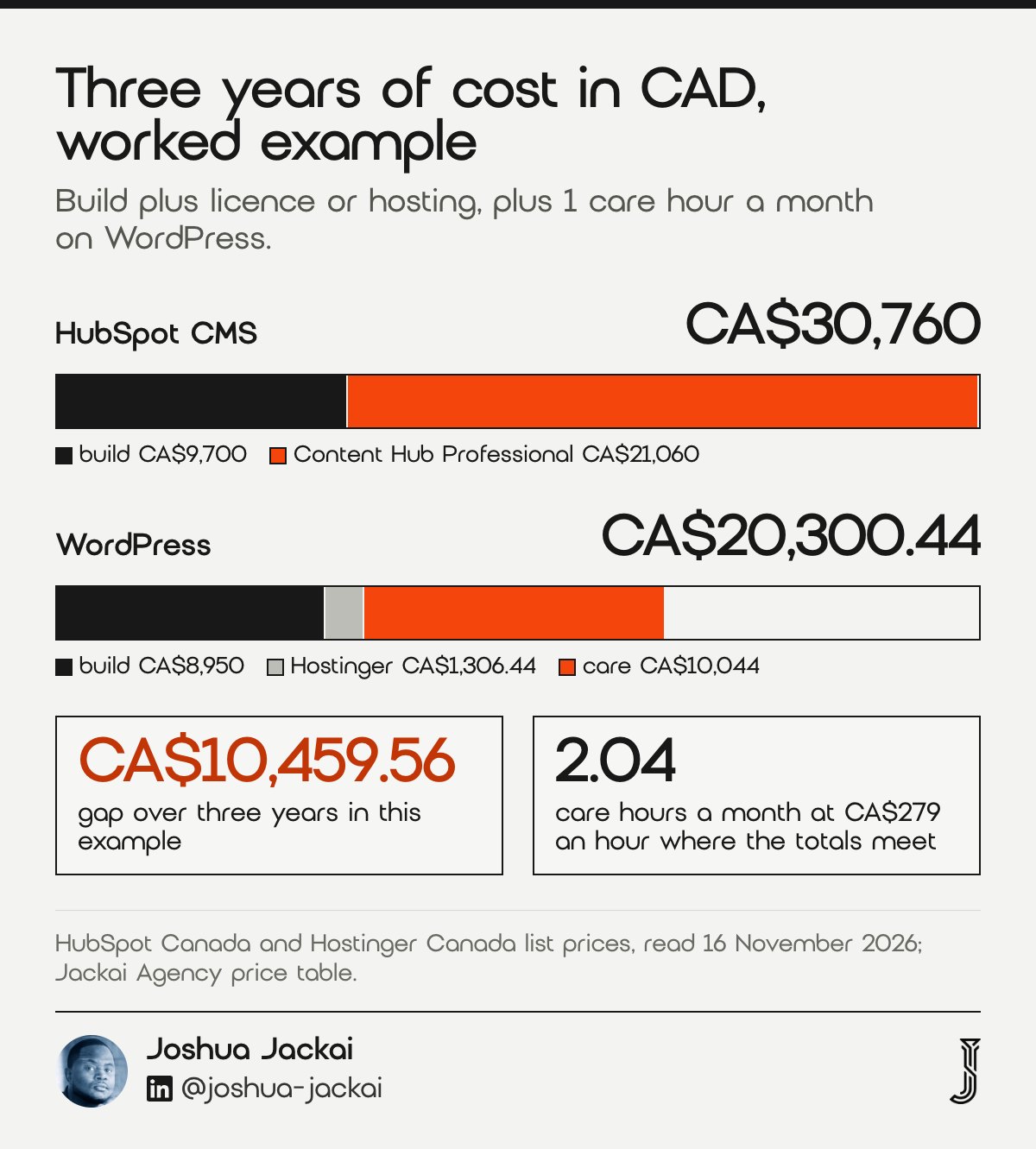
- HubSpot build (my price): from CA$9,700, up to five pages
- WordPress build (my price): from CA$8,950, up to five pages
- Content Hub Professional, 3 years: CA$21,060 before tax
- Hostinger Cloud Startup, 3 years at renewal: CA$1,306.44
- Care at CA$279 an hour, 1 hour a month, 3 years: CA$10,044
Here is the arithmetic. HubSpot: CA$9,700 to build plus CA$585 a month for 36 months, CA$21,060, gives CA$30,760. WordPress: CA$8,950 to build, plus hosting on Hostinger’s Cloud Startup plan, which renews at CA$36.29 a month, CA$1,306.44 over 36 months, plus one hour of care a month at my published CA$279 rate, CA$10,044, gives CA$20,300.44. The gap is CA$10,459.56. The care hours are the swing figure. WordPress costs the same as HubSpot when care reaches about 2.04 hours a month, so a site that needs a developer most weeks loses its price advantage. HubSpot’s side has a hidden line too: Marketing Hub Professional carries a one-time CA$3,700 onboarding fee if you buy that hub as well. Estimates drift either way. A review of software surveys found 60% to 80% of projects overran effort or schedule, so treat my care hours as a placeholder and use your own invoices from the last year.
“WordPress costs the same as HubSpot when care reaches about 2.04 hours a month,” Joshua Jackai, Vancouver web designer, wrote in this guide.
4. How each lead gets its source and its owner: best for teams judged on pipeline
Every form should record where the lead came from and who owns it next. HubSpot CMS forms write straight into HubSpot CRM, with the original source on the contact. WordPress can do the same through HubSpot’s free plugin, but someone has to keep that plugin working after each update.
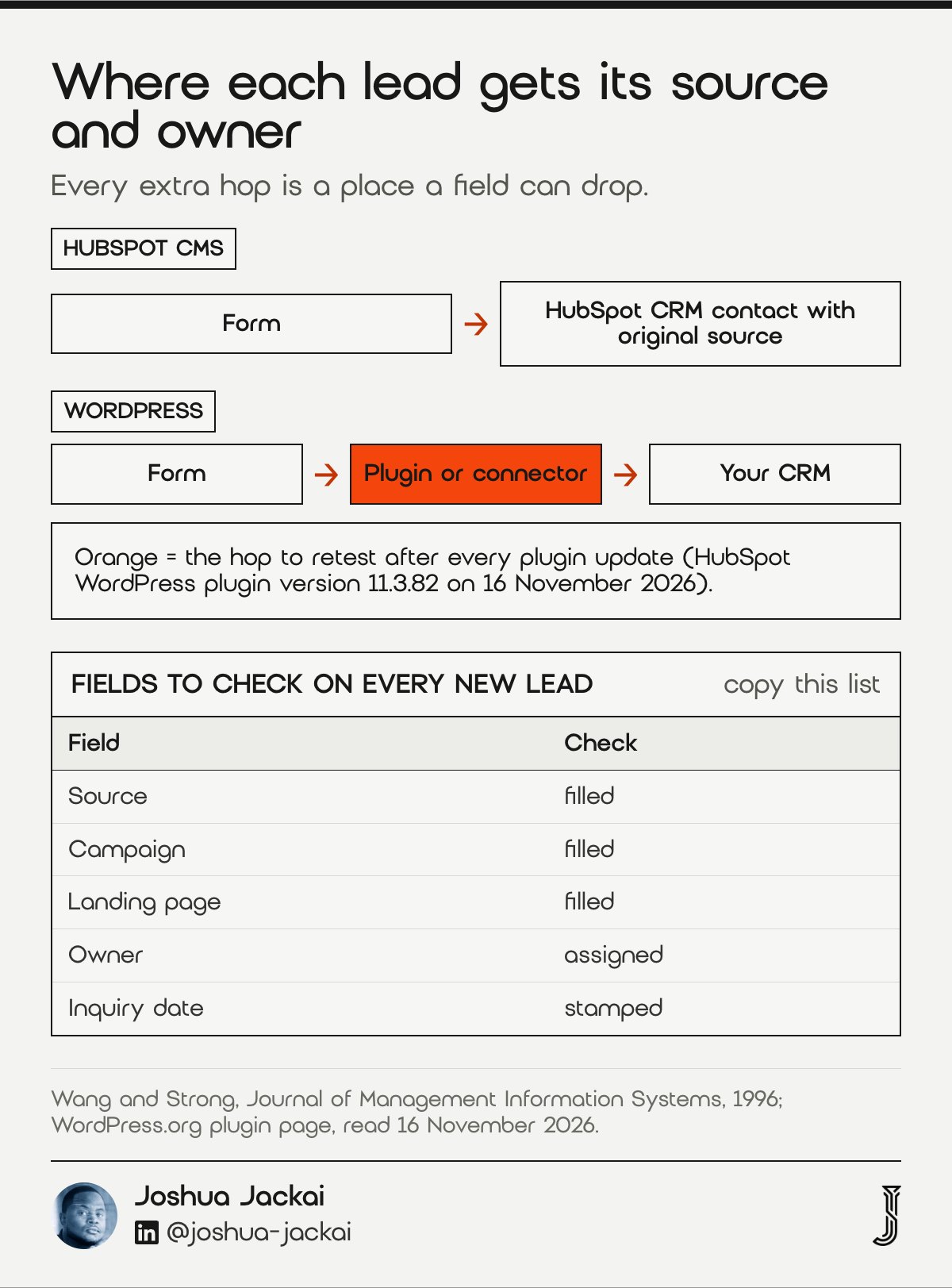
- HubSpot CMS: native forms, source stored on the contact record
- WordPress: HubSpot’s free plugin, version 11.3.82 on WordPress.org on 16 November 2026, or a form plugin plus a connector
- Fields to keep: source, campaign, landing page, owner, inquiry date
- Test: submit one form per channel each month and read the record
- My service: Lead Source Reporting, CA$2,600
Lead routing is where I see the most quiet damage. A form that sends an email but never reaches the CRM looks fine to the visitor and costs sales a lead. On HubSpot CMS the form and the CRM are the same product, so the path is short. On WordPress, HubSpot publishes a free plugin that embeds its forms, which brings the path close to the HubSpot one, as long as the plugin stays updated and nobody swaps the form for a theme’s built-in one. Wang and Strong showed that the people who use data judge its quality by fitness for their task, not accuracy alone. For a sales team the task is follow-up, so a lead with no source or owner is low quality even when the email address is right. Whichever platform you pick, run a monthly test: one form per channel, then read the record. My Lead Source Reporting setup is CA$2,600 and covers this on either platform.
“Contextual DQ highlights the requirement that data quality must be considered within the context of the task at hand,” Wang and Strong wrote in the Journal of Management Information Systems.
5. Who owns plugin and security updates: best for firms without a developer on call
WordPress gives you thousands of plugins and the job of updating them. HubSpot hosts and patches its CMS for you. In one large study, 11.58% of dependency updates contained breaking changes that affected the software using them, and Patchstack reports that 46% of WordPress vulnerabilities were not fixed in time for public disclosure.
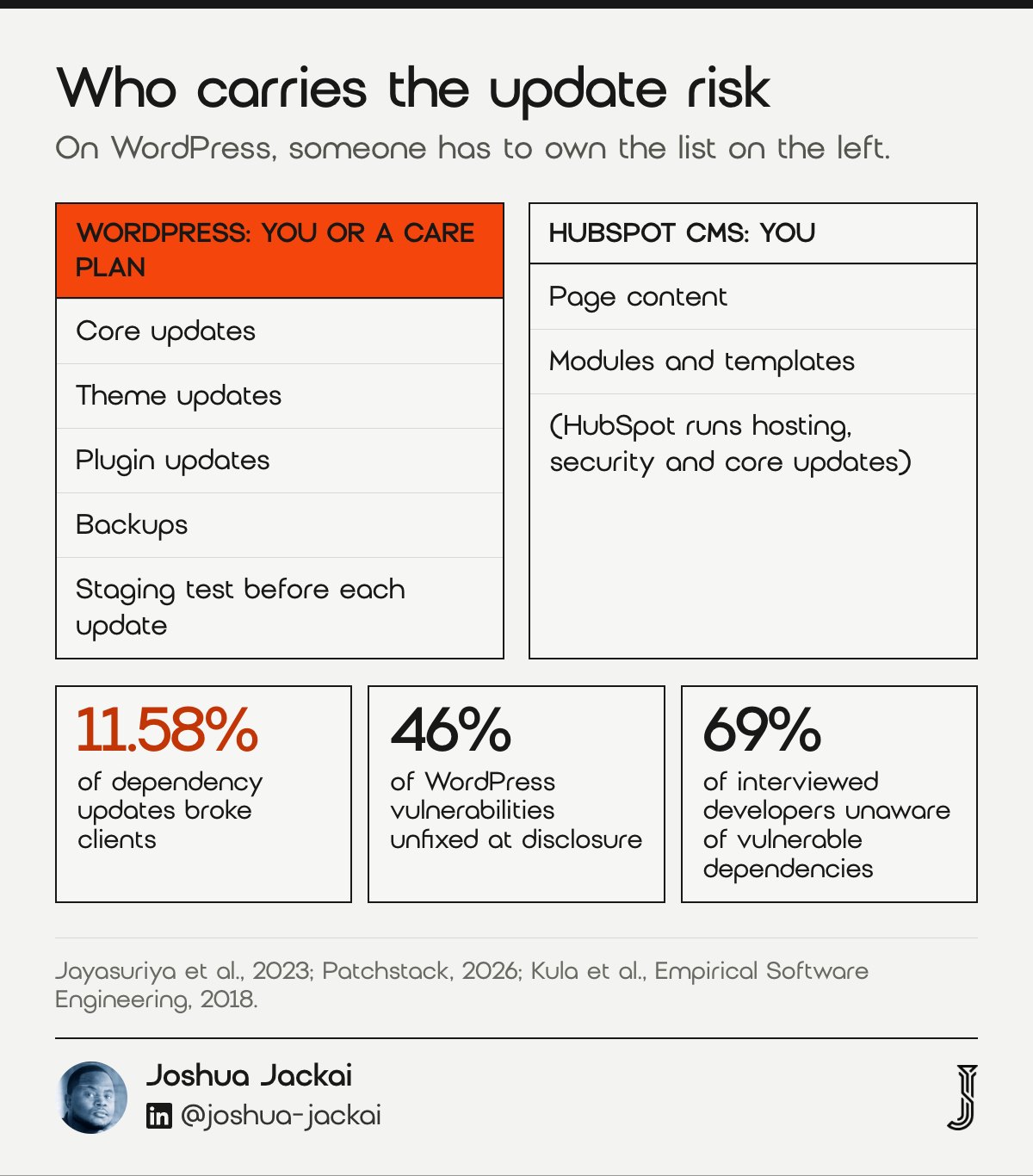
- WordPress duty: core, theme and plugin updates, backups, a staging test
- HubSpot duty: content and modules only; HubSpot runs hosting and the CMS
- Breaking updates: 11.58% of dependency updates (Jayasuriya et al., 2023)
- Unaware of risk: 69% of interviewed developers, in Kula and colleagues
- Cadence I use: monthly updates, tested on staging first
This is the honest case for HubSpot. A WordPress site is a stack of parts from different authors, and each part changes on its own timetable. Jayasuriya and colleagues studied real library updates and found 11.58% broke the code that depended on them. Kula and colleagues interviewed developers and found 69% were unaware of their vulnerable dependencies. Those were software libraries, not WordPress plugins, but the mechanism is the same: an update you skip leaves a hole, and an update you apply untested can break a page. Patchstack’s 2026 report adds that 46% of WordPress vulnerabilities were not fixed in time for public disclosure. None of this makes WordPress unsafe. It makes it a job. If someone owns that job monthly, WordPress is fine, and my post on why WordPress keeps breaking shows the routine. If nobody owns it, HubSpot’s hosted model removes most of that risk, at a price.
“11.58% of the dependency updates contain breaking changes that impact the client,” Dhanushka Jayasuriya and colleagues wrote at ISSTA 2023.
6. How hard it is to leave later: best for firms that want an exit plan
Every platform choice is also a future migration. A HubSpot CMS site is hosted on HubSpot, so leaving means rebuilding pages elsewhere and mapping every URL. WordPress runs on almost any host, so you can change hosts without a rebuild. HubSpot also caps bulk redirect uploads at 500 rows at a time.
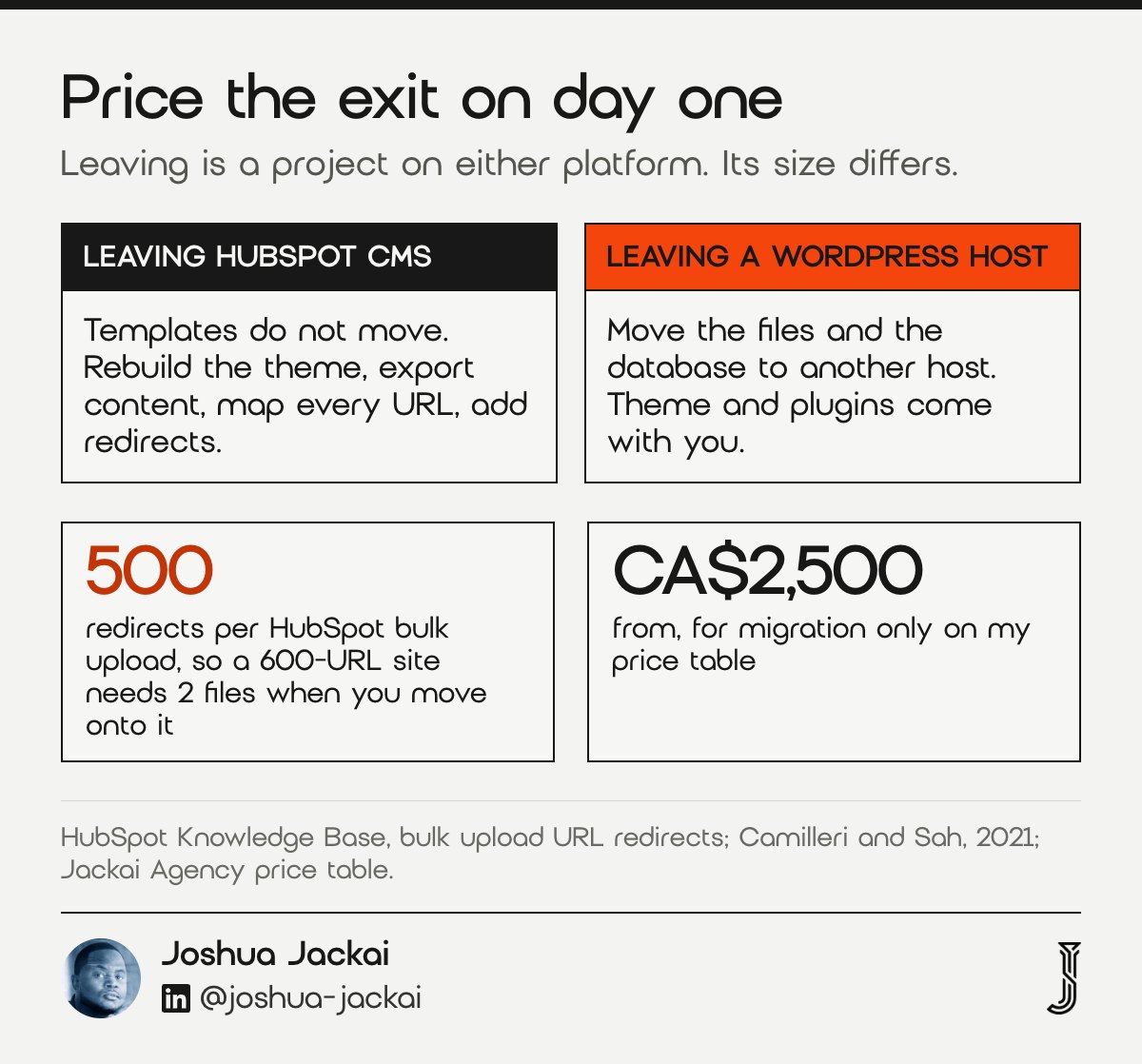
- HubSpot CMS: pages hosted by HubSpot; leaving means a rebuild
- WordPress: open source, move between hosts without a rebuild
- Redirect cap: 500 redirects per bulk upload on HubSpot
- Example: 600 old URLs need 2 upload files
- My migration only price: from CA$2,500
Lock-in is not a reason to avoid HubSpot. It is a cost to price on day one. HubSpot’s redirect guide caps bulk uploads at 500 redirects, so a 600-URL site needs 2 files when you move onto it, and the same mapping work returns when you move off. WordPress keeps more doors open because the software is open source and the database comes with you. The bigger risk is human. People stay with what they have. Camilleri and Sah tested 302 physicians and 733 members of the public and found the status quo bias in every group. In a platform decision that bias shows up years later, when a team keeps paying for a CMS nobody likes because leaving feels harder than it is. Write the exit plan now: who owns the domain, where redirects will live, and what a move would cost. If you already run HubSpot and the bill feels high, my HubSpot cost audit checks seats, contacts and hubs before you consider leaving.
“The status quo bias (SQB) is the tendency to prefer the current state of affairs,” Camilleri and Sah wrote in Applied Cognitive Psychology.
7. Canadian tax and currency on the bill: best for BC and Saskatchewan firms
Canadian firms pay sales tax on a software licence, and BC and Saskatchewan firms cannot claim PST back. At 7% BC PST, CA$7,020 a year of Content Hub Professional adds CA$491.40 a year, CA$1,474.20 over three years. The HubSpot CAD list also prices the US dollar at about 1.30, against 1.4257 from the Bank of Canada.
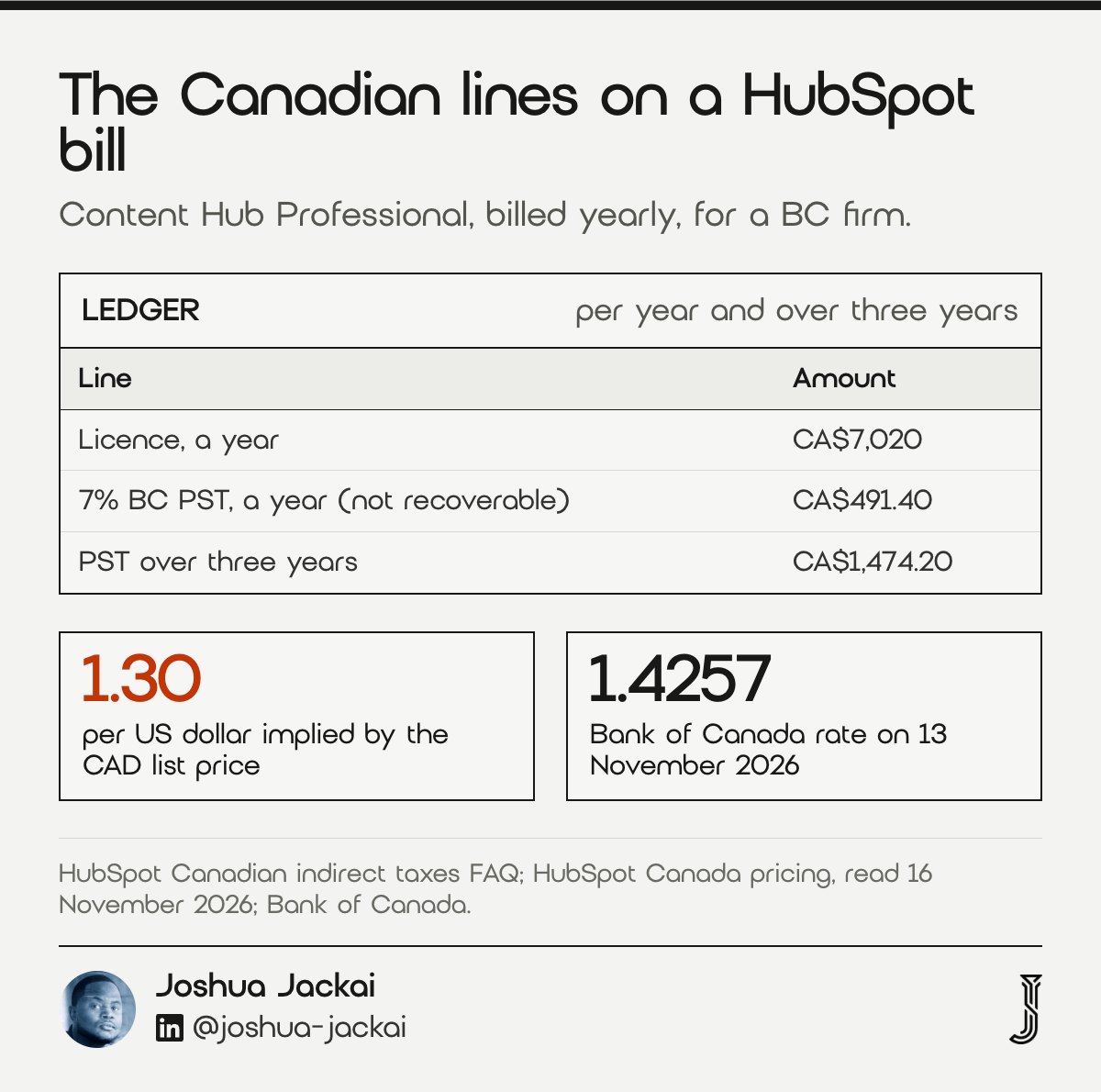
- BC PST on Content Hub Professional: CA$491.40 a year, not recoverable
- Three years of BC PST: CA$1,474.20
- Implied rate on HubSpot’s CAD list: about 1.30 (CA$585 against US$450)
- Bank of Canada rate: 1.4257 on 13 November 2026
- GST and HST: usually recoverable for registered firms
HubSpot’s Canadian tax FAQ says it may collect GST, HST, PST or QST by province, and that BC and Saskatchewan PST is not recoverable. On a CA$7,020 annual licence, 7% is CA$491.40 a year that stays on your books, and it grows with every hub and seat. The WordPress side carries tax too, on hosting and any paid plugins, but those lines are small, so the tax gap tracks the licence gap. Currency works in your favour if you pay in CAD. When I read HubSpot’s US page on 6 November 2026, Content Hub Professional was US$450 a month. CA$585 divided by US$450 is 1.30, while the Bank of Canada published 1.4257 on 13 November 2026. At that rate the US price would be CA$641.57 a month, so ask for CAD on the order form. List prices and rates both move, so recheck before you sign. My HubSpot partner cost guide breaks the same tax lines down for a full implementation quote.
“The PST imposed by British Columbia and Saskatchewan is not a recoverable tax,” HubSpot stated in its Canadian indirect tax FAQ.
Compare HubSpot CMS and WordPress on all seven checks
This matrix scores each check for a typical Canadian B2B firm of 2 to 200 people. Filter by which platform a check favours, or by how much effort it takes to verify, and rows are hidden rather than deleted. Prices are list prices read on 16 November 2026, so confirm them against your own quote before you decide.
| Check | Usually favours | Effort | Key number |
|---|---|---|---|
| 1. Who edits the pages | Depends on the edit log | Low | r=.63 usefulness vs r=.45 ease of use |
| 2. CRM fit | HubSpot CMS if HubSpot CRM is in use | Low | CA$585 a month, Content Hub Professional |
| 3. Three-year cost in CAD | WordPress under about 2.04 care hours a month | Medium | CA$30,760 vs CA$20,300.44 |
| 4. Lead source and routing | HubSpot CMS, native forms | Medium | Free HubSpot plugin for WordPress |
| 5. Plugin and security upkeep | HubSpot CMS if nobody owns updates | Medium | 11.58% of updates broke clients |
| 6. Lock-in and leaving later | WordPress | Low | 500 redirects per bulk upload |
| 7. Canadian tax and currency | WordPress (smaller taxed licence) | Low | 7% BC PST, CA$491.40 a year |
Work out your own three-year cost in CAD
This calculator compares three years of HubSpot CMS and WordPress from your own numbers. Enter both build quotes, the monthly licence, hosting, care hours and the hourly rate. The defaults are my published prices and the list prices quoted in this guide, so treat them as placeholders until you have quotes in hand.
Defaults are placeholders: my published build prices, HubSpot and Hostinger CAD list prices read 16 November 2026, and one care hour a month. Replace them with your quotes.
Which platform I recommend, and when
I recommend HubSpot CMS for a Canadian B2B firm that runs sales in HubSpot CRM and has marketers publishing every week. I recommend WordPress for a firm whose site changes a few times a year, whose CRM is something else, or whose budget cannot carry CA$21,060 of licence over three years. Everything else is detail.
I build on both. For Snappy Kraken, a B2B fintech company selling to financial advisors, I took a design from Figma to production on HubSpot CMS in 3 weeks, and the marketing team edits inside the design system afterwards. See the Snappy Kraken case study. For firms that fit WordPress better, my WordPress website redesign service covers the build, and my HubSpot website redesign service covers the other route. Moving an existing site onto HubSpot is covered on my HubSpot migration page.
Frequently asked questions
Is HubSpot CMS better than WordPress for B2B?
It is better when your sales team uses HubSpot CRM and marketers publish weekly, because forms, pages and reporting share one record. WordPress is better when pages change rarely or you use another CRM. On my CAD example, WordPress costs CA$10,459.56 less over three years.
How much does HubSpot CMS cost in Canada?
On 16 November 2026, HubSpot’s Canadian page listed Content Hub Starter from CA$10 per seat a month, Professional at CA$585 a month on annual billing and Enterprise at CA$1,950 a month. Professional is CA$7,020 a year before tax, and BC PST is not recoverable.
Is WordPress cheaper than HubSpot for a B2B website?
Usually, yes. Hosting on Hostinger’s Cloud Startup plan renews at CA$36.29 a month, against CA$585 for Content Hub Professional. The saving shrinks as care hours grow. On my worked example, the two costs meet at about 2.04 care hours a month at CA$279 an hour.
Can I use HubSpot CRM with a WordPress website?
Yes. HubSpot publishes a free WordPress plugin that embeds HubSpot forms, so leads land in HubSpot CRM with their source. Keep the plugin updated and test one form per channel each month, because a broken form integration loses leads without any visible error on the page.
Is it hard to move from HubSpot CMS to WordPress later?
It takes a rebuild, because HubSpot CMS pages are hosted on HubSpot. Every old URL needs a redirect to its new address, and HubSpot caps bulk redirect uploads at 500 rows at a time. A migration with no redesign starts at CA$2,500 on my price table.
Who sets this up for you
I build B2B websites on HubSpot CMS and WordPress for Canadian firms, from Vancouver, on fixed quotes: from CA$8,950 on WordPress and CA$9,700 on HubSpot for up to five pages. My CA$995 website audit runs these seven checks on your site and is credited in full if a project starts within 30 days.
Sources
Peer reviewed
- Davis, F. D. (1989). Perceived usefulness, perceived ease of use, and user acceptance of information technology. MIS Quarterly. doi.org/10.2307/249008
- Coltman, T., Devinney, T. M. and Midgley, D. F. (2011). Customer relationship management and firm performance. Journal of Information Technology. doi.org/10.1057/jit.2010.39
- Moløkken, K. and Jørgensen, M. (2003). A review of software surveys on software effort estimation. International Symposium on Empirical Software Engineering. doi.org/10.1109/ISESE.2003.1237981
- Wang, R. Y. and Strong, D. M. (1996). Beyond accuracy: what data quality means to data consumers. Journal of Management Information Systems. doi.org/10.1080/07421222.1996.11518099
- Jayasuriya, D., Terragni, V., Dietrich, J. and Ou, S. (2023). Understanding breaking changes in the wild. ISSTA 2023. doi.org/10.1145/3597926.3598147
- Kula, R. G., German, D. M., Ouni, A., Ishio, T. and Inoue, K. (2018). Do developers update their library dependencies? Empirical Software Engineering. doi.org/10.1007/s10664-017-9521-5
- Camilleri, A. R. and Sah, S. (2021). Amplification of the status quo bias among physicians making medical decisions. Applied Cognitive Psychology. doi.org/10.1002/acp.3868
Industry, vendor and government (not peer reviewed)
- HubSpot. Content Hub pricing, CAD, read 16 November 2026. hubspot.com/pricing/content?currency=CAD
- HubSpot. Marketing Hub pricing, CAD, read 16 November 2026. hubspot.com/pricing/marketing?currency=CAD
- HubSpot Knowledge Base. Canadian indirect taxes FAQ. knowledge.hubspot.com
- HubSpot Knowledge Base. Bulk upload URL redirects. knowledge.hubspot.com
- WordPress.org. HubSpot All-In-One Marketing plugin, version 11.3.82, read 16 November 2026. wordpress.org/plugins/leadin
- Hostinger Canada. WordPress hosting plans, read 16 November 2026. hostinger.com/ca/wordpress-hosting
- Patchstack. State of WordPress Security in 2026. patchstack.com
- Bank of Canada. USD/CAD daily rate, 13 November 2026. bankofcanada.ca