7 B2B Website Conversion Rate Benchmarks: 2026 Field Guide
Seven checks for reading B2B website conversion rate benchmarks in Canada: define the conversion, read the range, pick your industry row, split by source, test your sample, score lead quality and fix the first screen.
 Joshua Jackai
16 min read
Joshua Jackai
16 min read
Published 22 October 2026 · Last updated and fact-checked 22 October 2026
Short answer: Published B2B website conversion rates mostly fall between 1% and 5% (Predictable Profits), and I found no Canadian benchmark with a stated sample. Pick the industry row closest to yours, such as 1.1% for B2B SaaS, then test your own rate against its 95% confidence interval.
On 22 October 2026 I searched “b2b website conversion rate benchmarks canada” the way a Canadian marketing lead would. The results I saw were global or American, and none gave a Canadian number with a stated sample. So this guide does something different. It reads the Unbounce and First Page Sage reports at their origin, checks two secondary summaries against them, shows where they disagree, and gives you seven checks that turn a borrowed number into a decision you can defend. I support it with six peer-reviewed studies on first impressions, trust, small samples and online experiments.
Disclosure: I sell web design, so I benefit if you decide your site needs work. This guide contains no conversion data from my own client sites. Every benchmark comes from the source named beside it, and the confidence interval calculations are mine.
In this guide
Key takeaways
- Unbounce’s 2024 report gives a 6.6% median across 41,000 landing pages, but a landing page median is not a whole-site B2B rate.
- First Page Sage lists 1.1% for B2B SaaS, 1.5% for IT and managed services and 1.9% for financial services, from client data gathered between January 2022 and August 2025 (First Page Sage).
- One summary page gives the all-industry average as both 2.9% and 3.3%, and its typical range as 1% to 5% (Predictable Profits).
- A review of 26,841 statistical records from 3,801 cognitive neuroscience and psychology papers found a median power of 0.12 to detect a small effect, because sample sizes stayed small (Szűcs and Ioannidis, 2017). It is not a web study, and I use it to show why small samples mislead.
- At 1,000 visitors and 20 conversions, a 2.0% rate has a 95% interval of 1.30% to 3.07%, which contains the First Page Sage rows for IT and managed services (1.5%), financial services (1.9%) and manufacturing (2.2%).
- Visual appeal can be judged within 50 milliseconds, so the first screen is tested before the second (Lindgaard and colleagues, 2006).
| Check | What you decide | What you need | Time |
|---|---|---|---|
| 1. Define the conversion | Which action counts | Your form and call list | 30 minutes |
| 2. Read the range | Whether a number is a site rate or a page rate | Two benchmark sources | 20 minutes |
| 3. Pick your industry row | Which published figure is yours | Your sector and its row | 15 minutes |
| 4. Split by source | Which channel to judge | 90 days of analytics | 1 hour |
| 5. Test the sample | Whether your rate is a number or noise | Visitors and conversions | 10 minutes |
| 6. Score lead quality | Which form fills are real leads | CRM and source field | 2 hours |
| 7. Fix the first screen | What to change first | One page and one hypothesis | 1 day |
1. Define the conversion before you read a benchmark: best for comparing like with like
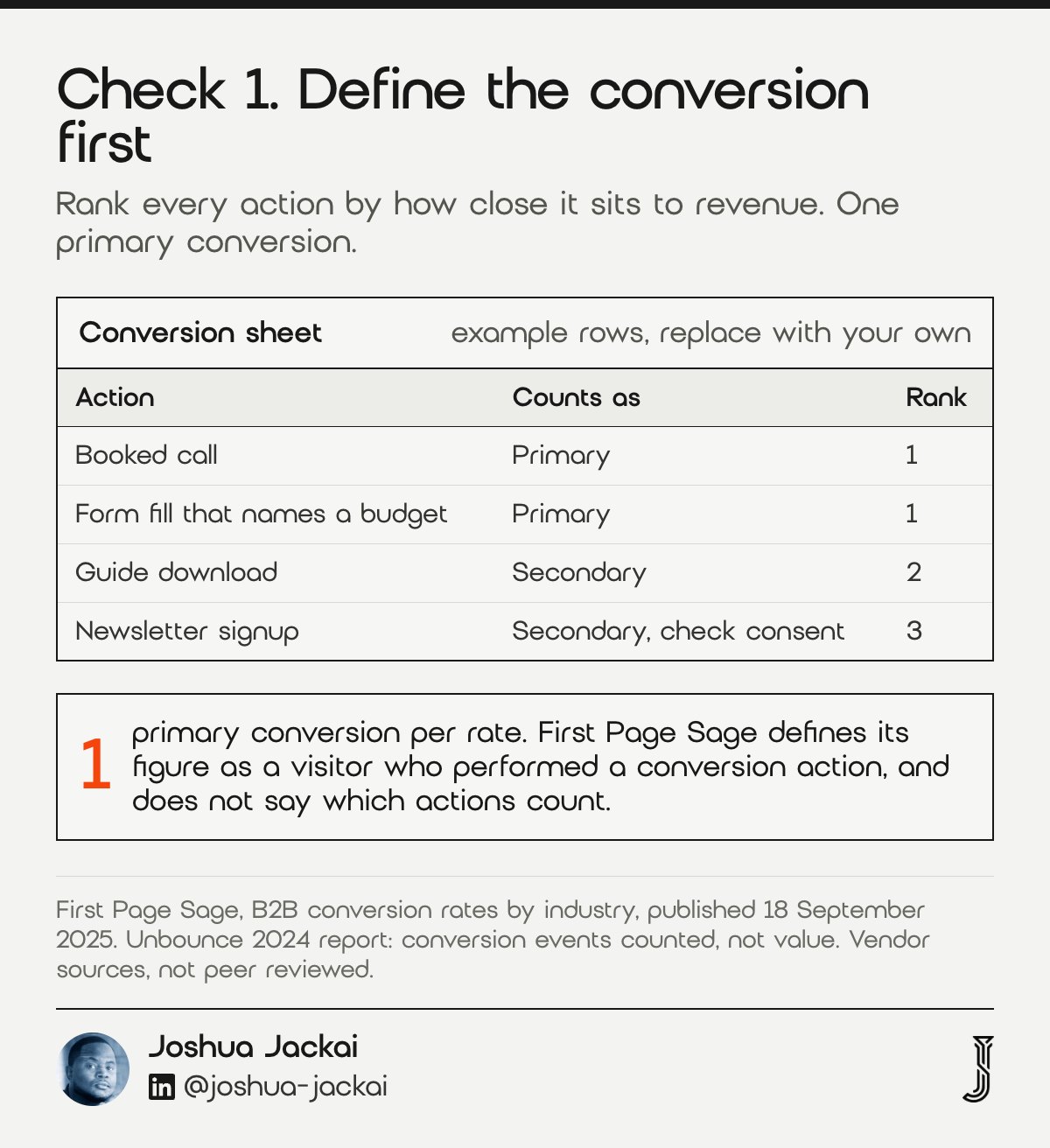
Write down every action your site counts as a conversion, then rank them by how close each sits to revenue. A booked call is not a newsletter signup. A benchmark is only useful when its definition matches yours, so this check comes first, before any percentage touches your report.
- Time: about 30 minutes
- You need: your analytics goals, your forms and your phone number tracking
- Output: a ranked list, with one primary conversion
- Check: whether the benchmark counts events or counts value
- Do not: add micro actions to a rate you compare with a sales number
First Page Sage defines its figure as the share of visitors who performed a conversion action, and the page does not say which actions count. Unbounce is more precise: its data looked only at conversion events, not the value of each event. That means a 6.6% median and a 1.1% SaaS rate are not measuring the same thing, and neither tells you whether the lead was good. Canadian sites add one more rule. If a form collects an email address for marketing, the request has to set out the purpose and identify who is asking, under section 10(1) of Canada’s Anti-Spam Legislation (CASL). If the form does not do that, the address may not be usable for marketing, so I count those signups separately until counsel confirms. Check the wording with counsel, because I am a web designer, not a lawyer. Then write the primary conversion on one line, such as a booked call or a form fill that names a budget, and keep every other action as a secondary count. When a benchmark page does not say what it counted, treat its number as a rough sense of scale and nothing more.
“A conversion rate is the percentage of visitors to a company’s website that performed a conversion action,” First Page Sage stated.
2. Read the range as a sanity check: best for catching a number that does not fit
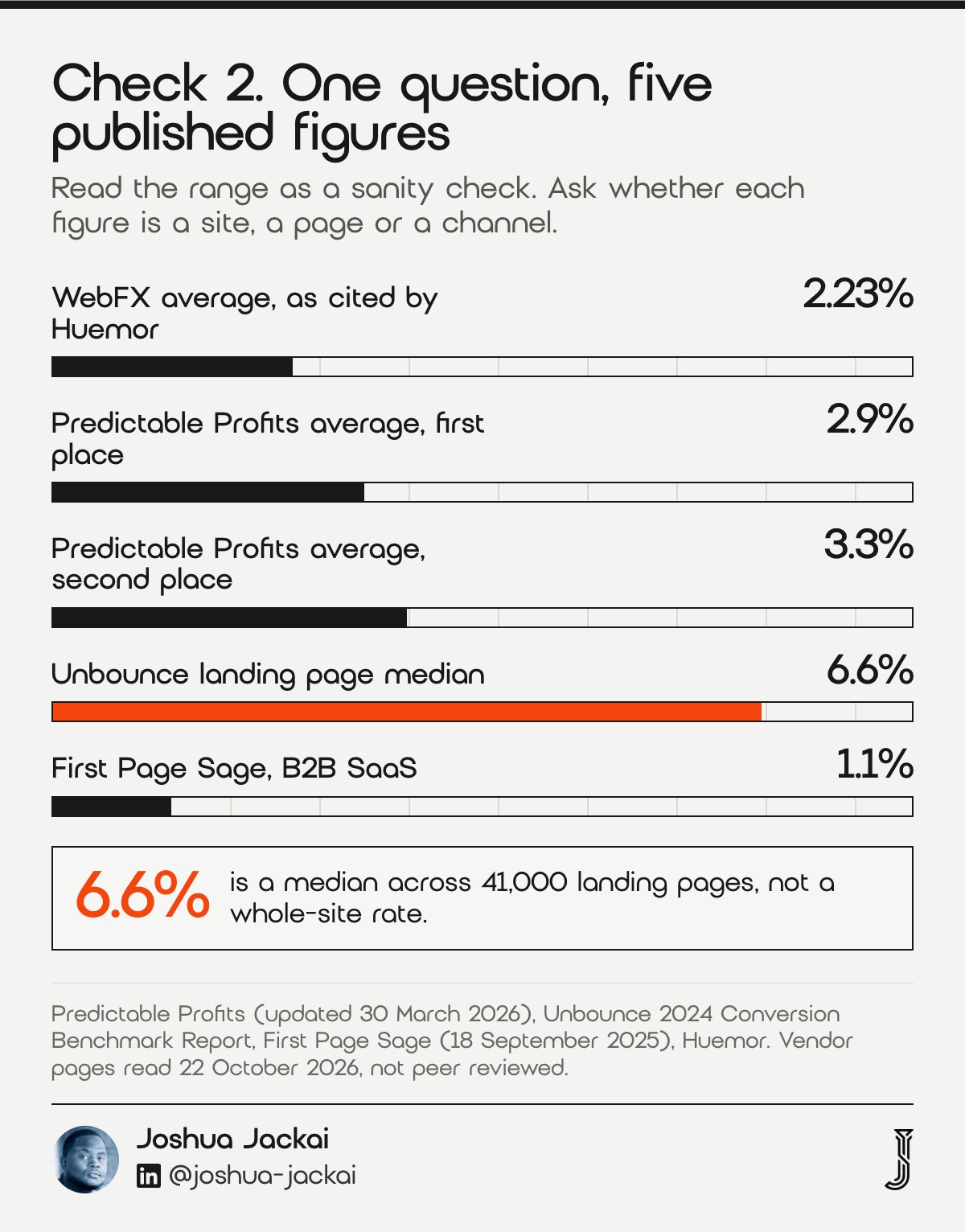
Published ranges agree on one thing: the middle sits near 1% to 5%. They disagree on everything inside it. Use the range to catch an impossible number, such as 0.2% or 15%, and never as a target. One page can quote two averages and a median without reconciling them.
- Time: about 20 minutes
- You need: two sources with a stated method
- Output: a range with the source and date written next to it
- Check: whether the figure is a site rate, a page rate or a channel rate
- Do not: average numbers from sources with different definitions
Predictable Profits, published 11 June 2025 and updated 30 March 2026, gives the B2B average as 2.9% in one place and 3.3% in another, a typical range of 1% to 5%, and a median of 6.6%. The 6.6% is the same number as Unbounce’s landing page median, so I suspect it is a page figure sitting beside site figures, though the page does not say. Huemor attributes 2.23% to WebFX and groups sites into tiers of 0.5% to 2%, 2% to 5% and 5% to 10%, without naming a source for the tiers. I read none of this as wrong. I read it as four different questions answered with one word. Check three things before you copy any figure: the date it was collected, whether it counts a whole site or one page, and whether the source shows its sample. Most of the pages I read fail at least one of those tests, which is why I keep a range with a source and a date rather than a single target.
A benchmark is a range to check your own number against, not a target to chase.
“Benchmarks are displayed as either medians or averages throughout the report,” Unbounce stated.
3. Pick your industry row: best for finding the figure that is closest to yours
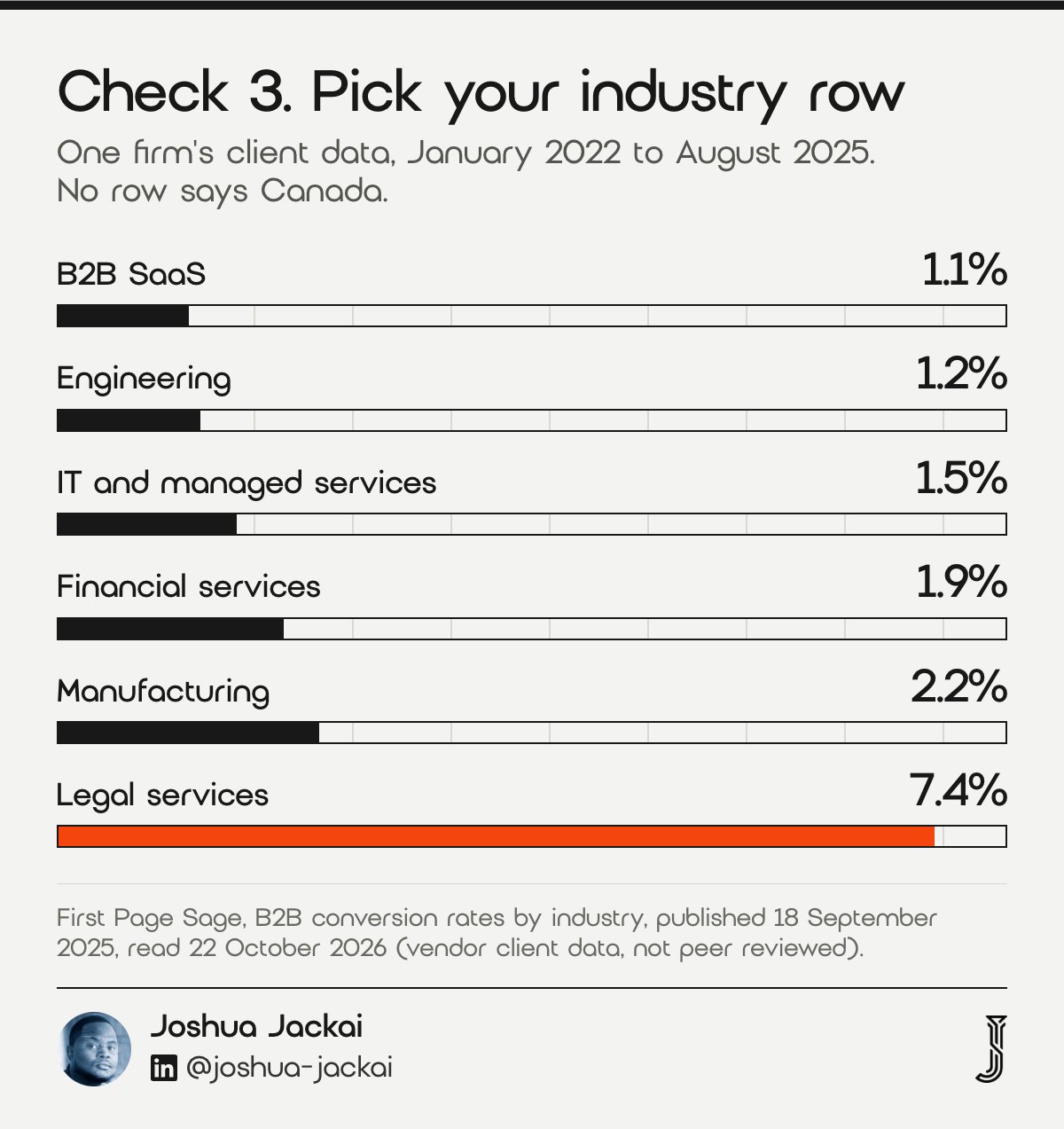
Find the industry row nearest to what you sell, copy the figure with its date, and stop there. Industry rows are the most useful published benchmarks because they separate a 1.1% software site from a 7.4% legal site. They still come from one firm’s clients, so they describe a pattern, not a promise.
- Time: about 15 minutes
- You need: your sector and the closest named row
- Output: one figure with its source and data window
- Check: whether your buyers look like the source’s clients
- Do not: use the legal services figure to judge a software site
First Page Sage published its table on 18 September 2025 and states that the rates come from research its own firm collected, using client data from January 2022 to August 2025. Rows relevant to Canadian B2B work: B2B SaaS 1.1%, engineering 1.2%, IT and managed services 1.5%, financial services 1.9%, manufacturing 2.2% and legal services 7.4%. Predictable Profits repeats the same legal, SaaS and IT figures without naming its source, which may mean a shared origin rather than two studies. I would not read that as two confirmations. Write the row next to its data window, so that in a year you know what the figure measured. A small firm that sells to Canadian mid-market buyers should expect its own rate to differ from the row in either direction.
The honest limit is geography. First Page Sage does not state where its clients are based, and no row says Canada. If you sell to Canadian buyers, treat the row as a starting guess and replace it with your own 90 day baseline as fast as you can.
| Industry | Conversion rate | Data window |
|---|---|---|
| B2B SaaS | 1.1% | January 2022 to August 2025 |
| Engineering | 1.2% | January 2022 to August 2025 |
| IT and managed services | 1.5% | January 2022 to August 2025 |
| Financial services | 1.9% | January 2022 to August 2025 |
| Manufacturing | 2.2% | January 2022 to August 2025 |
| Legal services | 7.4% | January 2022 to August 2025 |
4. Split the rate by traffic source: best for judging a channel fairly
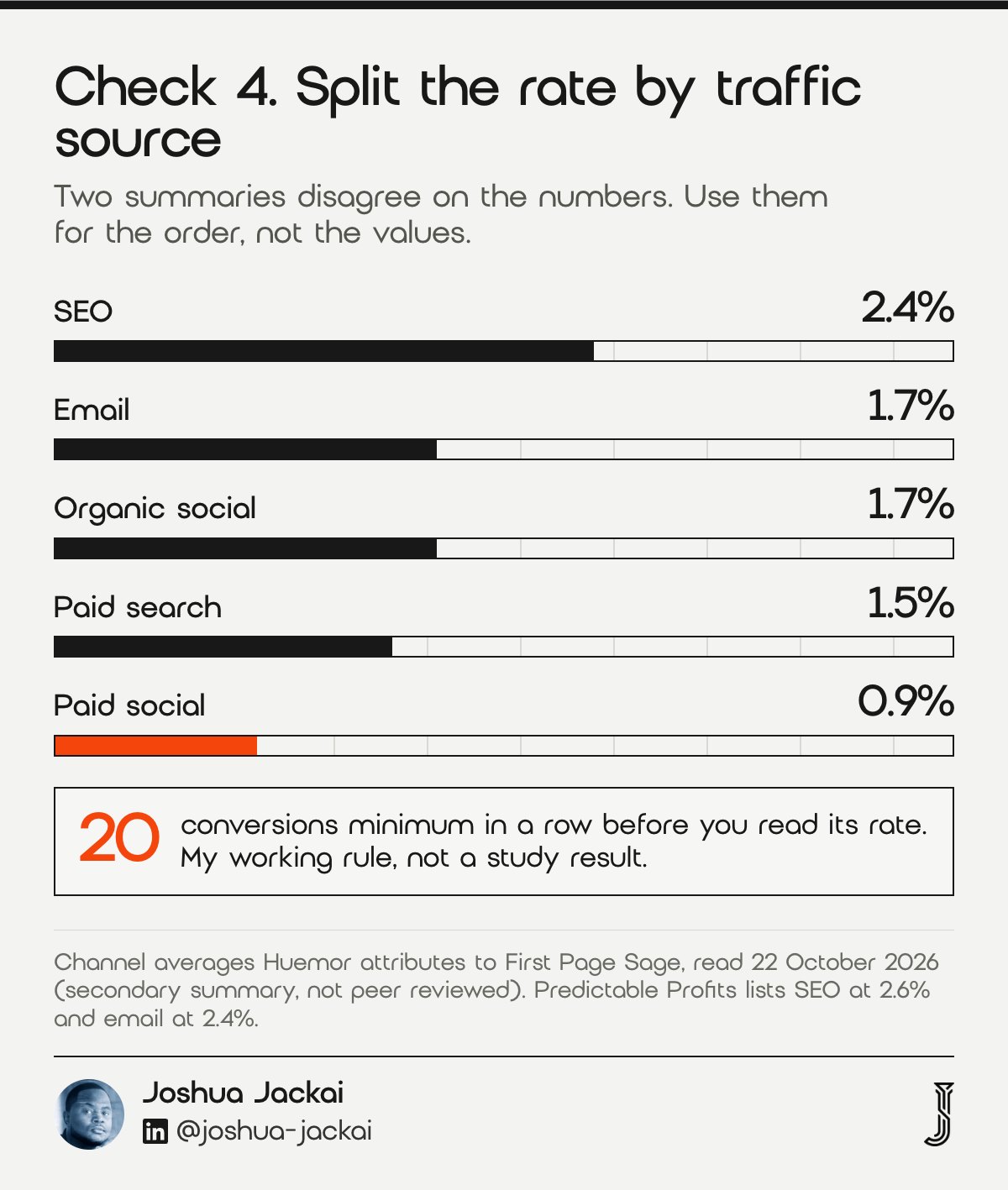
A site rate blends visitors who wanted you with visitors who never did. Split the 90 day figure by source before you judge a page. The channel averages in published summaries run from 0.9% for paid social to 2.4% for SEO, so the same page can convert visitors from different sources at very different rates.
- Time: about 1 hour
- You need: 90 days of analytics with a source and a conversion count
- Output: one row per source: visitors, conversions, rate
- Check: at least 20 conversions in a row before you read it
- Do not: compare a paid social rate with an organic search rate
Huemor lists channel averages it attributes to First Page Sage: SEO 2.4%, email 1.7%, organic social 1.7%, paid search 1.5% and paid social 0.9%. Predictable Profits lists SEO at 2.6% and email at 2.4%. Two summaries, two sets of numbers, and neither shows its sample, so I use them only for the order of the channels. Keep the source rows to the same 90 days, and drop any row with fewer than 20 conversions, since a handful of conversions swings a rate wildly. If most of your traffic is direct, say so in the table, because direct visits often hide earlier visits from search or referral, and that distorts the split. Huemor also attributes a split of 3.4% on desktop and 2.0% on mobile to Contentsquare’s 2026 Digital Experience Benchmarks Report, which I did not open at its origin, so treat that split as unverified.
Whatever the device, the first screen is judged quickly.
“Visual appeal can be assessed within 50 ms,” Lindgaard, Fernandes and Dudek of Carleton University wrote in Behaviour and Information Technology.
5. Test whether your sample is big enough: best for low traffic Canadian sites
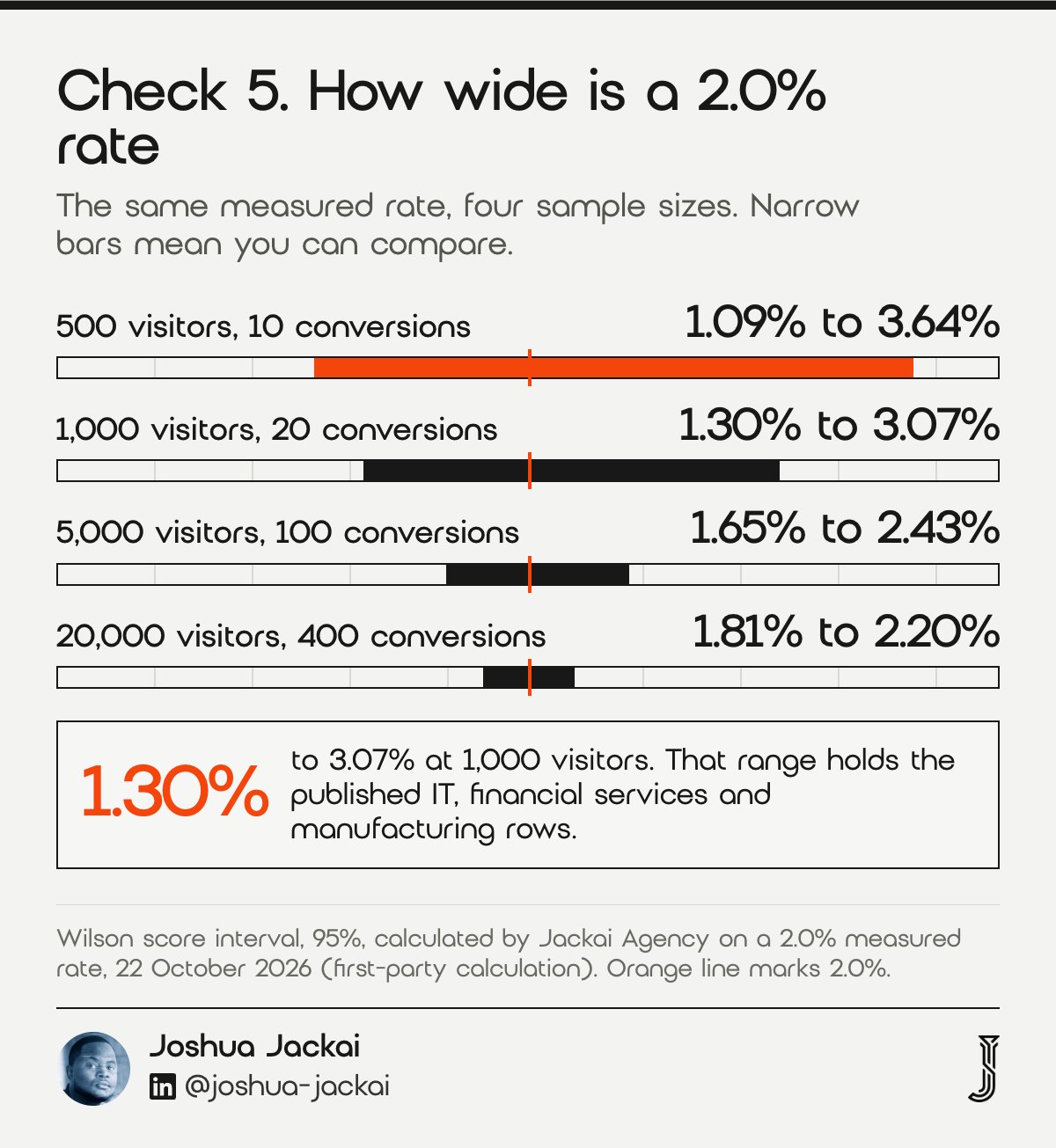
Divide your conversions by your visitors, then put a 95% confidence interval around it. With the traffic most Canadian B2B sites have, the interval is wide, and a wide interval means you cannot yet tell your site from the benchmark. This is the check most benchmark articles skip.
- Time: about 10 minutes
- You need: visitors and conversions for the same 90 days
- Output: a rate with a lower and an upper bound
- Check: whether the published figure falls inside your interval
- Do not: call a 0.5 point change a result at 500 visitors
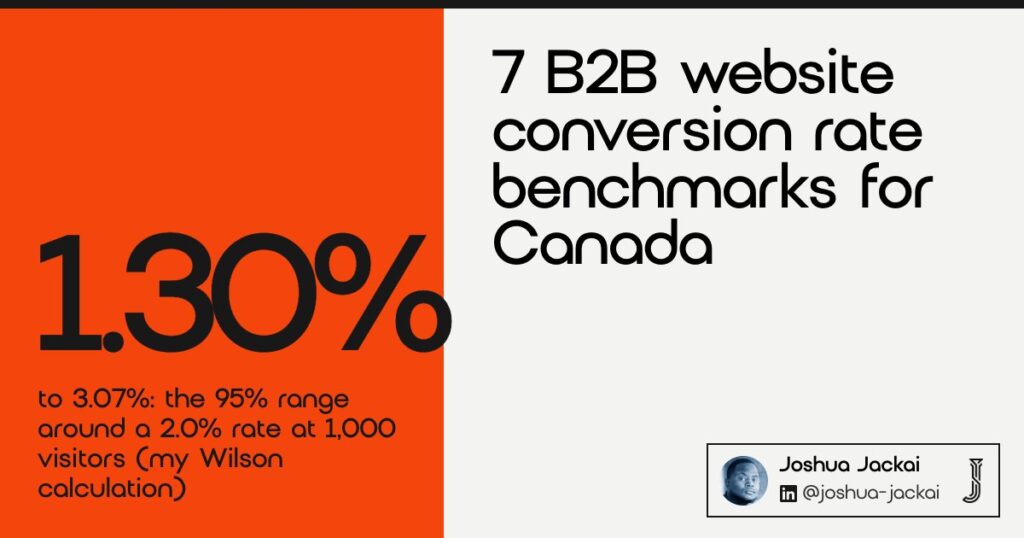
I calculated the interval with the standard Wilson score method at 95%. At 500 visitors and 10 conversions the rate is 2.0%, and the interval runs from 1.09% to 3.64%. At 1,000 visitors and 20 conversions it runs from 1.30% to 3.07%. At 5,000 visitors and 100 conversions it narrows to 1.65% to 2.43%, and at 20,000 visitors and 400 conversions to 1.81% to 2.20%. Read the result as a statement about your site, not about the benchmark. If the 1.1% figure for B2B SaaS falls inside your interval, you cannot say your site is better or worse yet, and the right move is to collect more traffic or compare longer periods, not to redesign. Those are my calculations, not a published study. Small samples are a known problem in research too: Szűcs and Ioannidis of the University of Cambridge and Stanford Medicine analysed 26,841 statistical records from 3,801 cognitive neuroscience and psychology papers and found the median power to detect a small effect was 0.12. That study is not about websites. It shows what small samples do to power.
“This is so because sample sizes have remained small,” Szűcs and Ioannidis wrote in PLOS Biology.
“Read the result as a statement about your site, not about the benchmark,” said Joshua Jackai, Vancouver web designer.
6. Score lead quality, not only form fills: best for connecting a rate to revenue
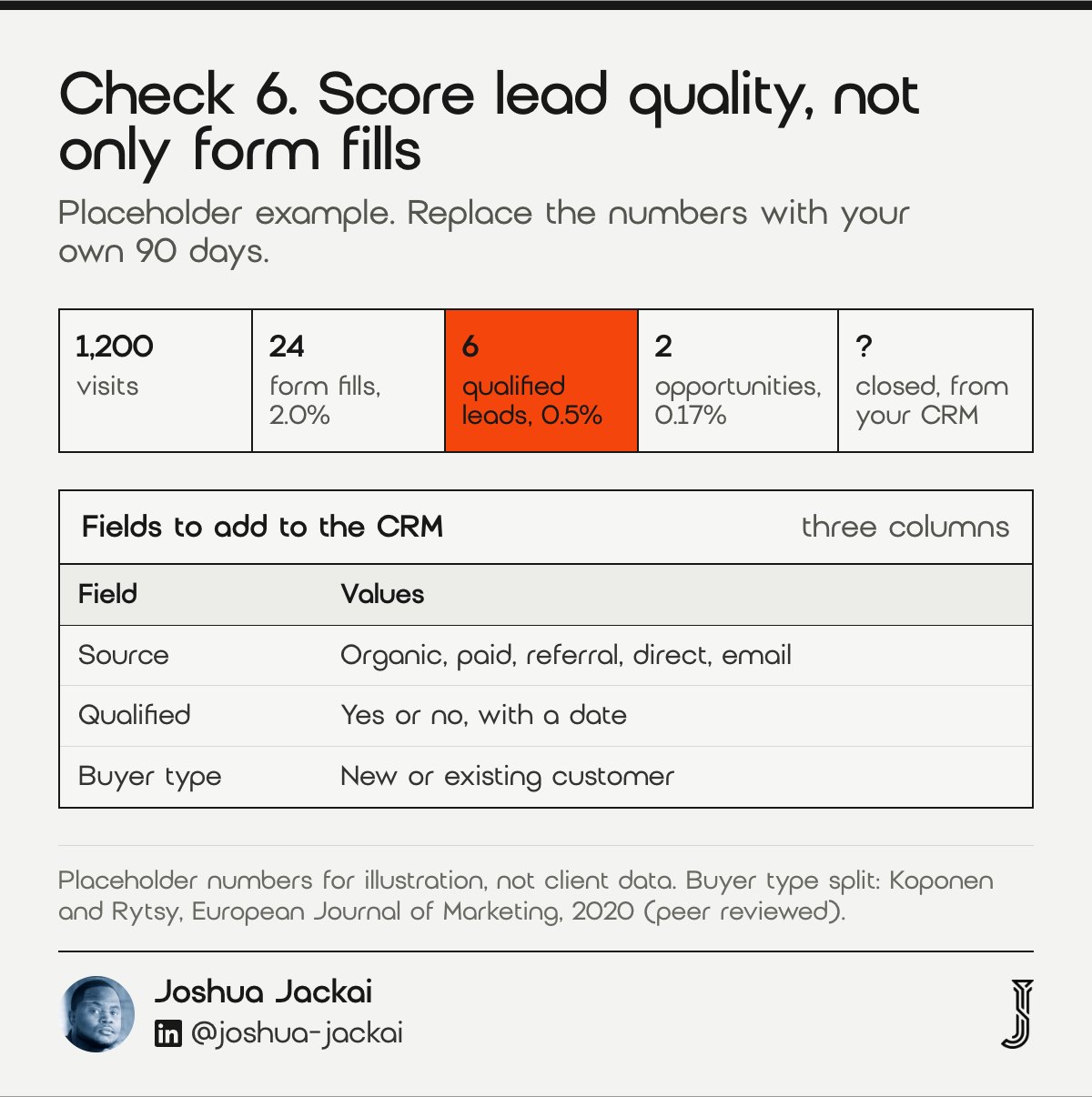
A conversion rate counts leads. Your pipeline counts good leads. Add the source and a quality tag to every form fill in your CRM, then report two rates: form fills per visitor, and qualified leads per visitor. The second one is the number a benchmark cannot give you.
- Time: about 2 hours to set up
- You need: a CRM field for source and a field for qualified yes or no
- Output: form fills, qualified leads and opportunities by source
- Check: how many fills come from existing customers
- Do not: celebrate a rate that rose while qualified leads fell
A worked example with placeholder numbers: 1,200 visits, 24 form fills (2.0%), 6 qualified leads (0.5%) and 2 opportunities (0.17%). The first rate sits inside every published range. The second tells you whether the site is doing its job. Buyer type matters here. Koponen and Rytsy of the University of Eastern Finland analysed 157 online chat conversations between buyers and sellers at one case company, and found that social presence differed by buyer type, with only existing customers showing relationship maintenance responses. One company is a small sample, so I use it as a reason to tag buyer type, not as a rule. Count calls separately if your number is on the site, because a form-only rate then misses real enquiries. Add the buyer type to the same sheet, new or existing customer, so that the two groups never blend into one rate.
I build lead source reporting into Canadian B2B sites as a fixed-quote piece of work, from CA$2,600, because without it a rate has no price attached.
“Social presence differed depending on the type of buyer,” Koponen and Rytsy wrote in the European Journal of Marketing.
7. Fix the first screen, then run one test: best for choosing what to change first
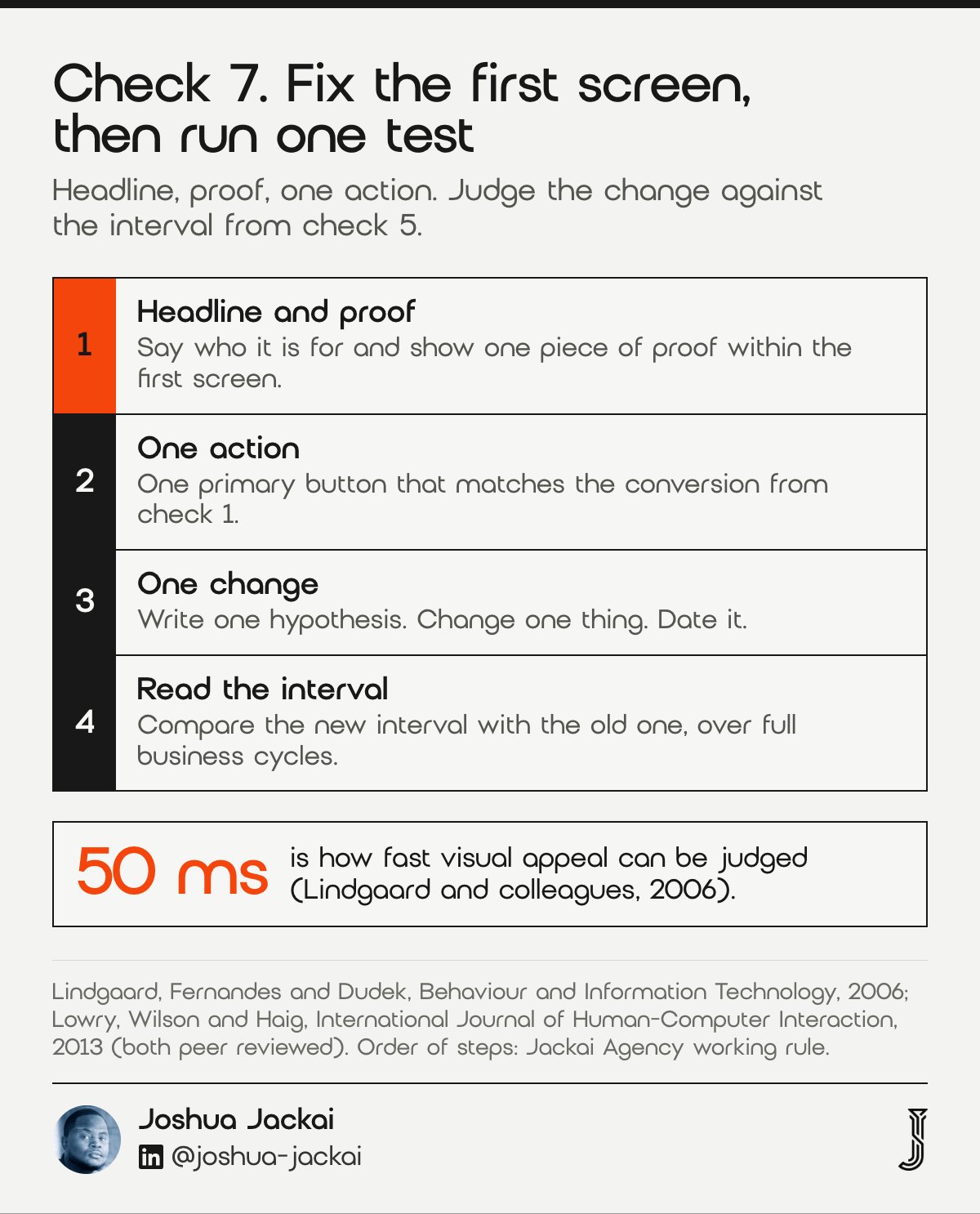
Start with the first screen of your highest traffic page: the headline, the proof and the one action. Write one hypothesis, change one thing, and judge it against the interval from check 5. Most changes will do nothing, which matches what Kohavi, Tang and Xu report.
- Time: about 1 day to write and ship one change
- You need: one page, one hypothesis and a baseline interval
- Output: a dated before and after with both intervals
- Check: whether the new interval clears the old one
- Do not: stop a test the moment it looks good
Lowry, Wilson and Haig of the City University of Hong Kong and the University of Arizona studied website credibility and trust. They wrote in the International Journal of Human-Computer Interaction that “the first impression given to users can greatly determine a website’s success.” Kohavi of Microsoft, Tang of Google and Xu of LinkedIn describe the other side of the same discipline in the quotation at the end of this section. Larsen, Stallrich and Sengupta of North Carolina State University reviewed the statistical challenges that online experiments raise. With low traffic you often cannot run a clean split test, so compare dated periods and say plainly that you did. A practical order is the headline, the proof under it, then the single action. Measure until each version has at least 20 conversions, the same floor I use in check 4. That floor is my own working rule, not a published threshold, and on low traffic it can take longer than a few weeks. Write the dated result in the same sheet as your baseline. If the interval does not move, the change did not matter, and that is information too.
The authors describe a culture of testing everything “because most ideas fail and tiny changes sometimes show surprising outcomes worth millions of dollars annually,” Kohavi, Tang and Xu wrote in Trials.
Compare the seven checks and filter by time and effort
Use the filters to find the check that fits the time you have today. Every row is a check you can finish in a working day or less, and the order in the list is the order I run them. Rows are hidden, never deleted, so clear the filters to see all seven again.
| Check | Time | Data | What you decide |
|---|---|---|---|
| 1. Define the conversion | 30 minutes | None yet | Which action counts |
| 2. Read the range | 20 minutes | None yet | Site rate or page rate |
| 3. Pick your industry row | 15 minutes | None yet | Which published figure is yours |
| 4. Split by source | 1 hour | Analytics | Which channel to judge |
| 5. Test the sample | 10 minutes | Analytics | Number or noise |
| 6. Score lead quality | 2 hours | CRM | Which fills are real leads |
| 7. Fix the first screen | 1 day | Analytics | What to change first |
Work out whether your rate differs from the benchmark
Enter your visitors and conversions for the same period. The calculator returns your rate and its 95% interval, then shows whether a published industry figure falls inside it. The default numbers are placeholders, so replace them with your own before you read the result.
Industry figures: First Page Sage, client data January 2022 to August 2025. The interval is a 95% Wilson score interval, a standard formula.
Frequently asked questions
What is a good conversion rate for a B2B website?
Predictable Profits gives a typical B2B website range of 1% to 5%, and First Page Sage lists rows from 1.1% for B2B SaaS to 7.4% for legal services. A good rate sits at or above your own industry row, counts a defined action and produces qualified leads.
Is 2.5% a good conversion rate for a B2B site?
It sits inside the typical 1% to 5% range and above every First Page Sage row except legal services at 7.4%. Whether it is good depends on what counts as a conversion and on your sample size, because at 1,000 visitors a 2.5% rate has a wide interval.
What is the average B2B website conversion rate in Canada?
I could not find a published Canadian figure with a stated sample. The all-industry averages quoted by Predictable Profits run from 2.9% to 3.3% and give no Canadian sample, so use them as a rough guide, and build your own baseline from 90 days of analytics first.
How do I calculate my website conversion rate?
Divide the number of people who completed one defined action by the number of visitors in the same period, then multiply by 100. Use one primary conversion, a 90 day window and the same source split every time, so that the figure can be compared with itself.
How many visitors do I need before a conversion rate means anything?
There is no single number, because it depends on your rate. For a rate near 2%, my Wilson interval calculation shows about 5,000 visitors and 100 conversions narrows the range to roughly 1.65% to 2.43%. Below 1,000 visitors, treat any change as a hint.
Who sets this up for you
I am Joshua Jackai, founder of Jackai Agency in Vancouver. I design, build and migrate websites for Canadian B2B companies with fixed quotes. The CA$995 website audit checks your first screen, form, tracking and lead source field, and is credited in full if a project starts within 30 days. Lead source reporting starts at CA$2,600.
Custom B2B sites start at CA$7,450.
If conversion is the whole job, read my B2B conversion web design service page, or start from the free AI visibility report to see whether answer engines can find you at all.
Sources
Peer reviewed
- Szűcs, D. and Ioannidis, J. P. A. (2017). Empirical assessment of published effect sizes and power in the recent cognitive neuroscience and psychology literature. PLOS Biology. doi.org/10.1371/journal.pbio.2000797
- Lindgaard, G., Fernandes, G. and Dudek, C. (2006). Attention web designers: you have 50 milliseconds to make a good first impression! Behaviour and Information Technology. doi.org/10.1080/01449290500330448
- Lowry, P. B., Wilson, D. W. and Haig, W. L. (2013). A picture is worth a thousand words: source credibility theory applied to logo and website design for heightened credibility and consumer trust. International Journal of Human-Computer Interaction. doi.org/10.1080/10447318.2013.839899
- Kohavi, R., Tang, D. and Xu, Y. (2020). Online randomized controlled experiments at scale: lessons and extensions to medicine. Trials. doi.org/10.1186/s13063-020-4084-y
- Larsen, N., Stallrich, J. and Sengupta, S. (2023). Statistical challenges in online controlled experiments: a review of A/B testing methodology. The American Statistician. doi.org/10.1080/00031305.2023.2257237
- Koponen, J. P. and Rytsy, S. (2020). Social presence and e-commerce B2B chat functions. European Journal of Marketing. doi.org/10.1108/ejm-01-2019-0061
Industry, vendor and government (not peer reviewed)
- First Page Sage. B2B conversion rates by industry, published 18 September 2025, client data January 2022 to August 2025, read 22 October 2026. firstpagesage.com
- Unbounce. 2024 Conversion Benchmark Report, 41,000 landing pages, 464 million visitors, read 22 October 2026. unbounce.com
- Predictable Profits. B2B conversion rate benchmarks, published 11 June 2025, updated 30 March 2026, read 22 October 2026. predictableprofits.com
- Huemor. 2026 B2B conversion rate benchmarks, read 22 October 2026, secondary summary of other sources. huemor.rocks
- Government of Canada. An Act to promote the efficiency and adaptability of the Canadian economy (CASL), section 10, read 22 October 2026. laws-lois.justice.gc.ca
- Wilson score interval, calculated by Jackai Agency on the stated visitor and conversion counts, 22 October 2026 (first-party calculation).
- Jackai Agency price table, October 2026 (first-party prices, CAD).