7 Steps to Claim Your Business in ChatGPT from Canada
OpenAI opened Businesses in ChatGPT on 10 November 2026. Here is what a Canadian firm can claim today, how to verify with a DNS TXT record, what Persona asks for, and which parts stay US only, checked against OpenAI's own help pages.
 Joshua Jackai
19 min read
Published 20 November 2026 · Last updated and fact-checked November 2026
Short answer: Yes, a Canadian firm can try to claim its business in ChatGPT through Business Hub, launched in beta on 10 November 2026, because Canada is on OpenAI’s list of countries where ChatGPT is offered. Claiming depends on location and business type, Business Agents are US only, and claiming does not raise visibility. Verify, then fix your website.
Three terms come up throughout. Business Hub is the section in the ChatGPT sidebar where you find and claim a listing. Persona is the identity checker OpenAI uses to confirm you may represent the business. A Business Agent is a customer-answering chat inside ChatGPT, open only to some US businesses today.
OpenAI opened Businesses in ChatGPT in beta on 10 November 2026 and said it reaches the 1.2 billion people who use ChatGPT each week. For a Canadian owner the first question is simple: does this work for us, or is it another American launch we read about and cannot use?
Can a Canadian business claim its ChatGPT profile? Partly: the claim and insights are open, Business Agents are not. Most of the guides ranking for this question skip the Canadian half. They were written for US shops. This guide sticks to what OpenAI’s own help page says, as saved on 20 November 2026, and marks where I am reading between the lines. I have not run a Canadian claim end to end for this article, so the steps are OpenAI’s and the Canadian notes are mine. If you want the longer game of getting named in answers, read how to get recommended by ChatGPT next.
In this guide
Key takeaways
- Canada appears on OpenAI’s supported countries list, and OpenAI says “any eligible business located where ChatGPT is available” can claim through Business Hub.
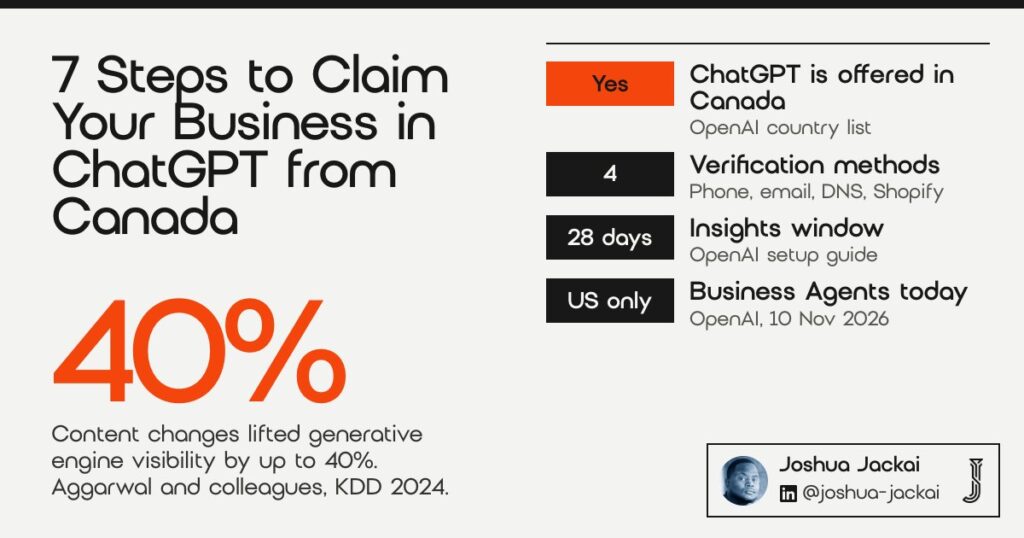
- OpenAI’s setup guide offers 4 verification methods: business phone, business email, website domain (a DNS TXT record) and Shopify.
- Business Agents are limited to eligible ecommerce and online service businesses in the US, so a Canadian firm gets the profile and insights, not the agent, for now.
- Insights cover the past 28 days and count mentions and website clicks. For an online business, a mention counts only when ChatGPT references your website, not your brand name alone.
- A content study at KDD 2024 found page changes lifted visibility in generative engine answers by up to 40% (Aggarwal and colleagues). Your website is the part of the picture you control directly.
| # | Step | What you do | My time estimate | Confirmed by OpenAI for Canada? |
|---|---|---|---|---|
| 1 | Check eligibility | Confirm location, business type and website | 10 minutes | Partly: country yes, categories not listed |
| 2 | Find or add the listing | Search Business Hub, or add an online business | 10 minutes | Partly: add option shown to eligible online businesses |
| 3 | Pick a verification method | Phone, email, domain or Shopify | 5 minutes | Methods vary by listing |
| 4 | Add the DNS TXT record | Copy type, name and value into your DNS host | 15 minutes plus waiting | Not stated for Canada; method offered per listing |
| 5 | Pass Persona identity checks | Legal name, address and registration details | 20 minutes plus review | Canadian documents not named |
| 6 | Complete the profile and read insights | Description, category, logo, 28 day insights | 30 minutes | Not stated for Canada; opens after Persona approval |
| 7 | Plan around the US-only parts | Skip the agent, fix the site, recheck monthly | Ongoing | Agents: US only |
1. Can a Canadian business claim its profile in ChatGPT?
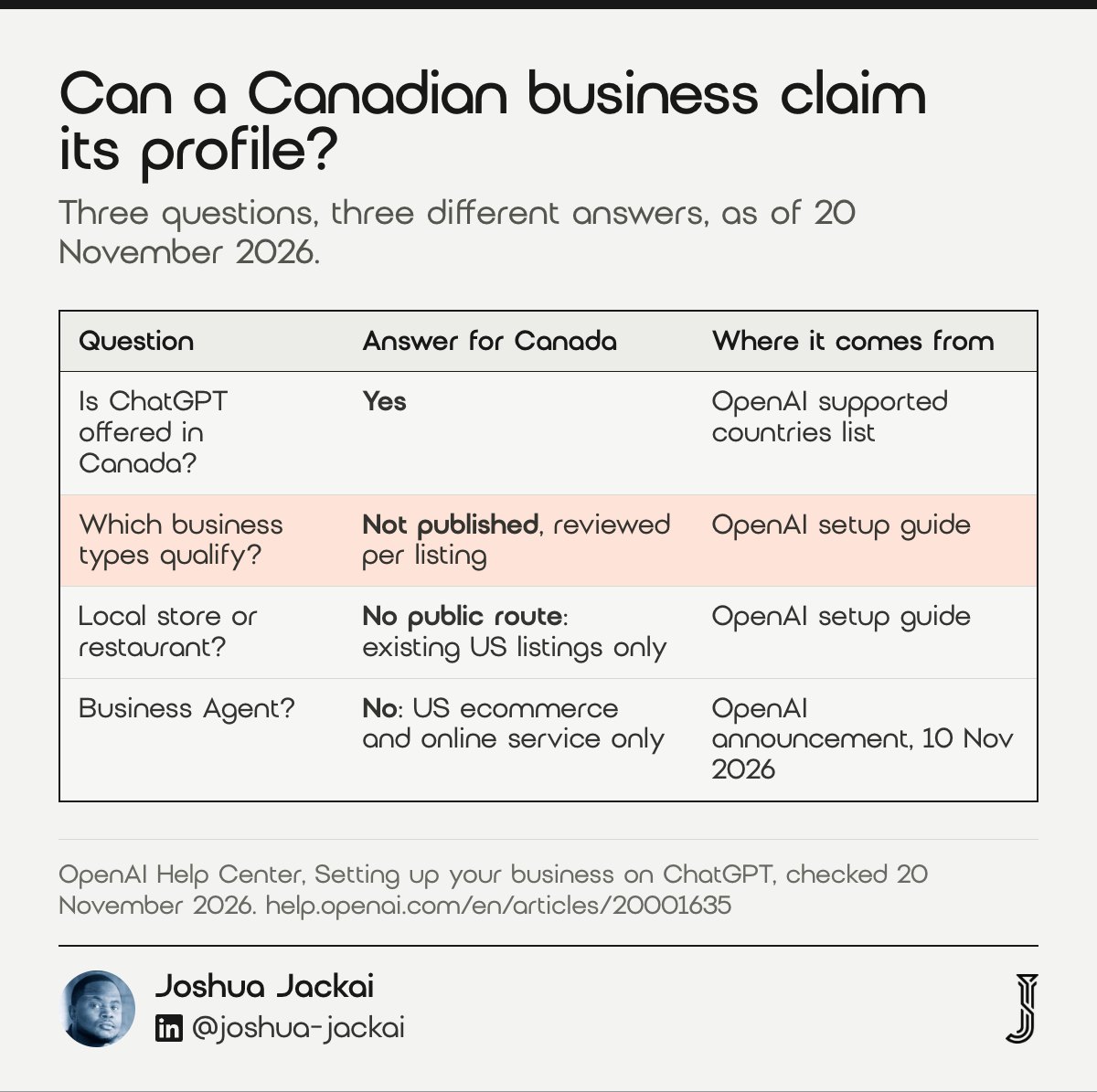
A Canadian business can start a claim, because ChatGPT is offered in Canada and OpenAI lets eligible businesses claim wherever ChatGPT is available. Anyone who owns the firm or is authorized to represent it can start. Eligibility still “depends on the business’s location and type”, in OpenAI’s words, and the help page names no Canadian categories.
- Who can claim: an owner, or someone “authorized to represent” the business
- Not needed: an OpenAI Ads account or a ChatGPT Enterprise agreement
- Country: Canada is listed where ChatGPT is offered
- Business type: reviewed per listing; no public list for Canada
- Local stores and restaurants: can claim only an existing US listing today
The country question has a clean answer and the type question does not. OpenAI’s announcement says any eligible business located where ChatGPT is available can claim through Business Hub, and Canada is on the supported countries list. So the door is not shut at the border.
What OpenAI has not published is which business types qualify outside the US. The setup page says local stores and restaurants “can currently claim only an existing U.S. listing”. That line matters for a Kitsilano café or a Surrey retail shop: today, the help page gives you no route. For a B2B service firm with a website, the picture is better, because the page describes an add option for “an eligible online business”.
My reading, and I want to be clear it is a reading: a Canadian consulting firm, software company or professional services practice that sells through its website is closer to an “online business” than a “local store”. Try the claim. If Business Hub waitlists you or offers no add option, that is your answer for now, and you lose nothing by trying.
A verified profile is a trust signal, and buyers lean on those. McKnight, Choudhury and Kacmar (2002) found that trust in a web vendor rests partly on “institution-based trust”, the structures that make a deal feel safe.
“Trust plays a central role in helping consumers overcome perceptions of risk and insecurity.”
D. Harrison McKnight, Vivek Choudhury and Charles Kacmar wrote (Information Systems Research, 2002)
2. How do you find your business, or add it if it is missing?
You sign in to ChatGPT, open Business Hub from the sidebar and search for your business by name. If your business is missing and you run an eligible online business, OpenAI says you “may see an option to add it”, per its setup guide dated November 2026.
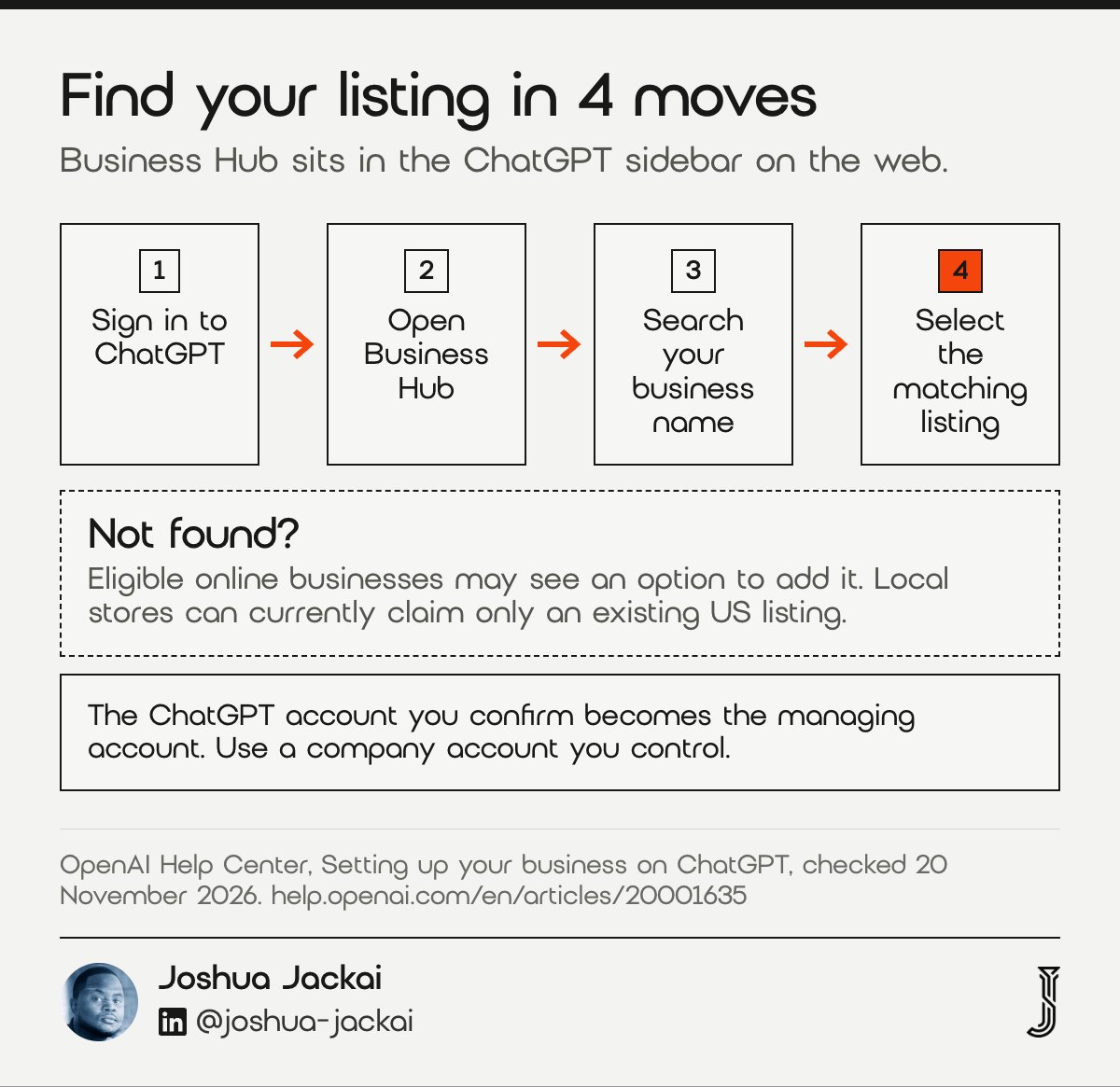
- Where: Business Hub, in the ChatGPT sidebar on the web
- Account: the ChatGPT account you pick becomes the managing account
- Missing listing: an add option for eligible online businesses
- Started a claim already: open Business Hub, select Business, open the profile
- Enterprise workspace: some listings need the tenant admin to start the claim
The account choice is the step people rush. Whatever ChatGPT account you confirm here is the one that manages the profile. OpenAI’s page says the admin who claimed the business can add teammates later and grant an agency access, using each person’s own ChatGPT account. So claim with a company account you control, not an intern’s personal login or your agency’s.
“So claim with a company account you control, not an intern’s personal login or your agency’s.”
Joshua Jackai, Vancouver web designer, said in this guide
If you see a listing with the wrong details, select it anyway if it is your business. Fixing the details is what the profile is for. If the listing is already claimed by someone else, open it, select the more options menu and choose “Dispute ownership”, which sends you through Persona.
Ranking position shapes what people pick. In an eye-tracking study at Cornell, Pan and colleagues (2007) found college student users chose links higher in position even when the abstracts were less relevant. A wrong or empty listing sits in that same high-trust spot.
“Their decisions were strongly biased towards links higher in position even if the abstracts themselves were less relevant.”
Bing Pan and colleagues wrote of Google users (Journal of Computer-Mediated Communication, 2007)
3. Which verification method should a Canadian firm pick?
Pick the method you can finish today: business phone, business email, website domain or Shopify. This suits firms whose public phone or email reaches the owner. The website domain method needs no change to your public contact details, per OpenAI’s setup guide, which makes it the safest choice for B2B firms.
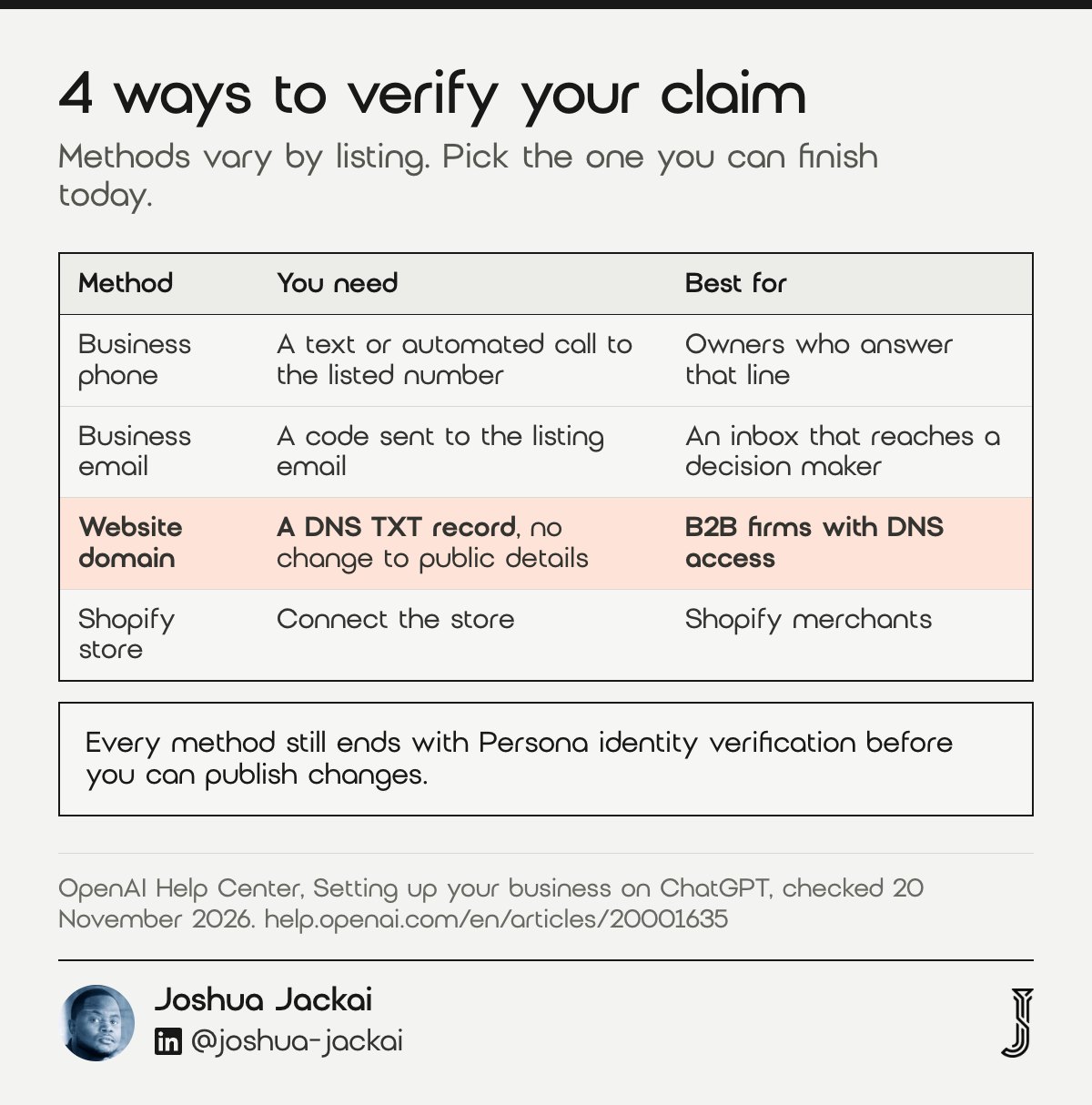
- Business phone: a text or automated call with a code to the number shown
- Business email: a code sent to the email tied to the listing
- Website domain: a TXT record in your DNS settings
- Shopify: connect the store from Business Hub or the Shopify admin
- Rule: methods vary by listing, so you choose from what appears
The phone and email routes break in a quiet way. A listing often shows a reception line, an old office number or a generic info@ address that nobody reads. Your code goes there, and you sit waiting for a text that went to a desk phone in Yaletown.
OpenAI’s page is direct about the fix: if you see Website domain, “you can verify your connection using a DNS record without changing the public phone number.” For a Canadian B2B firm, the domain route is the one I would pick, because the person with DNS access is usually reachable and the record proves you control the website the profile points to.
Shopify is the fast lane if you sell on Shopify, since the store connection handles verification. Most B2B service firms do not, so ignore it unless it applies.
Whichever of the 4 methods you pick, remember what a claim is, per OpenAI’s guide. OpenAI says submitting a claim “asks for review. It does not grant access to the profile.” Expect an email with a decision or a request for more information.
A claim is a small trust signal in a larger decision. Kim, Ferrin and Rao (2008), in Decision Support Systems, modelled online purchase decisions around trust, perceived risk and their antecedents, the same factors a verified listing speaks to.
4. How do you add the DNS TXT record on a Canadian host?
You copy the TXT record ChatGPT shows you into your domain’s DNS settings, exactly as written, then return and select Verify domain. You need DNS access, or a web person who has it. OpenAI warns that “DNS changes may take time to appear”, so allow time before retrying.
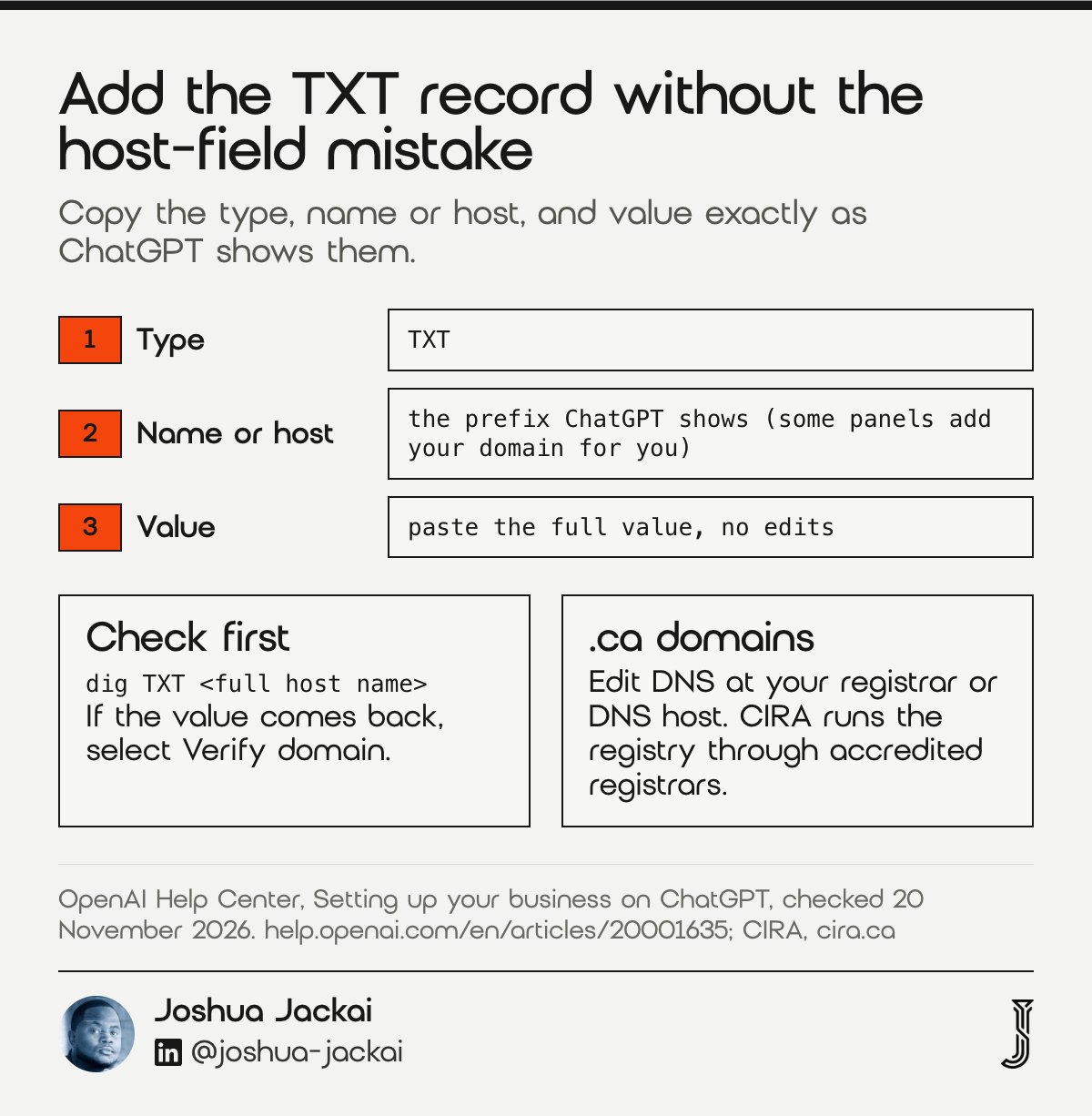
- Copy: the type, the name or host, and the value, exactly
- Who: whoever manages DNS for your domain, which may not be your web host
- .ca domains: DNS sits with your registrar or DNS host, not with CIRA itself
- Check before verifying: look the record up from a terminal
- If it fails: compare the record in your DNS with the one in your claim
The usual failure with TXT verification, OpenAI’s or Google’s, is the host field. Some DNS panels want only the prefix and add your domain for you. Others want the full name. Paste the full name into a panel that appends the domain and you get a record for the wrong host, and verification fails with no useful error.
Before you click Verify domain, check the record from your own machine. This is general DNS practice, not a step in OpenAI’s guide. On a Mac, open Terminal and run `dig TXT` followed by the full host name ChatGPT gave you. If the value comes back, the record is live. If nothing comes back, wait, then check again before you touch the claim.
For .ca domains, remember who holds the keys: CIRA runs the .ca registry and works through accredited registrars, so it does not hold your DNS records. You manage DNS through your registrar or a DNS service such as Cloudflare, not through CIRA. Plenty of firms have their domain at one company and their website at another, and the person who set it up left years ago. Find the login before you start this step.
OpenAI’s setup guide also covers a later snag: if a product feed upload fails, check that the TXT record is still there and matches the claim. Leave the record in place: if a product feed upload fails, OpenAI’s troubleshooting steps say to compare the TXT record in your DNS with the one in your claim.
5. What does Persona identity verification ask for?
Persona checks that you, the person, may represent the business, and you need its approval to publish changes, view insights or set up an agent. OpenAI says you “may need a government-issued ID, business registration information, and proof that you’re authorized to represent the business.”
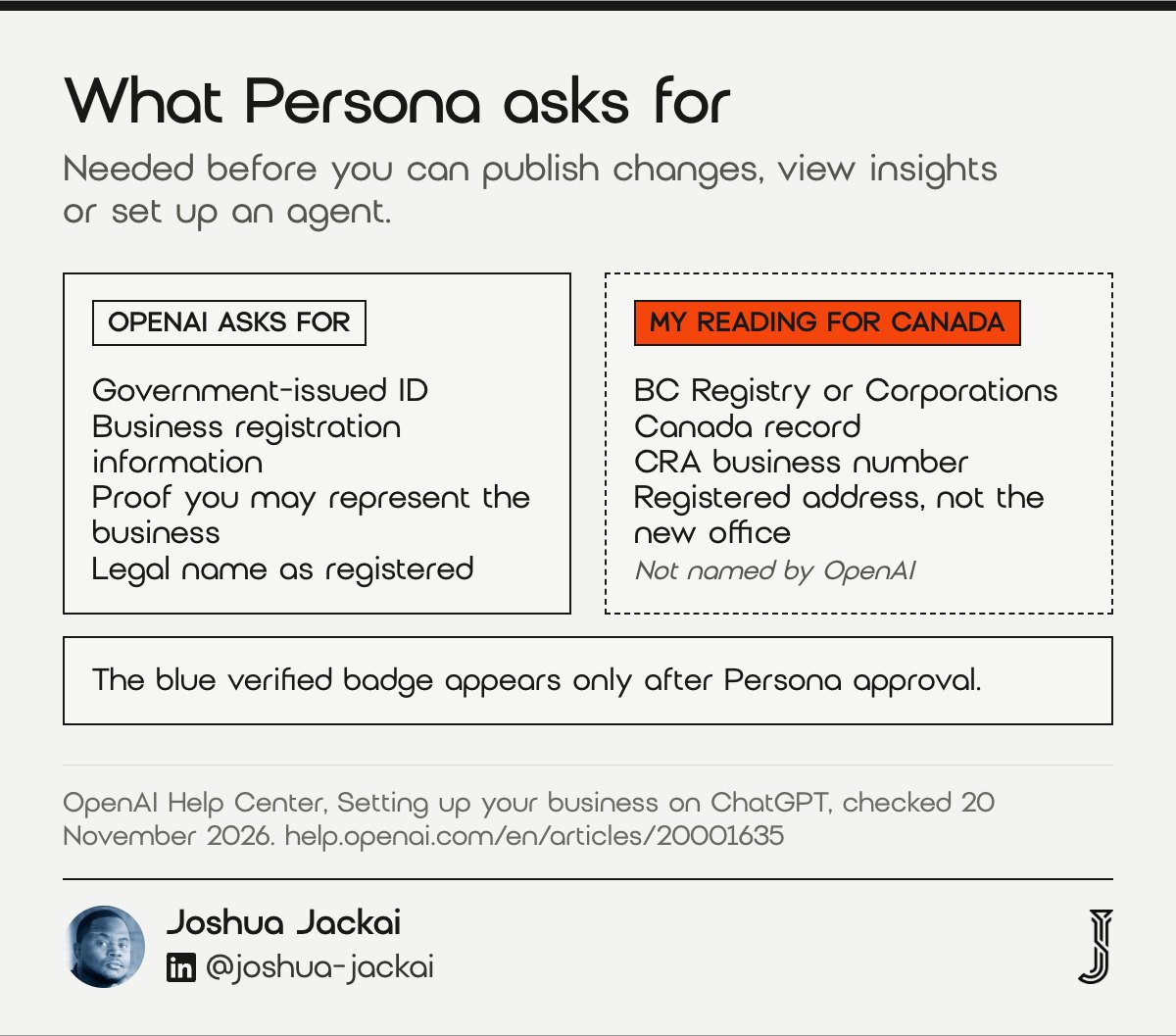
- Required for: publishing changes, viewing insights, product feeds, agents
- Badge: the blue check appears only after Persona approval
- Legal name: use the name on your registration documents
- Trade name: goes in a separate “doing business as” field, if offered
- Retry: follow the email if a check fails or expires
Two claims happen here, and people mix them up. The business claim proves a connection to the listing. Persona proves who you are. OpenAI’s page says even a verified website or connected Shopify store still needs Persona approval before you can publish anything.
Names trip Canadian firms. OpenAI’s example is a coffee shop called River Street Coffee registered as River Street Foods LLC: the legal-name field gets the registered name. A BC firm trading as “Harbour Analytics” but incorporated as a numbered company should enter the numbered company, then the trade name where the form allows it.
OpenAI’s page does not name Canadian documents. My reading is that your provincial or federal registration record and your CRA business number are what “business registration information” and “registration or tax number” mean here. Make sure the address matches your registration, not the office you moved to last spring.
One warning from the help page is worth repeating: if you create a new profile through Persona, approval publishes it automatically. There is no separate publish step. Have your description and logo ready first, because OpenAI’s page describes no separate publish step after approval.
“Make sure the business name, address, and any registration or tax number you provide match your official business records.”
OpenAI stated in its Help Center (Setting up your business on ChatGPT, November 2026)
6. What should you fill in, and what do the insights show?
After approval you can update your website, description, category, logo and policies, and read 28 days of insights: mentions, website clicks and discovery topics. OpenAI reviews each change before it appears, and says ChatGPT “may also use other sources” when answering about you.
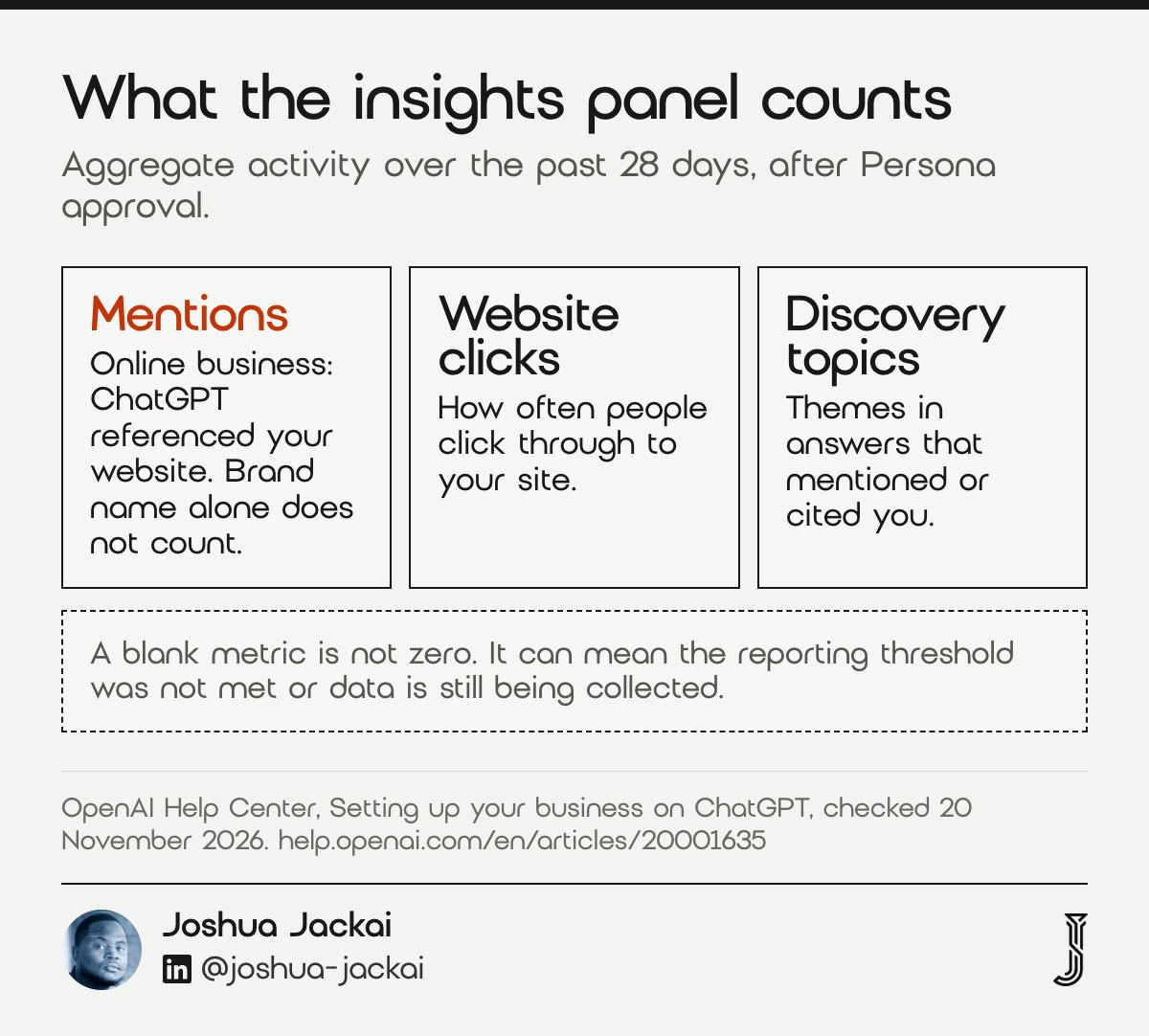
- Editable: website, description, category, logo, delivery and return policies, cover photo
- Review: OpenAI reviews and publishes changes, which takes time
- Window: insights show the past 28 days
- Mentions: for an online business, ChatGPT referenced your website
- Blank metric: may mean a threshold was not met, not zero activity
Write the description the way a buyer would ask about you, not the way your About page reads. Name what you do, who you do it for and where: “B2B website design for Canadian software and professional services firms, based in Vancouver” tells ChatGPT more than a mission statement.
Read the insights with care. For an online business, OpenAI says a mention counts only when ChatGPT references your website; your brand name alone does not count. So a firm named often but never linked could show low numbers, even across a full 28 day window in OpenAI’s insights. And a blank metric “doesn’t necessarily mean zero activity”. OpenAI says a blank can mean the reporting threshold was not met, so a small firm should not read much into an empty panel.
Discovery topics are the useful part. They group the themes in answers that mentioned or cited your business. If ChatGPT cites you for “website cost” but never for “website redesign”, treat that as a prompt to review the redesign page, not as proof of what buyers want.
“It doesn’t guarantee increased visibility or give you direct control over ChatGPT’s independent recommendations.”
OpenAI stated in its Help Center FAQ (Setting up your business on ChatGPT)
Why this matters: people follow machine advice. In six experiments, Logg, Minson and Moore (2019) at Harvard and UC Berkeley found lay people adhered more to advice they believed came from an algorithm than from a person.
“Lay people adhere more to advice when they think it comes from an algorithm than from a person.”
Jennifer Logg, Julia Minson and Don Moore wrote (Organizational Behavior and Human Decision Processes, 2019)
7. What should Canadian firms do while some features stay US only?
Business Agents, the chat that answers customer questions inside ChatGPT, are open only to eligible ecommerce and online service businesses in the US. A Canadian firm can claim the profile but cannot build an agent. Claim anyway, then put the effort into your website, where a KDD 2024 study measured lifts of up to 40% in generative engine visibility.
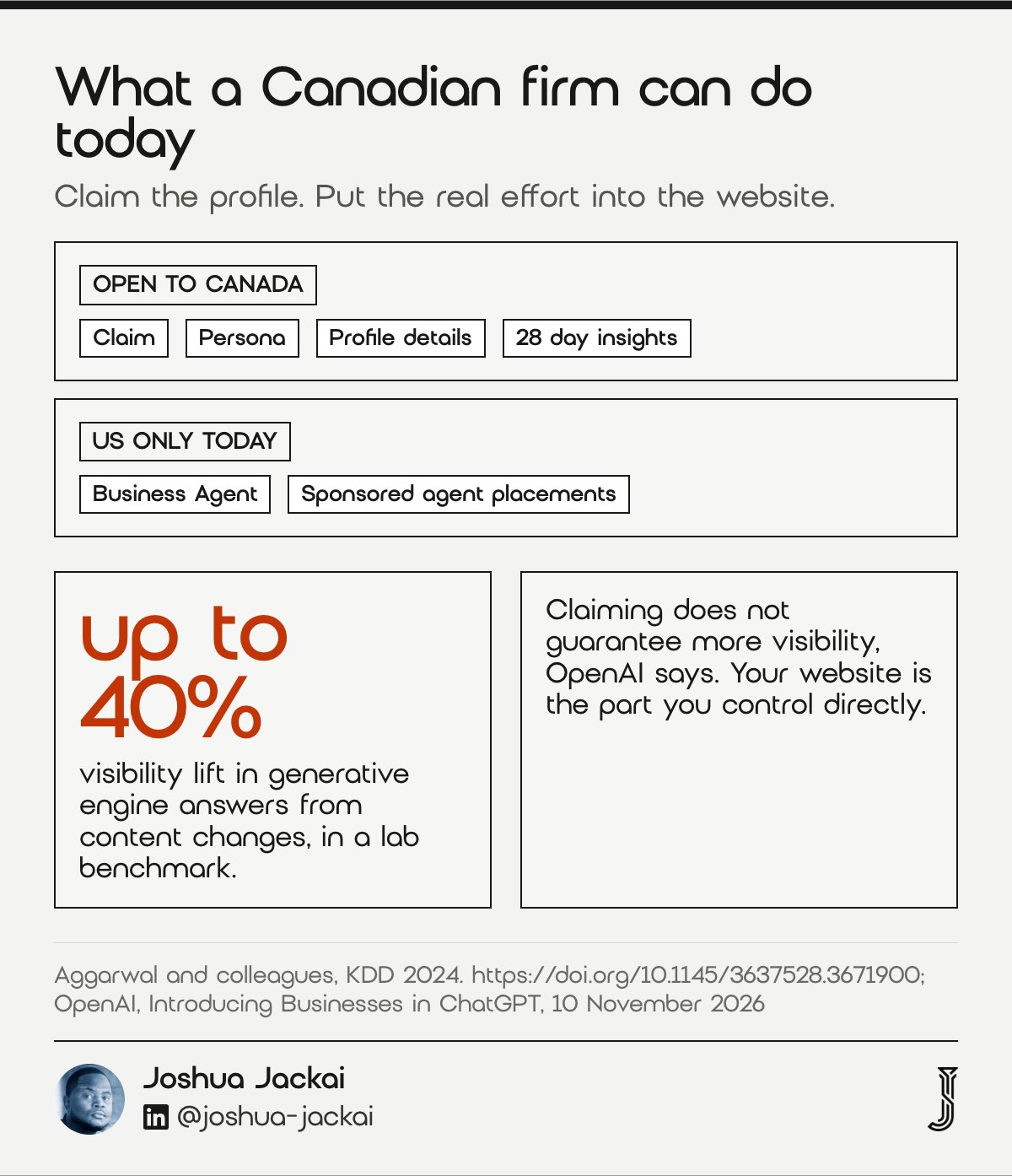
- US only today: Business Agents and sponsored agent placements
- Open to Canada: claim, profile, insights, subject to eligibility
- OpenAI’s own line: claiming does not guarantee more visibility
- What still moves answers: the pages ChatGPT cites
- Recheck: OpenAI says it plans to expand to more markets
OpenAI is clear about the limits of a claim. Its FAQ says claiming “doesn’t guarantee increased visibility or give you direct control over ChatGPT’s independent recommendations”, and advertising does not influence its independent answers. The profile lets you manage the information you give ChatGPT. It does not make ChatGPT mention you more often.
That puts the work back on your site. Aggarwal and colleagues, from IIT Delhi and Princeton, tested content changes across a benchmark of queries and found the effect “varies across domains”. For a Canadian B2B firm, that means pages that answer buyer questions in plain words, with prices in CAD, named locations and sources.
“The profile lets you manage the information you give ChatGPT. It does not make ChatGPT mention you more often.”
Joshua Jackai, Vancouver web designer, said in this guide
My own baseline is a reminder of where most firms start. In my audit on 3 October 2026 I ran 3 Vancouver prompts 3 times each through OpenAI’s API with web search, and Jackai Agency was named in 0 of 9 answers. OpenAI says claiming does not guarantee visibility, so I would not expect a profile alone to change that. My check used the API, not the ChatGPT app.
OpenAI’s 10 November 2026 announcement says it plans to bring Businesses in ChatGPT and Business Agents to more markets. Put a monthly reminder in your calendar to recheck the help page.
“We demonstrate that GEO can boost visibility by up to 40% in generative engine responses.”
Pranjal Aggarwal and colleagues wrote (KDD 2024)
What has OpenAI confirmed for Canadian businesses, and what not?
As of 20 November 2026, OpenAI has confirmed that ChatGPT is offered in Canada, that claiming works wherever ChatGPT is available for eligible businesses, and that Business Agents are US only. It has not published which Canadian business types qualify, or which Canadian documents Persona accepts.
| Question | Status on 20 November 2026 | Source |
|---|---|---|
| Is ChatGPT offered in Canada? | Yes | OpenAI supported countries |
| Can eligible businesses outside the US claim? | Yes, where ChatGPT is available | OpenAI announcement, 10 November 2026 |
| Which Canadian business types qualify? | Not published | OpenAI setup guide |
| Can a Canadian local store claim? | No public route: local stores can claim only existing US listings | OpenAI setup guide |
| Can a Canadian firm build a Business Agent? | No, US only | OpenAI announcement |
| Which Canadian documents does Persona accept? | Not named | OpenAI setup guide |
| Does claiming raise visibility? | No guarantee | OpenAI setup guide FAQ |
Compare the verification methods side by side
The four verification methods differ in who can finish them and what they change. A Canadian B2B firm with no storefront will usually finish fastest with the website domain method, which needs DNS access and no change to public contact details. Use the filters to narrow the methods to the ones your listing shows.
| Method | What you need | Changes public details? | Best for |
|---|---|---|---|
| Business phone | A text or automated call to the number shown on the listing | No | Owners who answer the listed number |
| Business email | A code sent to the email tied to the listing | No | Firms whose listed email reaches a decision maker |
| Website domain | A DNS TXT record added at your registrar or DNS host | No | B2B firms with DNS access, including .ca domains |
| Shopify store | Connect the store from Business Hub or the Shopify admin | No | Shopify merchants |
Source: OpenAI Help Center, Setting up your business on ChatGPT. Persona identity verification is still required after any method.
Which parts of Business Hub apply to your firm?
Answer 4 questions about your firm and the checker returns which Business Hub features OpenAI's help page says apply to you, and which it does not. It uses only OpenAI's published rules as of 20 November 2026. Nothing you enter leaves your browser.
Rules from OpenAI's Help Center as of 20 November 2026. This is a guide to what the help page says, not an eligibility decision: OpenAI reviews every claim.
Claiming your business in ChatGPT from Canada: questions, answered
These are the questions Canadian owners ask most about Business Hub, answered from OpenAI's help pages as of 20 November 2026. Where OpenAI has not said something, the answer says so instead of guessing. Recheck the help page before you act, because the beta is changing.
Can Canadian businesses claim their business in ChatGPT?
Yes, they can start a claim. ChatGPT is offered in Canada, and OpenAI lets eligible businesses claim wherever ChatGPT is available. Eligibility depends on location and business type, and OpenAI has not published a Canadian category list, so the review decides. Local stores can currently claim only existing US listings.
Is the ChatGPT Business Agent available in Canada?
No. As of 20 November 2026, OpenAI offers Business Agents only to eligible ecommerce and online service businesses in the United States with a website. A Canadian firm can still claim its profile, complete Persona verification and read insights. OpenAI says it plans to expand to more markets over time.
How do I verify my business in ChatGPT with a DNS TXT record?
Choose Website domain in your claim, copy the TXT record's type, name and value into your DNS settings exactly, and wait for it to appear. Check it with a dig TXT lookup, then select Verify domain in ChatGPT. For a .ca domain, edit DNS at your registrar or DNS host.
Does claiming my business make ChatGPT recommend it more?
No. OpenAI says claiming lets you manage the information you provide, but does not guarantee more visibility or give you control over ChatGPT's independent recommendations, and advertising does not influence those answers. What moves answers is the content ChatGPT cites, which is mostly your own website and pages about you.
Do I need an OpenAI Ads account or ChatGPT Enterprise to claim?
No. OpenAI's setup guide says you do not need an Ads account or a ChatGPT Enterprise agreement to claim an eligible business. Claiming, publishing an agent and advertising are separate. Existing Enterprise customers and advertisers can also work with their OpenAI representative to claim.
How I help Canadian firms get named in ChatGPT answers
A claimed profile lets you manage what you tell ChatGPT about your firm; your website is where you earn the citations. I build and fix websites for Canadian B2B firms so answer engines can cite them, and I start with a free check of what ChatGPT says today.
If you want to see where you stand before you claim, my free AI Visibility Report shows how ChatGPT and other engines answer buyer questions about your firm, delivered within 24 hours. For a full review of the site itself, the CA$995 website audit is credited against a project that starts within 30 days, and GEO work starts at CA$4,775.
I'd also read does ChatGPT recommend Canadian businesses, which covers why some Vancouver firms get named and others do not.
Sources
Peer reviewed
- Aggarwal, P., Murahari, V., Rajpurohit, T., Kalyan, A., Narasimhan, K., and Deshpande, A. (2024). GEO: Generative engine optimization. Proceedings of the 30th ACM SIGKDD Conference on Knowledge Discovery and Data Mining, 5 to 16. https://doi.org/10.1145/3637528.3671900
- Kim, D. J., Ferrin, D. L., and Rao, H. R. (2008). A trust-based consumer decision-making model in electronic commerce: The role of trust, perceived risk, and their antecedents. Decision Support Systems, 44(2), 544 to 564. https://doi.org/10.1016/j.dss.2007.07.001
- Logg, J. M., Minson, J. A., and Moore, D. A. (2019). Algorithm appreciation: People prefer algorithmic to human judgment. Organizational Behavior and Human Decision Processes, 151, 90 to 103. https://doi.org/10.1016/j.obhdp.2018.12.005
- McKnight, D. H., Choudhury, V., and Kacmar, C. (2002). Developing and validating trust measures for e-commerce: An integrative typology. Information Systems Research, 13(3), 334 to 359. https://doi.org/10.1287/isre.13.3.334.81
- Pan, B., Hembrooke, H., Joachims, T., Lorigo, L., Gay, G., and Granka, L. (2007). In Google we trust: Users' decisions on rank, position, and relevance. Journal of Computer-Mediated Communication, 12(3), 801 to 823. https://doi.org/10.1111/j.1083-6101.2007.00351.x
Industry and vendor (checked 20 November 2026)
- OpenAI. (2026, November 10). Introducing Businesses in ChatGPT. https://openai.com/index/introducing-businesses-chatgpt/
- OpenAI Help Center. (2026). Setting up your business on ChatGPT. https://help.openai.com/en/articles/20001635-setting-up-your-business-on-chatgpt
- OpenAI Help Center. (2026). ChatGPT release notes: Business Hub in ChatGPT. https://help.openai.com/en/articles/6825453-chatgpt-release-notes
- OpenAI Help Center. (2026). ChatGPT and OpenAI API supported countries and territories. https://help.openai.com/en/articles/7947663-chatgpt-supported-countries