7 Website Maintenance Vancouver Costs: 2026 Field Guide
Seven line items that set what website maintenance costs in Vancouver: updates, backups, security, uptime, speed, edit hours and accounts, with published Canadian plan prices and a budget calculator.
 Joshua Jackai
17 min read
Joshua Jackai
17 min read
Published 18 October 2026 · Last updated and fact-checked October 2026
Short answer: Canadian providers publish CA$100 to CA$400 a month for basic WordPress maintenance and CA$900 to CA$2,000 a month when you need 48-hour or faster response times and included edit hours. The one Vancouver monthly price I found is a CA$150 website plan with hosting. These are 2026 prices (Right Design; Kolonell, 1 October 2026).
When a Vancouver owner asks what website maintenance should cost, I find that the price pages answer a different question from the one they asked. They list a monthly number. They rarely say which jobs sit inside it. In the Canadian results I read on 18 October 2026, I found one Vancouver provider that publishes a monthly price, and it bundles hosting with a small site rather than selling maintenance alone. The maintenance tiers here come from Toronto and other Canadian providers, and I label each as vendor data.
In this guide
Key takeaways
- Three of 23 popular WordPress plugins tested by researchers held previously unknown cross-site scripting flaws (Mohideen and colleagues, Future Internet, 2024).
- A Toronto provider prices maintenance at CA$400, CA$900 and CA$2,000 a month, with 0, 3 and 8 included change hours (Kolonell, 2026).
- A Canadian web studio quotes basic care from CA$100 a month plus a CA$50 setup fee (Right Design, 2026).
- In a lab study of 196 students, delays from 0 to 12 seconds changed how people rated a site (Galletta and colleagues, JAIS, 2004).
- Under the federal breach regulations, an organization covered by PIPEDA must keep a record of every breach of security safeguards for 24 months (Breach of Security Safeguards Regulations, SOR/2018-64).
- Jackai Agency’s optional care plan is CA$279 an hour, and its Website Audit is CA$995, credited if a project starts within 30 days.
| Line item | What it covers | Published price signal | Peer-reviewed support |
|---|---|---|---|
| 1. Updates | WordPress core, theme and plugin versions | Monthly in the CA$400 tier, weekly in CA$900 | Yes |
| 2. Backups and restore tests | Copies you can actually restore | 30, 90 or 365 days kept | Model only |
| 3. Security scans and recovery | Malware checks and clean-up after a hack | Clean-up quoted separately or included once a year | Yes |
| 4. Uptime and response time | Alerts and how fast a person answers | 5 business days, 48 hours or 4 hours | No, vendor terms |
| 5. Speed checks | Load time on phones | Reports in the CA$900 and CA$2,000 tiers | Yes |
| 6. Content and change hours | Edits you would rather not make | 0, 3 or 8 hours; CA$110 to 150 an hour extra | No, vendor terms |
| 7. Hosting, licences and accounts | Who pays the provider and who holds the logins | About $20 to 50 hosting, $10 to 100 licences a month (currency not stated) | No, vendor data |
1. Updates: best for closing known holes
An update fixes a flaw that has already been published. WordPress core, your theme and every plugin each ship versions, and a maintenance plan applies them on a schedule and checks the site afterwards. One Toronto provider updates monthly at CA$400 a month and weekly from CA$900.
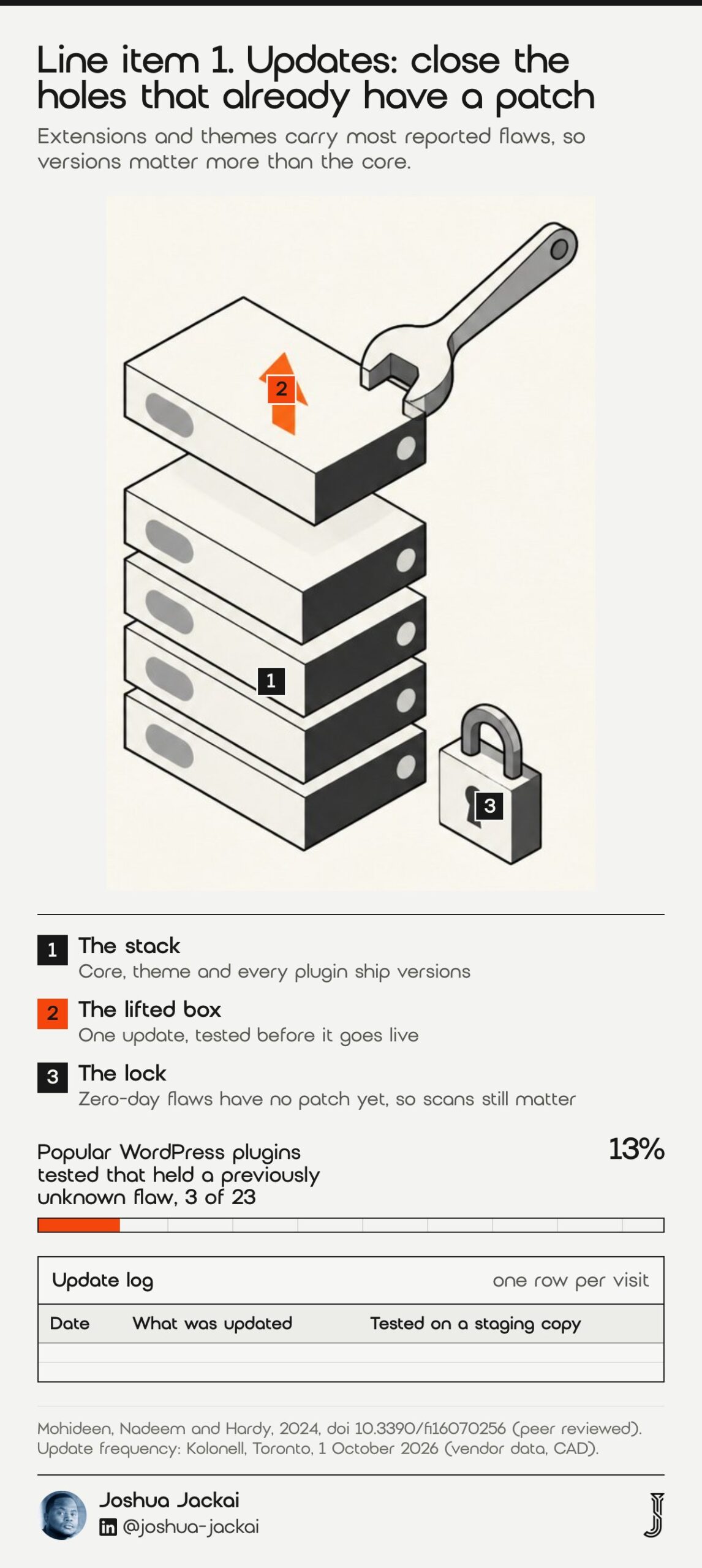
- Frequency: monthly in a CA$400 plan, weekly in CA$900 and CA$2,000 plans
- Your time if you do it yourself: 30 to 60 minutes every week (Ambrite, 26 May 2026)
- Ask the provider: do you test on a staging copy before touching the live site
- Risk if skipped: known holes stay open
- Skip it only if: the site is a static page with no plugins
Updates matter because the weak spot is usually not WordPress itself. Tashenova and colleagues, in a 2026 paper on detecting plugin flaws, describe third-party extensions and themes as the source of most reported flaws. Mohideen and colleagues tested 23 popular plugins and found previously unknown cross-site scripting flaws in three of them, about 13% of a small sample and not a prevalence rate. Those flaws received CVE-2023-5119, CVE-2023-5228 and CVE-2023-5955. Zero-day means no patch existed when they found it, so updates alone do not close every hole. They do close the ones that have a patch.
“third-party extensions and themes, which account for the vast majority of reported vulnerabilities,” wrote Tashenova and colleagues in Applied Sciences, 2026.
One more point on responsibility. Maurushat and Nguyen (2022) write that in Australia there is no legal obligation to provide security support, and they argue one should. I did not find a Canadian rule that sets a patching deadline for a small business website, so the duty to patch sits in your contract with whoever maintains the site. Write it down.
2. Backups and restore tests: best for recovering from a bad day
A backup is a copy. A restore test proves the copy works. Those are different jobs, and in the Toronto tiers only the top plan lists restore tests. The published tiers keep daily copies for 30 days at CA$400, 90 days offsite at CA$900, and 365 days with quarterly restore tests at CA$2,000.
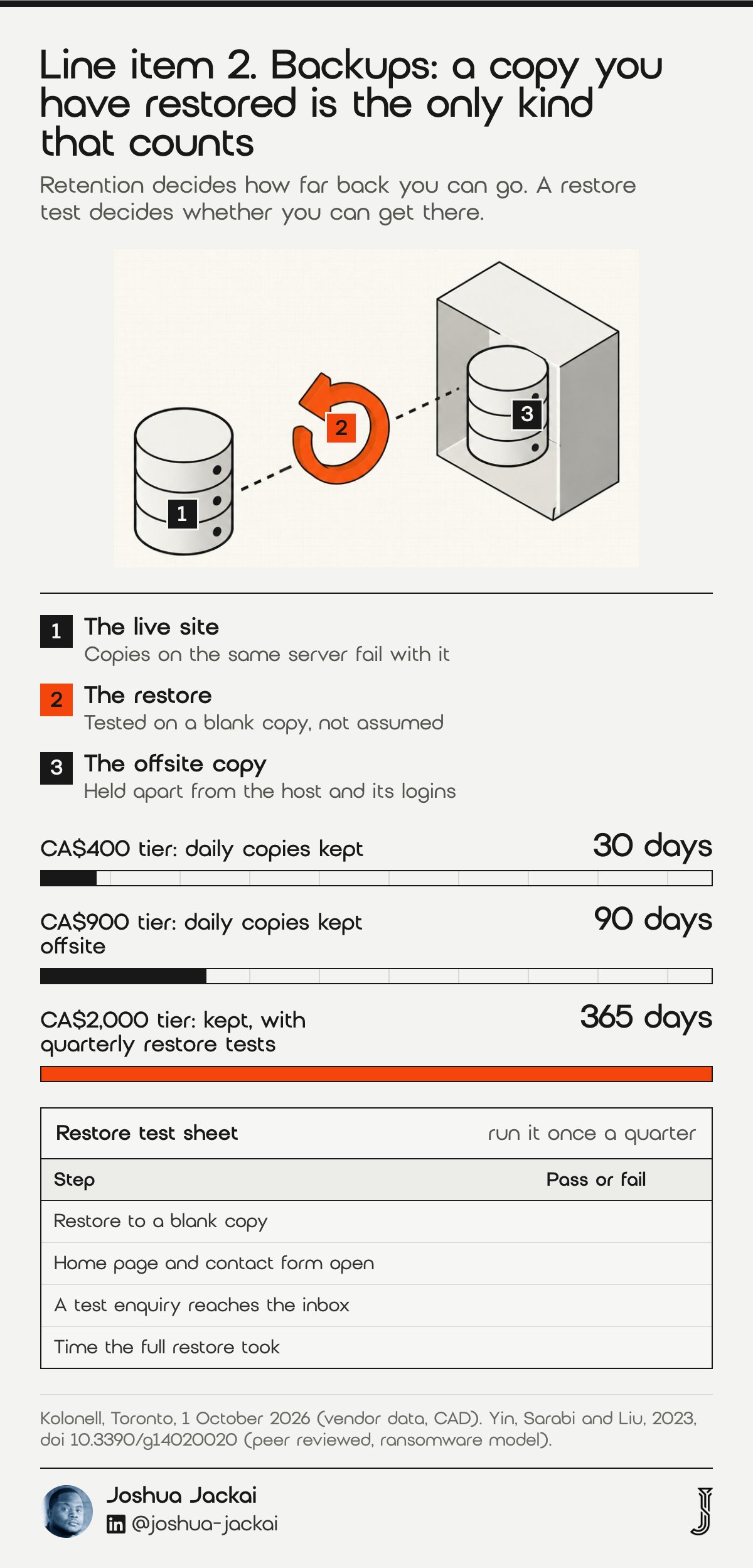
- Retention: 30, 90 or 365 days depending on the tier (Kolonell, 2026)
- Where copies live: the same server is not a backup, ask for offsite
- Restore test: quarterly at the top tier, otherwise unlisted
- DIY effort: about 45 minutes a month for backups and testing (Ambrite, 2026)
- Ask the provider: when did you last restore a client site from this plan
Yin, Sarabi and Liu modelled ransomware as a game between an attacker and a defender. Their model compares deterrence, backup and insurance, and treats backup as the effort that lets a defender recover when an attack succeeds. My reading, not theirs, is a plain budget rule for a small site: you will not stop every attack, so pay for the copy that lets you recover.
Count the days a problem can hide. If an infected file sits unnoticed for six weeks, a 30-day window restores the infection along with the site. That is why retention is a price lever and not a footnote. Where the copy lives matters just as much: a backup stored on the same server as the site disappears in the same failure. Ask for offsite storage, ask who holds the credentials, and ask how long a full restore takes, and get the restore time in hours, in writing.
“a backup effort serving the purpose of recourse, allowing the defender to recover from successful attacks,” wrote Yin and colleagues in Games, 2023.
A simple check is to restore the backup to a blank copy and open the contact form. A backup that has never been restored is a hope, not a plan.
3. Security scans and hack recovery: best for catching what updates miss
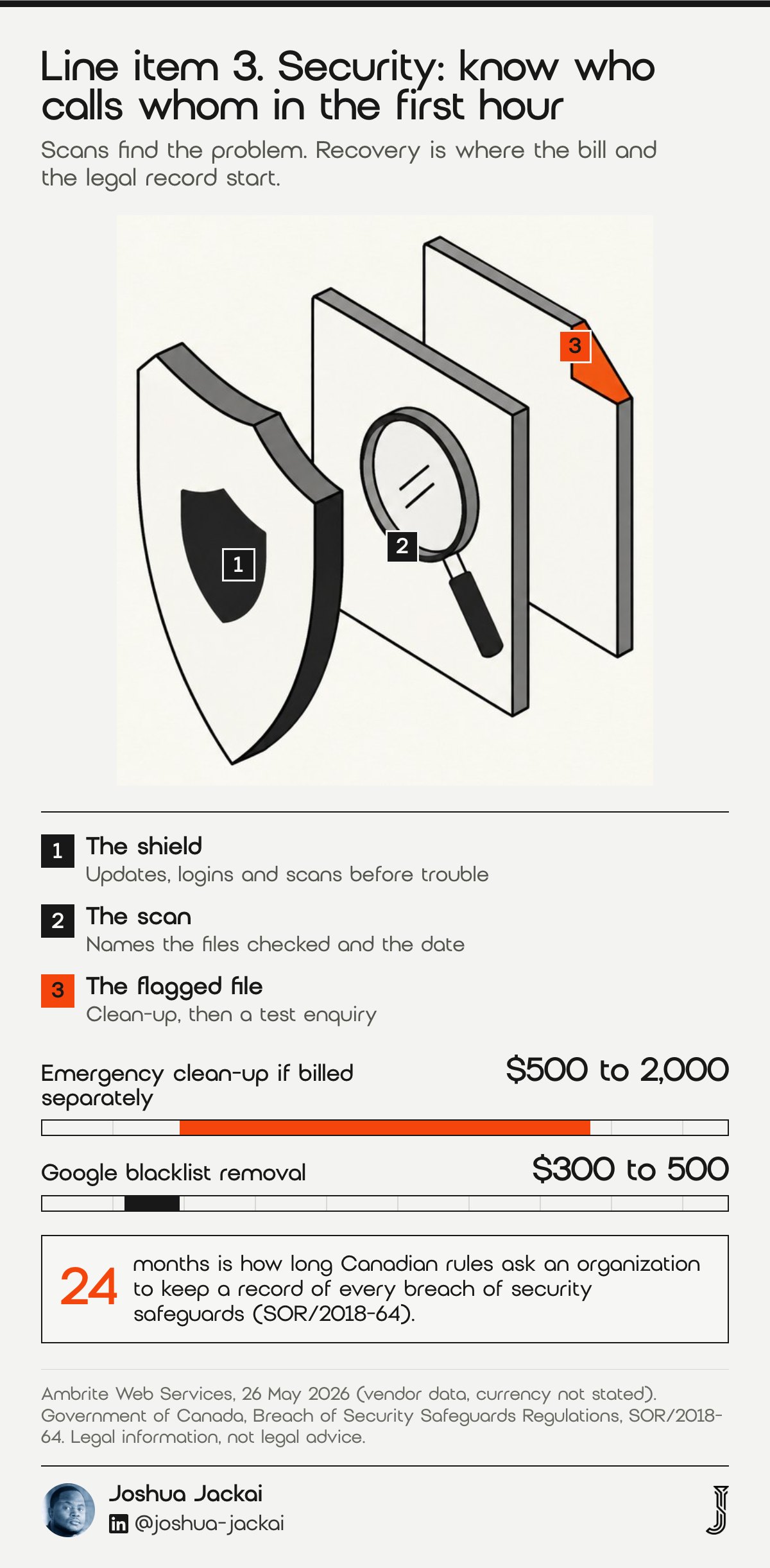
A scan looks for malware, changed files and weak logins. Recovery is the clean-up after something gets in, and it is where bills jump. One Canadian provider lists emergency clean-up at $500 to $2,000 and removal from Google’s blacklist at $300 to $500 (Ambrite, 2026).
- Entry tier: hack recovery billed separately
- Mid tier: one recovery a year included, with 24/7 alerts (Kolonell, 2026)
- Top tier: unlimited recovery and a monthly vulnerability scan
- Canadian duty: keep a record of every breach for 24 months
- Ask the provider: who calls whom within the first hour of a hack
Canada adds a legal layer for sites that collect personal information. If your organization is covered by the federal privacy law (PIPEDA), the Breach of Security Safeguards Regulations say it “must maintain a record of every breach of security safeguards for 24 months” after the day it determines the breach occurred. Many BC-only businesses are covered by BC’s own privacy law instead, so confirm which applies. A breach report to the Privacy Commissioner must be in writing and include seven elements, starting with a description of the circumstances and the cause if known. A good maintenance partner helps you assemble those facts. It does not leave you to guess them. Ask who calls whom in the first hour of a hack, because that answer tells you more than the price.
A scan finds two kinds of trouble: files that should not be there and files that changed. For a lead-generation site the harm is often quiet. The home page looks fine while a form sends enquiries to a stranger. So ask for a scan report that names what was checked and when, and submit a test enquiry after every clean-up. Recovery is also where the tiers differ most. At the entry level it is billed separately, at the mid tier one recovery a year is included, and at the top tier it is unlimited. Price that against the clean-up ranges a provider might quote you after the fact.
“Ask who calls whom in the first hour of a hack, because that answer tells you more than the price,” said Joshua Jackai, Vancouver web designer.
4. Uptime and response time: best for knowing before customers do
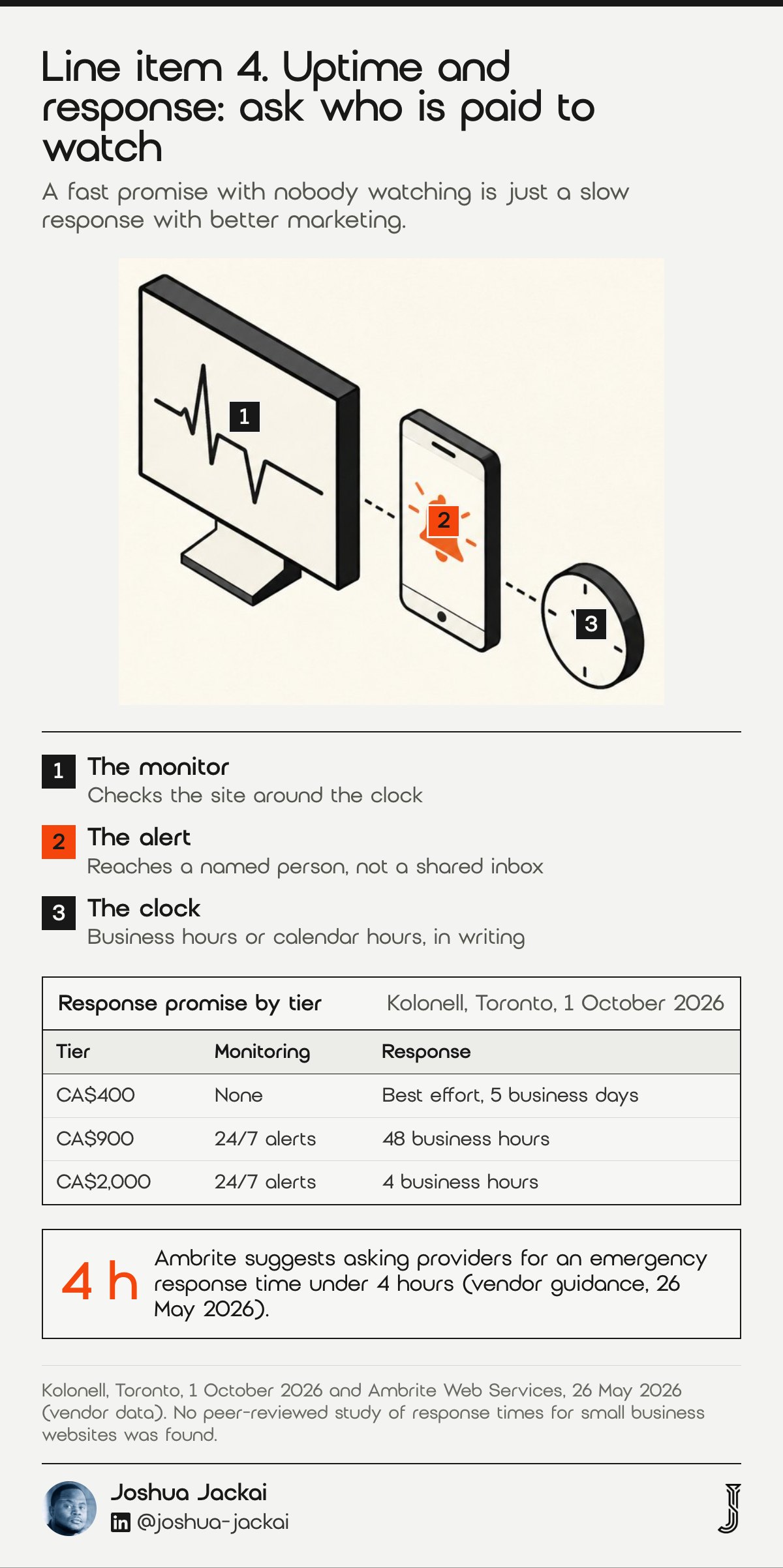
Monitoring checks that the site is up and tells a person when it is not. Response time is the promise about how fast that person answers. Kolonell, a Toronto provider, writes it into three tiers: best effort within 5 business days at CA$400, 48 business hours at CA$900 and 4 business hours at CA$2,000.
- Entry tier: no monitoring and no monthly report
- Mid tier: 24/7 uptime and security alerts, 48 business-hour response
- Top tier: 4 business-hour response
- Benchmark to ask for: under 4 hours for emergencies (Ambrite, 2026)
- Skip it only if: nobody would notice the site being down for a week
A business-hour clock matters, and so does the time zone it runs on: a Toronto provider’s 5 pm Eastern cutoff is 2 pm in Vancouver, so ask which clock applies. If the site breaks at 5:30 pm on a Friday, a 4 business-hour promise starts again on Monday morning. For a site that takes bookings or enquiries at the weekend, ask for the hours in writing and what happens outside them.
This is the line item where vendor terms are the only evidence, and I say so plainly. I could not find peer-reviewed research that sets a right response time for a small business website. What I can say from running client sites is that the number on the contract matters less than whether anyone is paid to watch. A site with alerts and a 48-hour promise beats a site with a 4-hour promise and no alerts. A fast promise with nobody watching is just a slow response with better marketing.
Alerts are the part owners forget to test. Ask the provider to show the last alert they sent for a client, and who received it. If the answer is a shared inbox nobody reads, the monitoring is decoration. A site that takes enquiries should not depend on one person noticing an outage. A written escalation path costs nothing to request and protects both sides when something breaks at a bad hour.
“A fast promise with nobody watching is just a slow response with better marketing,” said Joshua Jackai, Vancouver web designer.
5. Speed checks: best for keeping pages fast as they grow
Sites get slower as plugins, images and tracking scripts pile up. A speed check measures the pages that matter on a phone and reports what changed. Google rates a page as good when its largest content loads within 2.5 seconds, interaction responds within 200 milliseconds and layout shift stays at 0.1 or less (web.dev).
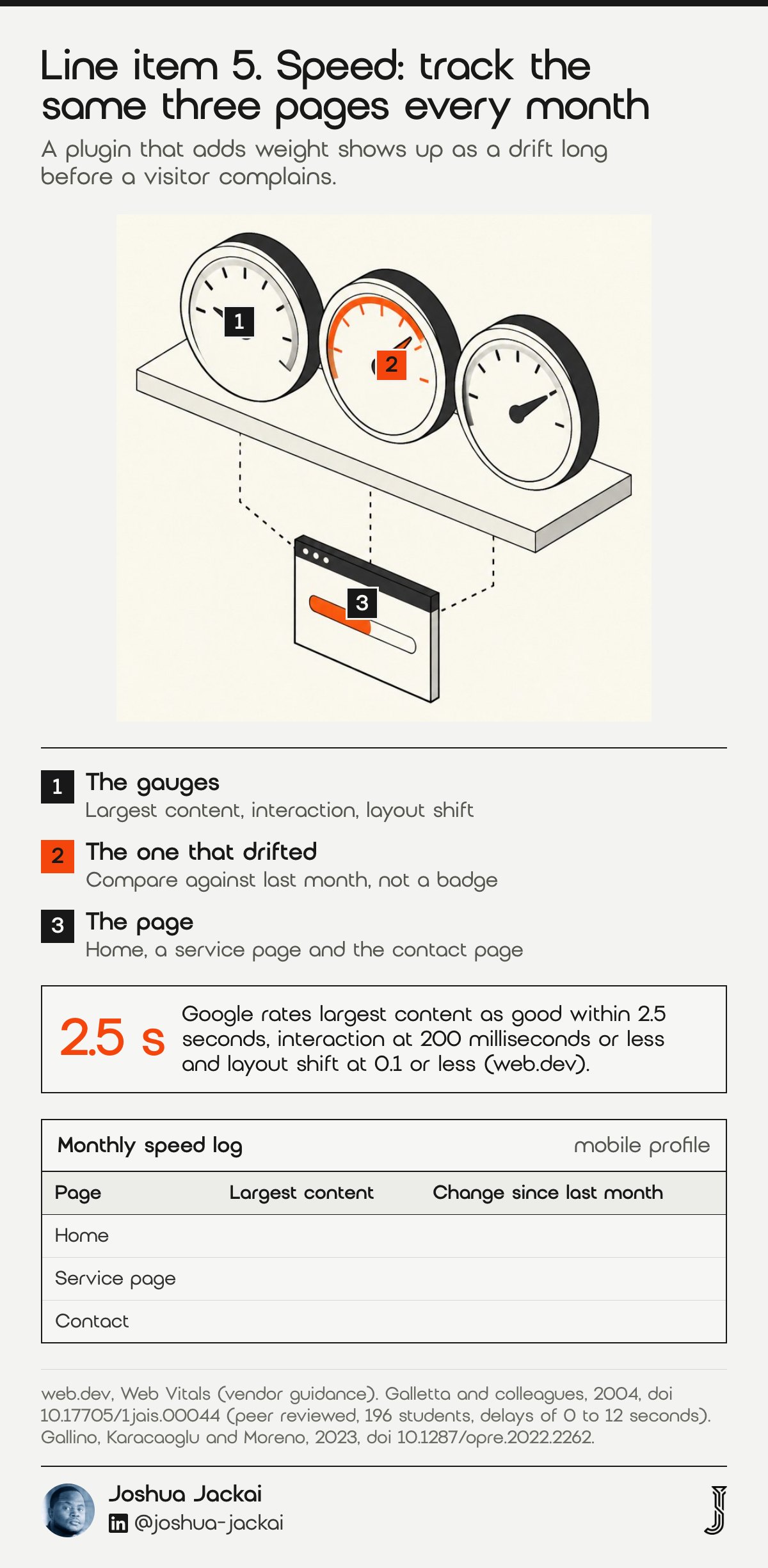
- Metrics: largest content, interaction delay, layout shift
- Tier fit: reports appear in the CA$900 and CA$2,000 plans, which add a monthly technical report
- Tool: PageSpeed Insights, mobile tab, free
- Ask the provider: which three pages do you test each month
- Skip it only if: the site has fewer than five pages and no new plugins
Galletta and colleagues assigned 196 students a constant delay of 0, 2, 4, 6, 8, 10 or 12 seconds across 9 search tasks on a familiar and an unfamiliar site, and then plotted performance, attitudes and behavioural intentions. Gallino, Karacaoglu and Moreno later estimated sizable negative effects of slowdowns on online sales and conversion rates, with customers more sensitive at the checkout stage.
Their finding is that tolerance to delay is not one fixed number. That is why I would not ask a provider for a score. Ask for the same three pages, measured every month, so a plugin that adds weight shows up as a drift before a visitor complains. A speed line in a maintenance plan should name the pages, the tool and the month-to-month comparison.
“sizable negative effects of website slowdowns on online sales and conversion rates,” wrote Gallino, Karacaoglu and Moreno in Operations Research, 2023.
In my view, for a B2B site the contact form plays the role checkout plays in retail, so I would test that page first.
6. Content and change hours: best for the edits you do not want to learn
Change hours are the time a provider spends on your requests: a new team member, a price update, a landing page. Plans handle them in one of three ways. The entry tier includes none, the CA$900 tier includes 3 hours, and the CA$2,000 tier includes 8. Extra hours are billed at CA$110 to CA$150 (Kolonell, 2026).
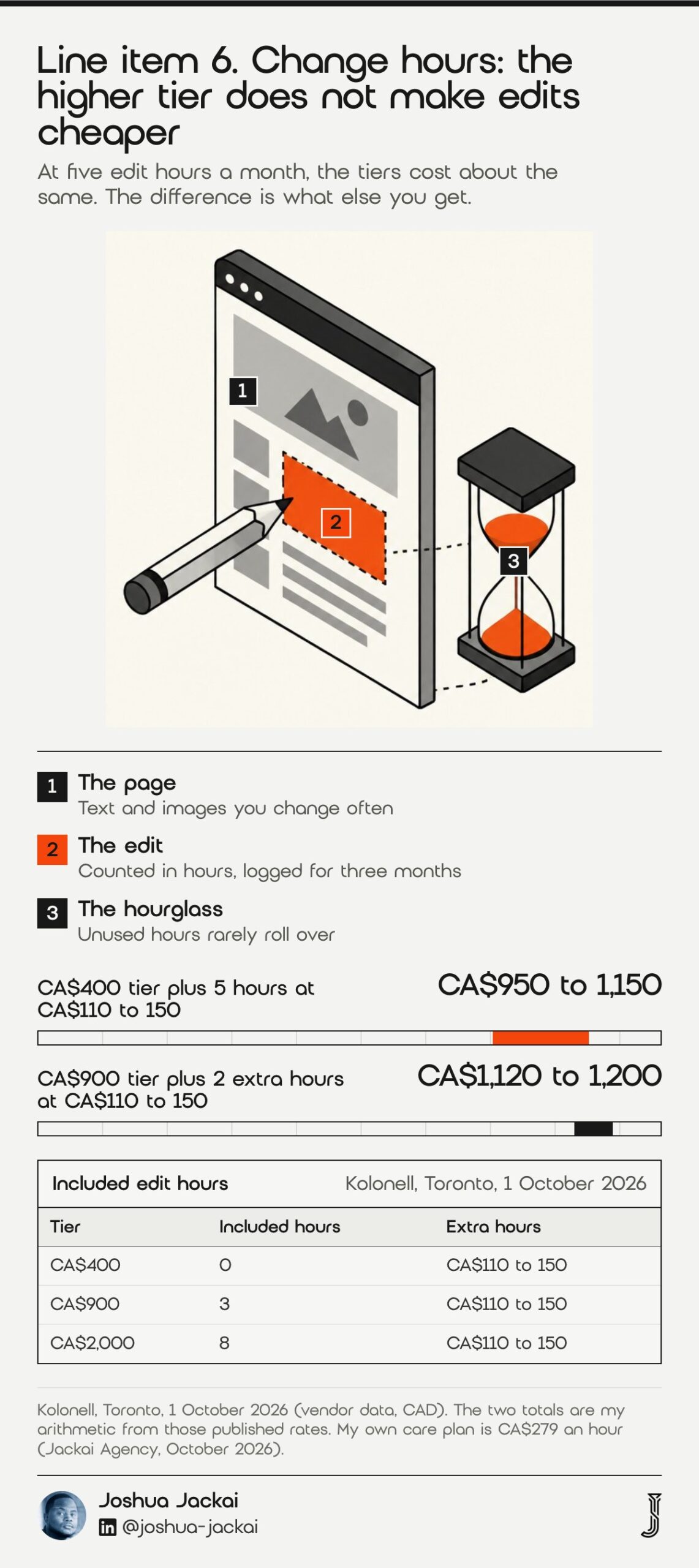
- Included hours: 0, 3 or 8 a month by tier
- Overage rate: CA$110 to 150 an hour in Toronto; my care plan is CA$279 an hour
- Rollover: the Toronto provider’s article says unused hours rarely roll over beyond one month
- Term: this provider’s plans are mostly annual with 3 months’ notice (Kolonell, 2026)
- Add-on price signal: content updates add $50 to $200 a month elsewhere (Ambrite, 2026)
Do the arithmetic before you compare. A site that needs five hours of edits a month pays the CA$400 tier plus five hours at CA$110 to CA$150, which is CA$950 to CA$1,150. The CA$900 tier plus its two extra hours comes to CA$1,120 to CA$1,200 (my arithmetic from the published rates). So edit hours alone do not justify the higher tier. It buys alerts, longer backups and a faster response. Owners who are told “maintenance is CA$400” often discover the edit bill in month two. Count your own edits for three months, then pick the tier.
My rate is higher than the Toronto overage because I design and write as well as edit, and I do not hide it in a bundle, so two hours is CA$558. I would rather you teach a teammate to change a headline and call me for the real work. Ask a teammate to change a headline without your help, and you will learn how much change time you actually need.
Keep a simple log of requests for three months: what you asked, how long it took, who did it. That log is the best quote you will ever write, because it replaces a guess with your own hours. If most requests are small text changes, buy the lower tier and train a teammate. If most are new pages, buy the tier with included hours or a project quote. Also ask whether hours expire monthly, because a plan that resets to zero each month rewards the provider when you are quiet.
“Ask a teammate to change a headline without your help, and you will learn how much change time you actually need,” said Joshua Jackai, Vancouver web designer.
7. Hosting, licences and accounts: best for knowing who owns what
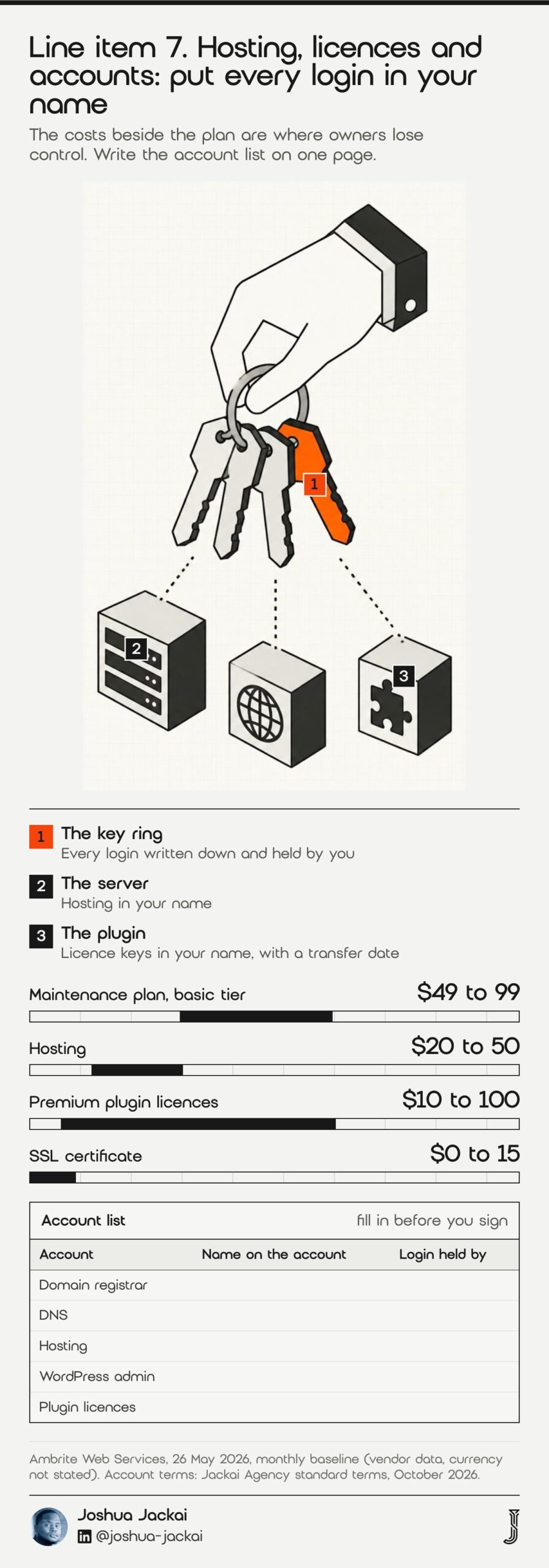
Hosting, plugin licences and the domain are costs that sit beside the plan, and they are where owners lose control. The Ambrite guide puts a monthly baseline at a plan of $49 to $99, hosting of $20 to $50, premium plugin licences of $10 to $100 and SSL of $0 to $15 (currency not stated) (Ambrite, 2026).
- Hosting signal: Likuid lists plans from CA$4.99 a month, with datacenters in Canada, Europe and the United States (Likuid, 2026)
- Bundled option: Digitari Solutions in Vancouver lists CA$150 a month for 7 pages with hosting, read 3 October 2026 (Digitari)
- Licences: premium plugin and theme keys should be in your name
- Domain: registered to you, not to the provider
- Ask the provider: can I take every login and leave on 30 days’ notice
Check what a person does each month, not only what the server does.
My standard terms are that the client owns the site, the domain and the hosting. Every account belongs in the client’s name, because a plan you cannot leave is not a plan, it is a lease. I wrote a separate guide on who owns your website in Canada that covers the legal side.
Add-ons move the monthly figure quickly. The same guide adds $50 to $100 for an online shop, $30 to $50 for a site with 10,000 or more monthly visitors and $50 to $150 for compliance work (Ambrite, 2026). Before you sign, write the account list on one page: domain registrar, DNS, hosting, WordPress admin, plugin licences, email sender and analytics. Next to each, write whose name it is in. If the provider’s name appears beside any of them, ask for a transfer date in the contract.
“Every account belongs in the client’s name, because a plan you cannot leave is not a plan, it is a lease,” said Joshua Jackai, Vancouver web designer.
Compare the seven line items and filter by what you need
Use the filters to see which line items matter for your kind of site. Tick what you already handle and the matrix hides the rest. The numbers are the published tiers from the Toronto provider and the other vendors in the sources, so treat them as placeholders you replace with your own quotes.
| Line item | First included at | What to ask | Published price signal |
|---|---|---|---|
| 1. Updates | CA$400 (monthly) | Do you test on a staging copy | Weekly from CA$900 |
| 2. Backups and restore tests | CA$400 (30 days) | When did you last restore a client site | 365 days at CA$2,000 |
| 3. Security scans and recovery | CA$900 (1 recovery a year) | Who calls whom in the first hour | Clean-up $500 to 2,000 if billed separately |
| 4. Uptime and response time | CA$900 (48 hours) | Show me the last alert you sent | 4 business hours at CA$2,000 |
| 5. Speed checks | CA$900 (monthly report) | Which three pages do you test | Performance report at CA$2,000 |
| 6. Content and change hours | CA$900 (3 hours) | Do unused hours roll over | CA$110 to 150 an hour extra |
| 7. Hosting, licences and accounts | Separate cost | Are all logins in my name | About $20 to 50 hosting, $10 to 100 licences a month |
Estimate a monthly budget for a Vancouver site
A monthly budget for a Vancouver site is a maintenance tier plus extra change hours, hosting and licences. Each default is a placeholder drawn from the vendor pages in the sources, not a quote. Change any number to match a real quote you hold, and the total updates. The point is to compare tiers on equal terms before you sign.
Monthly budget estimate (placeholders from vendor pages, edit them)
Frequently asked questions
How much does website maintenance cost per month in Canada?
Published Canadian prices run from about CA$100 a month for a small WordPress site to CA$400, CA$900 and CA$2,000 for tiers with backups kept longer, response times and included hours (Right Design; Kolonell, 2026). Hosting and licences usually cost extra.
How much does website maintenance cost in Vancouver?
Apart from one Vancouver website plan with hosting at CA$150 a month (Digitari Solutions, read 3 October 2026), I did not find a Vancouver agency that publishes a maintenance price. Other Canadian providers publish CA$100 to CA$2,000 a month. My optional care plan at Jackai Agency is CA$279 an hour.
Is WordPress maintenance worth paying for?
Usually yes if the site brings leads. Researchers found previously unknown flaws in 3 of 23 popular plugins. Updates close flaws that have a patch, and a plan is how patches get applied (Mohideen and colleagues, 2024). A static brochure with no plugins may need only a yearly check.
What does a website maintenance plan include?
Most plans list updates, backups, security scans and uptime alerts, and the better ones add a staging site, a monthly report and included change hours. Compare the seven line items in this guide rather than the plan name, because a cheap plan may leave out restore tests and response times.
Can I leave a maintenance provider and keep my site?
You can if the contract says so before you sign. Ask for the domain, hosting, plugin licences and admin logins to sit in your name, and for a notice period you can live with. This Toronto provider says most plans are annual with 3 months’ notice (Kolonell, 2026).
Who sets this up for you
Jackai Agency, run by me in Vancouver, designs, builds and looks after WordPress sites for Canadian B2B companies in Vancouver and across Canada. New sites I build include 90 days of care. After that, an optional care plan is CA$279 an hour, with every account in your name.
If your site already exists and you want to know what it needs, the fastest start is the Website Audit at CA$995, credited if a project starts within 30 days. See the offers page and my WordPress web design page. Planning a rebuild first? Read how to rebuild WordPress without losing SEO and why web design quotes vary so much.
Sources
Peer reviewed
- Mohideen, M. A. M., Nadeem, M. S. and Hardy, J. (2024). Behind the Code: Identifying Zero-Day Exploits in WordPress. Future Internet. doi.org/10.3390/fi16070256
- Tashenova, Z., Aitmagambetuly, A. and Bayegizova, A. (2026). SentinelCMS: Proactive Vulnerability Detection in CMS Plugins Using Static Taint Analysis and Bidirectional LSTM. Applied Sciences. doi.org/10.3390/app16115471
- Yin, T., Sarabi, A. and Liu, M. (2023). Deterrence, Backup, or Insurance: Game-Theoretic Modeling of Ransomware. Games. doi.org/10.3390/g14020020
- Maurushat, A. and Nguyen, K. (2022). The legal obligation to provide timely security patching and automatic updates. International Cybersecurity Law Review. doi.org/10.1365/s43439-022-00059-6
- Galletta, D., Henry, R., McCoy, S. and Polák, P. (2004). Web Site Delays: How Tolerant are Users? Journal of the Association for Information Systems. doi.org/10.17705/1jais.00044
- Gallino, S., Karacaoglu, N. and Moreno, A. (2023). Need for Speed: The Impact of In-Process Delays on Customer Behavior in Online Retail. Operations Research. doi.org/10.1287/opre.2022.2262
Industry, vendor and government (not peer reviewed)
- Kolonell. Website maintenance plan tiers compared, Toronto, 1 October 2026 (CAD, vendor). kolonell.com
- Ambrite Web Services. How much does WordPress maintenance really cost, 26 May 2026 (currency not stated, vendor). ambrite.ca
- Right Design. How much does a website care plan cost, read 18 October 2026 (CAD, vendor). rightdesign.ca
- Likuid. Hosting plans, read 18 October 2026 (CAD, vendor). likuid.com
- Digitari Solutions. Website plan, read 3 October 2026 (CAD, vendor). digitarisolutions.com
- web.dev (Google). Web Vitals, read 18 October 2026. web.dev/articles/vitals
- Government of Canada. Breach of Security Safeguards Regulations, SOR/2018-64. gazette.gc.ca
- Jackai Agency price table, October 2026 (first-party prices, CAD).