Realtor Website Design Vancouver: 7 Essential Rules for 2026
Seven rules for a Vancouver realtor website: brokerage name on every page, REALTOR® and MLS® used correctly, a listing feed you may use, honest photos, sourced claims, CASL-safe lead forms and phone speed, with my CAD prices.
 Joshua Jackai
20 min read
Published 24 November 2026 · Last updated and fact-checked November 2026
I am a web designer, not a lawyer or a regulator. Confirm rule questions with BCFSA, your board and your managing broker.
Short answer: Good realtor website design in Vancouver does two jobs: it wins the buyer’s trust fast, and it follows BC’s advertising rules. BCFSA requires your brokerage name to be clear, prominent and easily readable, and CREA says MLS® must never be used as a synonym for a database. Fixed builds on my table start at CA$4,950.
Vancouver agents ask me two questions before a new site: how do I get leads from it, and what am I allowed to put on it? Most templates answer the first one and skip the second. In BC, your website is real estate advertising under the Real Estate Services Rules, so the same rules that cover a yard sign cover your homepage, your listing pages and your lead form. This guide gives you the seven rules I check on every realtor site, with the regulation or the study behind each one.
In this guide
Key takeaways
- BCFSA says consumers “must also be able to readily identify who the advertisement is for”, so your brokerage name belongs on every page in a clear, prominent and easily readable way (BCFSA Advertising Guidelines).
- CREA expects a trademark statement on websites that display the REALTOR® mark, and the MLS® mark must never be used as a synonym for a database, so “search the MLS®” is out (CREA Café).
- BCFSA says expired listings must be removed from websites immediately, and other agents’ listings need the listing agent’s permission.
- MLS® photographs and virtual tours showed positive relationships with house prices in a peer-reviewed study of broker marketing (Allen and colleagues, Journal of Real Estate Research, 2015).
- Canada’s anti-spam law requires consent before you send a commercial email, and an unsubscribe request must take effect within 10 business days.
- My fixed prices run from CA$4,950 for a 5-page small business site to CA$7,450 and up for a custom build, and a CA$995 audit is credited within 30 days.
| # | Rule | What it protects | Source |
|---|---|---|---|
| 1 | Show your licensed name and brokerage on every page | Discipline risk, buyer trust | BCFSA, Rules s.40 |
| 2 | Use REALTOR® and MLS® in their proper form | Trademark compliance | CREA trademark policy |
| 3 | Pick a listing feed you are allowed to use | Listing accuracy | REALTOR.ca DDF®, BCFSA |
| 4 | Keep listing photos honest and complete | Price, trust, discipline risk | Allen 2015, BCFSA |
| 5 | Back every claim in your copy | Misleading-claim risk | Goodwin 2014, Rules s.41 |
| 6 | Build lead forms that follow CASL and PIPA | Consent, privacy, trust | CASL s.6, BC PIPA, Gefen 2003 |
| 7 | Make it fast and clear on a phone | First impression, enquiries | Lindgaard 2006, Galletta 2004 |
1. What must a BC realtor website show on every page?
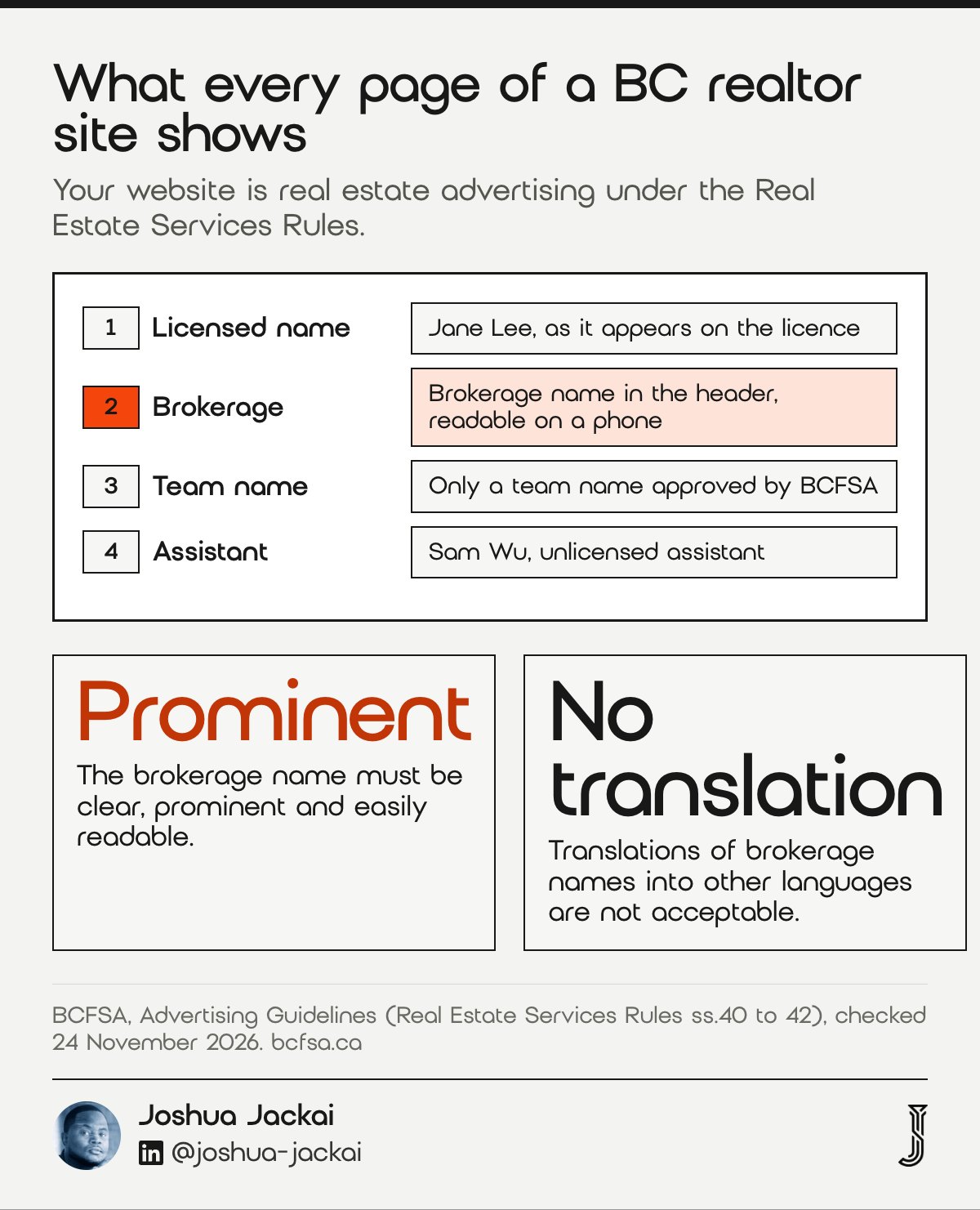
Every page should show your name exactly as it appears on your licence, or a short form BCFSA approved, plus your brokerage name in a clear, prominent and easily readable way. If you work in a team, the team name must be approved by BCFSA, and unlicensed team members must be labelled as unlicensed.
- Your name: as licensed, or the approved short form
- Brokerage name: in the header or footer of every page, readable at phone size
- Team name: only one approved by BCFSA, with the brokerage still prominent
- Assistants: any unlicensed person shown must be identified as unlicensed
- Translations: a translated brokerage name is not acceptable on a Chinese, Punjabi or Farsi page
BCFSA’s guideline cites 4 sections of the Real Estate Services Rules, sections 37, 40, 41 and 42, as the rules behind its advertising guidance (BCFSA). BCFSA reads a website the way it reads print advertising. Its advertising guideline says the obligation to show the brokerage name applies across print, radio, social media and other formats, and it judges “the prominence of the brokerage’s name in relation to the rest of the advertisement”. In practice that means a tiny grey brokerage line under a giant personal logo is a risk.
Most agent sites I review in Vancouver put the agent’s personal brand first, which is fine, and then bury the brokerage in a footer at 10 pixel type. I fix that before anything else. The brokerage goes in the header on desktop, in the menu on phones, and in the footer of every listing page. It costs nothing in conversions, and it removes a whole category of complaint.
Multilingual sites need one extra check. Vancouver buyers search in many languages, and a translated listing page is often the best page on the site, so the brokerage name stays exactly as registered on every language version.
“Translations of brokerage names into other languages is not acceptable,” stated BCFSA’s advertising guideline (BCFSA, 2026).
Data point: In one BCFSA case summary, a licensee advertised under an unregistered team name and included an unlicensed individual without identifying her as unlicensed; BCFSA found the advertising contravened its requirements (BCFSA Advertising Guidelines, relevant cases).
2. How do you use REALTOR® and MLS® correctly on a website?
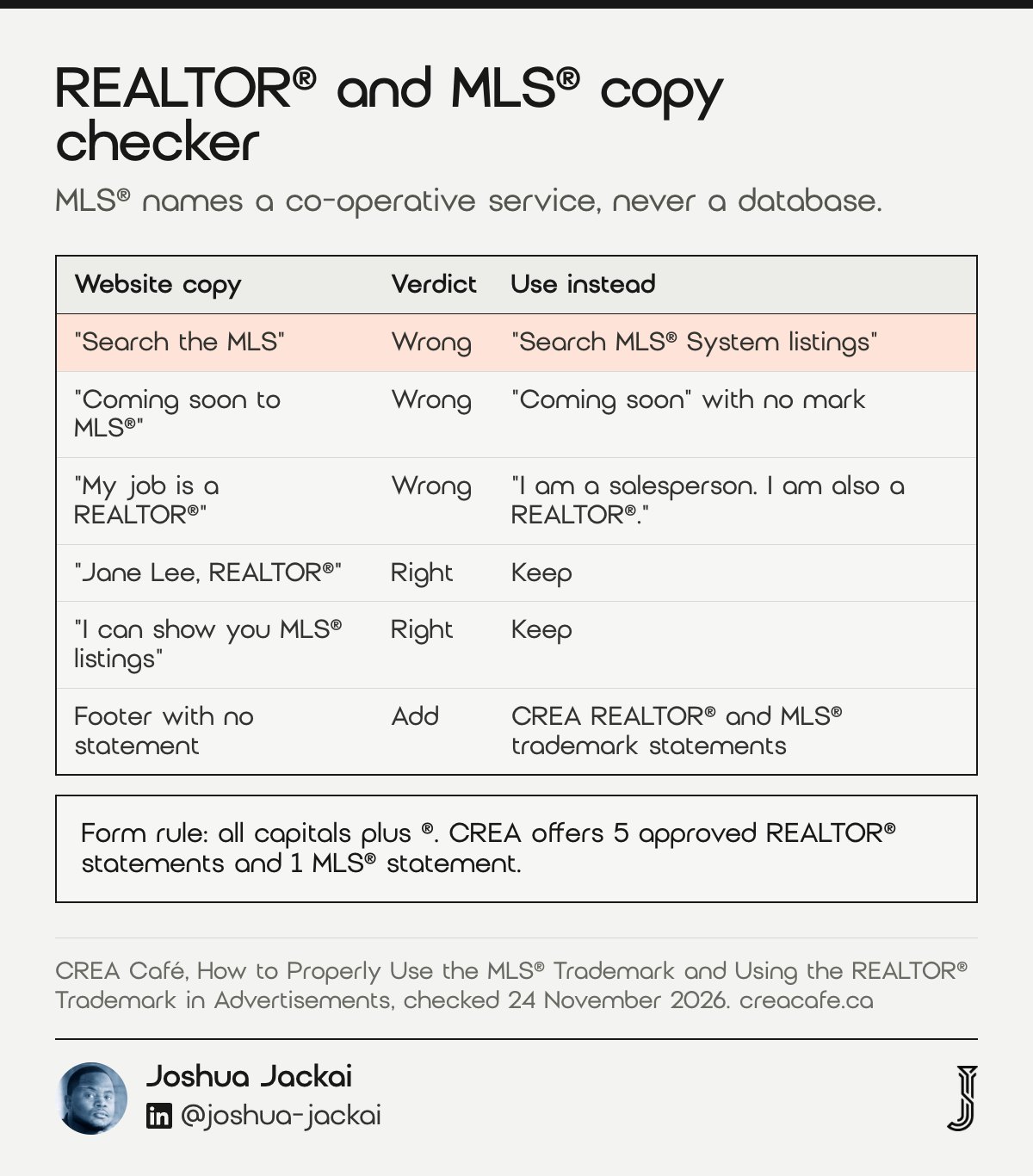
Write REALTOR® in capitals with the registered trademark symbol, attached to your name as a membership, not as a job title. Write MLS® only for the co-operative selling service, never for a database. Add a CREA trademark statement to the footer, because CREA says websites usually have room for one.
- Right: “Jane Lee, REALTOR®” or “I can show you MLS® listings”
- Wrong: “Search the MLS®”, “Coming soon to MLS®”, “My job is a REALTOR®”
- Board system: “Search the MLS® System of” your board is the allowed form
- Footer statement: one of CREA’s approved REALTOR® statements, plus the single MLS® statement
- Domains and brand names: CREA says the MLS® mark can never be used in a business name, trade name or corporate branding
CREA says the MLS® mark has been used since at least 1954 and describes a standard of service, not a database (CREA, Trademarks). Search bars cause most of the errors I see. A template ships with a big button labelled “Search the MLS” and nobody changes it. Allison McLure, former legal counsel at The Canadian Real Estate Association (CREA), put it bluntly on CREA Café:
“I review a lot of websites and almost all of them use the MLS® mark incorrectly,” wrote Allison McLure (CREA Café, How to Properly Use the MLS® Trademark).
The fix is a copy change, not a redesign. I relabel the search to “Search Greater Vancouver homes for sale” or “Search MLS® System listings”, depending on what your feed licence allows, and I add both trademark statements to the footer. CREA’s MLS® statement reads, in full: “The trademarks MLS®, Multiple Listing Service® and the associated logos are owned by The Canadian Real Estate Association (CREA) and identify the quality of services provided by real estate professionals who are members of CREA.”
The REALTOR® mark has its own form rule. CREA’s legal counsel Isaac Martin explains that the mark must be displayed with all letters capitalized followed by the registered trademark symbol, then a trademark statement where there is room, and websites are named as a place where CREA expects one.
Data point: CREA’s trademark policy offers 5 approved REALTOR® trademark statements and 1 MLS® statement, and websites are listed among the materials that “traditionally have enough room to include a statement” (CREA Café, Using the REALTOR® Trademark in Advertisements).
3. Which listing feed can you put on your website?
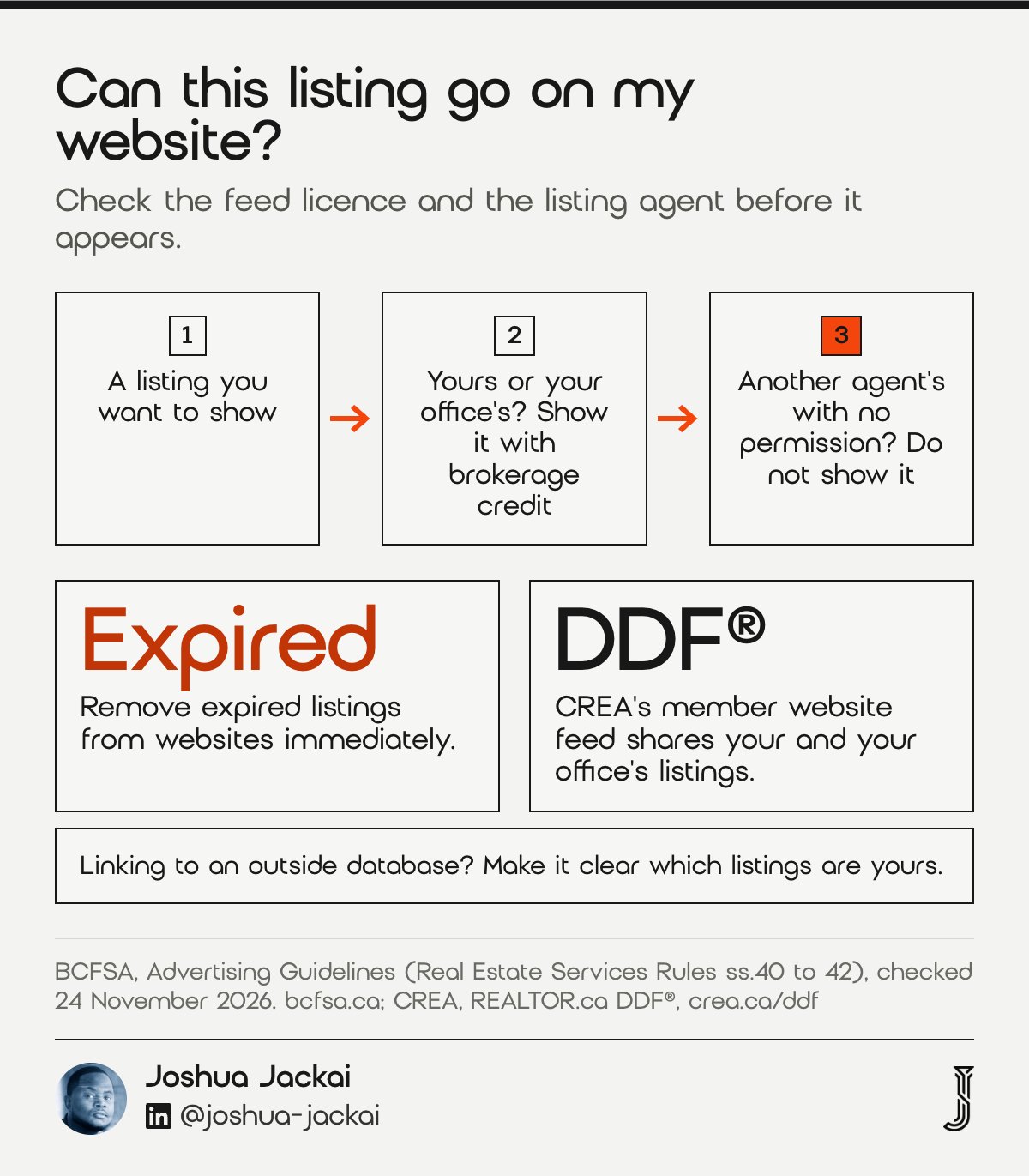
Use a feed your membership licenses for your own site: CREA’s REALTOR.ca DDF® member website feed, a shared pool you have joined, or your board’s own data service. Whichever you use, BCFSA says it must be clear which listings are yours and which are not, and expired listings must come down immediately.
- REALTOR.ca DDF®: CREA describes a member website feed for your and your office’s listings, plus a national shared pool
- Board feeds: check your board’s rules; BCFSA tells board members to check for “any specific advertising requirements”
- Other agents’ listings: only with the listing agent’s permission, and unaltered
- Expired listings: removed from the site immediately
- Labels: “Listed by” with the listing brokerage on every listing card
Agents call this “IDX” because US platforms do, and many builders sold in Canada use the US term. The label matters less than the licence. Before I quote a build, I ask which feed the agent has access to and read its rules, because the feed decides how listings can be shown, how fast they refresh and what credit lines each card must carry.
“REALTOR.ca DDF® is a managed service for REALTORS® and broker owners who are looking to share listings with multiple third-party websites, while providing access to more listings for your own website,” stated CREA (CREA, REALTOR.ca DDF®).
Its member feed covers your own and your office’s listings, and the shared pool adds listings from brokerages that opt in.
The refresh rate is the part buyers notice. A stale listing that shows “active” after it sold is the fastest way to lose a buyer’s trust, and BCFSA treats out-of-date information as an accuracy problem. I set the site to drop a listing the moment the feed marks it off market, and I test it with a real expired listing before launch.
Data point: BCFSA’s guideline says that when listings have expired, they must be “immediately removed from websites”, and that if property information changes during a listing period, the website should be changed too (BCFSA Advertising Guidelines).
4. Do listing photos and virtual tours change sale outcomes?
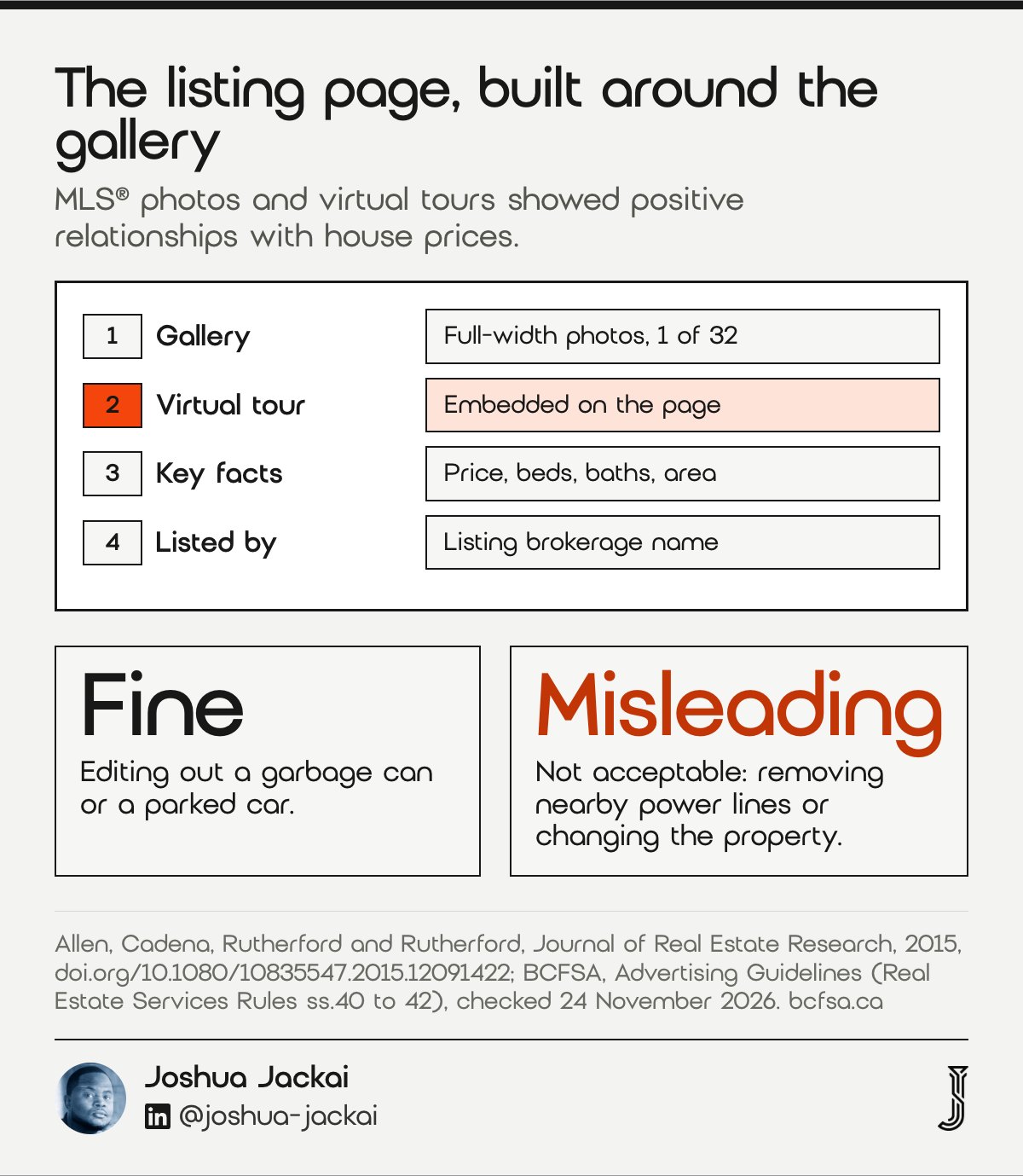
They are linked to higher prices. A peer-reviewed study of four broker strategies found that MLS® photographs and MLS® virtual tours showed positive relationships with house prices, with mixed effects on time on market. Honest, complete galleries are worth the design space they take.
- Gallery first: the first photo carries the listing card, so pick the clearest exterior or main room
- Count: show every photo the feed provides, not a cropped set of 3
- Virtual tour: embed it on the listing page, not only as an outside link
- Editing: removing a garbage can is fine; removing power lines is not
- Alt text: describe the room and its features for screen readers and search
Allen, Cadena, Rutherford and Rutherford tested public open houses, broker open houses, MLS virtual tours and MLS photographs against price, time on market and probability of sale.
“The results indicate positive relationships between these strategies and house prices and mixed relationships between these strategies and probability of sale and time-on-market,” wrote Allen and colleagues (Journal of Real Estate Research, 2015).
The study compared 4 strategies in one market (Allen and colleagues, 2015). That is a link, not proof that photos cause higher prices, and the study is not from Vancouver. It still tells me where to spend design effort on a listing page: a fast, full-width gallery and an embedded tour, before any animated hero or neighbourhood slideshow.
Editing is where design meets the rules, and BCFSA’s guideline separates acceptable edits from misrepresentation.
“While editing out such items as a garbage can or an automobile parked in a driveway would be acceptable, removing nearby power lines or changing any physical characteristic of a property such that it results in a misrepresentation would not be acceptable,” stated BCFSA (Advertising Guidelines).
I build the gallery so the original photo order from the listing stays intact, which keeps the agent out of that grey zone.
Data point: Allen and colleagues measured 3 outcomes, price, time on market and probability of sale, against 4 broker strategies, and found positive relationships with price (Journal of Real Estate Research, 2015).
5. What can you claim in your bio, awards and listing copy?
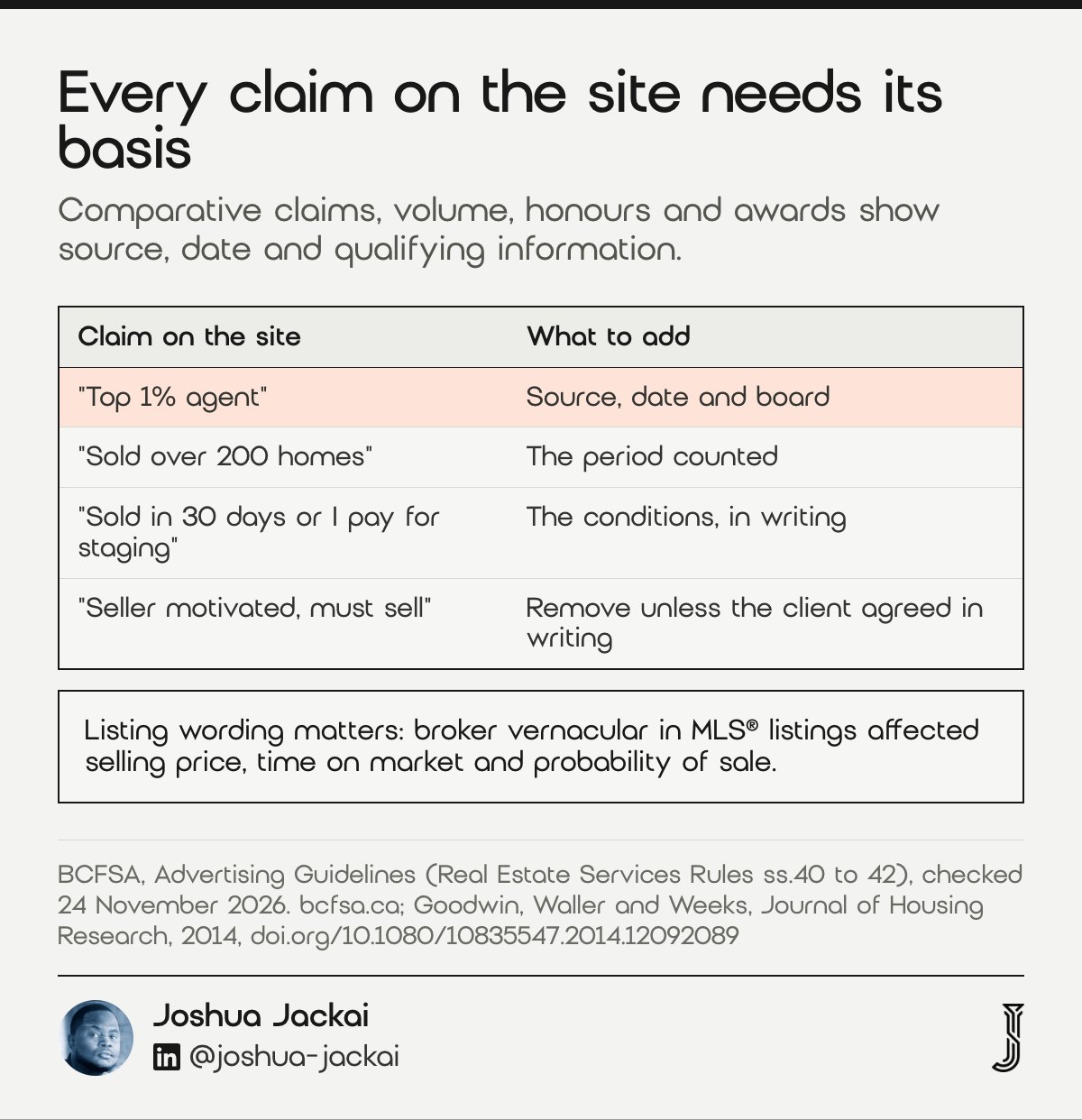
Claim only what you can source. BCFSA says a comparative claim, business volume, honour or award needs its basis shown, such as the source, date and qualifying information. Any promise or offer must state its conditions. Listing descriptions matter too: one study found the words brokers chose affected sale outcomes.
- Awards: “Top 1% of [board] members by unit sales, 2025, source: [board]” instead of “Top 1% agent”
- Volume: state the period and what was counted
- Guarantees: “Sold in 30 days or I pay for staging” needs its conditions on the page
- Client details: never a seller’s motivation or bottom line without written permission
- Descriptions: specific features beat vague praise words
BCFSA’s rule is simple to apply.
“If a comparative claim, business volume, honour or award is noted in any advertising, the basis of the claim/volume/honour/award, (e.g., the source, date, and qualifying information) needs to be included to avoid misleading the audience,” stated BCFSA (Advertising Guidelines).
I add a small source line under every badge and stat on the site, which also makes the claim more believable to a careful buyer reading closely.
Listing copy is the other half. Goodwin, Waller and Weeks studied the words brokers enter in MLS listings and their effect on selling price, time on market and probability of sale.
“What the broker promotes in the MLS listing impacts marketing outcomes,” wrote Goodwin, Waller and Weeks (Journal of Housing Research, 2014).
Their abstract adds that “careful construction of property descriptions can improve listing performance.” On a website, that means the description on your own listing page should not be an afterthought pasted from the feed. I give agents a short template: three concrete features, the commute or school fact a buyer would search for, and nothing a seller has not approved.
Data point: Goodwin and colleagues measured broker wording against 3 outcomes, selling price, time on market and probability of sale (Journal of Housing Research, 2014).
6. How do you capture leads without breaking CASL or privacy rules?
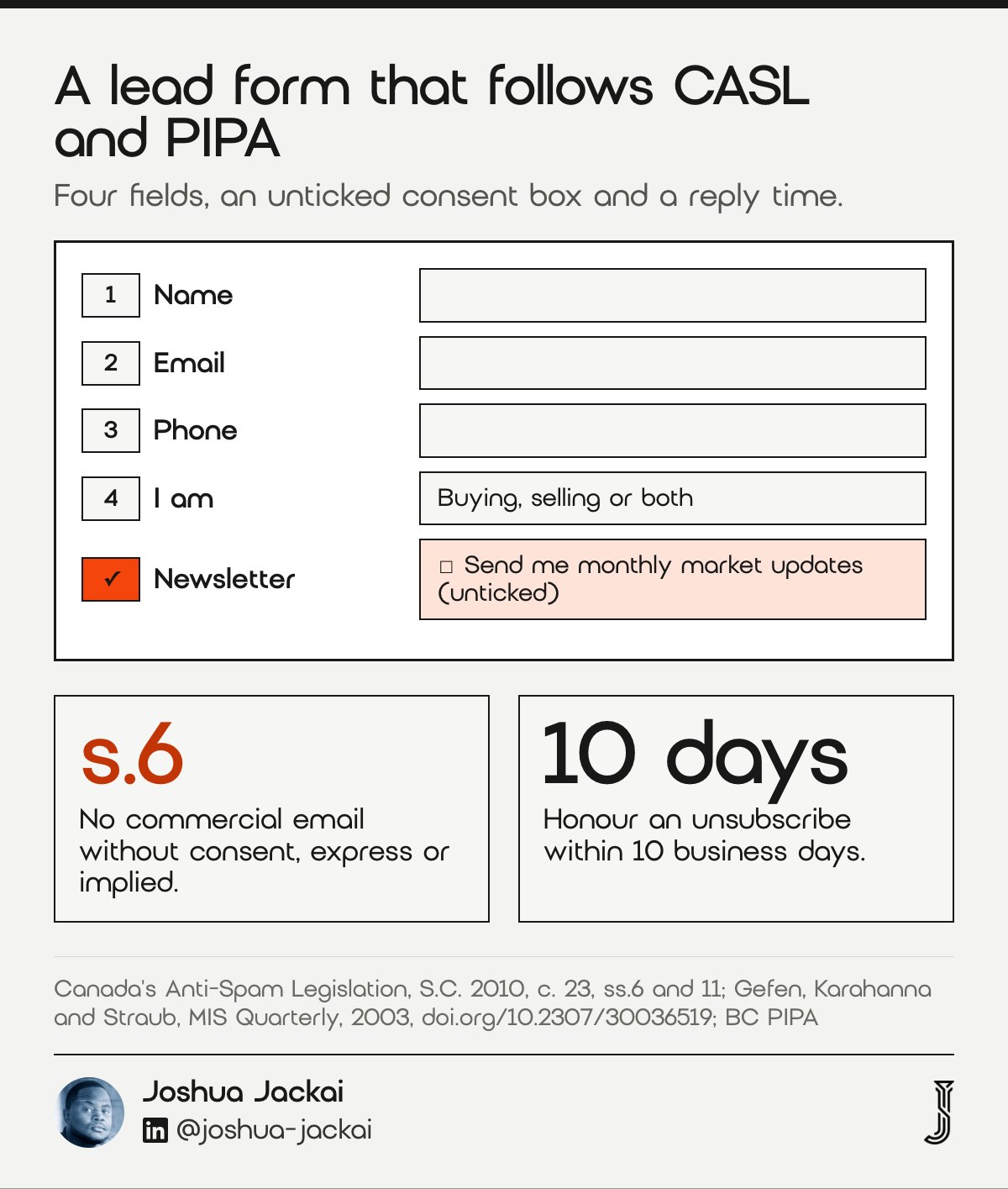
Ask for the fewest details you need, get express consent before adding anyone to an email list, and say who will reply and when. Canada’s anti-spam law bans commercial emails without consent and requires an unsubscribe that works within 10 business days. BC’s privacy law adds rules on purpose and on naming who answers privacy questions.
- Form fields: name, email, phone, and one question: buying, selling or both
- Consent box: unticked by default, with its own wording for the newsletter
- Sender details: your name, brokerage and contact details in every email
- Unsubscribe: one click, honoured within 10 business days
- Privacy page: what you collect, why, and the title of the person who answers questions
CASL also says the sender’s contact information must stay valid for at least 60 days after a message is sent (Justice Laws, section 6(3)). Lead magnets are where agents get caught. A “free home valuation” form that quietly adds the person to a weekly market email needs consent for that email. Section 6 of Canada’s Anti-Spam Legislation (CASL) says a commercial electronic message may only be sent if “the person to whom the message is sent has consented to receiving it, whether the consent is express or implied”, and each message must identify the sender and include an unsubscribe mechanism.
Trust matters as much as the law. Gefen, Karahanna and Straub found that online trust is built partly by a belief that the site has safety mechanisms built in. A short form with a visible privacy link and a plain line such as “Jane replies within one business day” does that work. A twelve-field form that asks for income before saying hello does the opposite.
I connect every form to the agent’s CRM with the lead’s source attached, so the agent knows which page, listing or ad brought each enquiry. That is the same lead source reporting I sell to B2B clients, scaled down to one agent.
Data point: CASL requires an unsubscribe request to take effect “without delay, and in any event no later than 10 business days” after it is sent (Justice Laws, S.C. 2010, c. 23, section 11).
7. Why does a realtor website need to be fast on a phone?
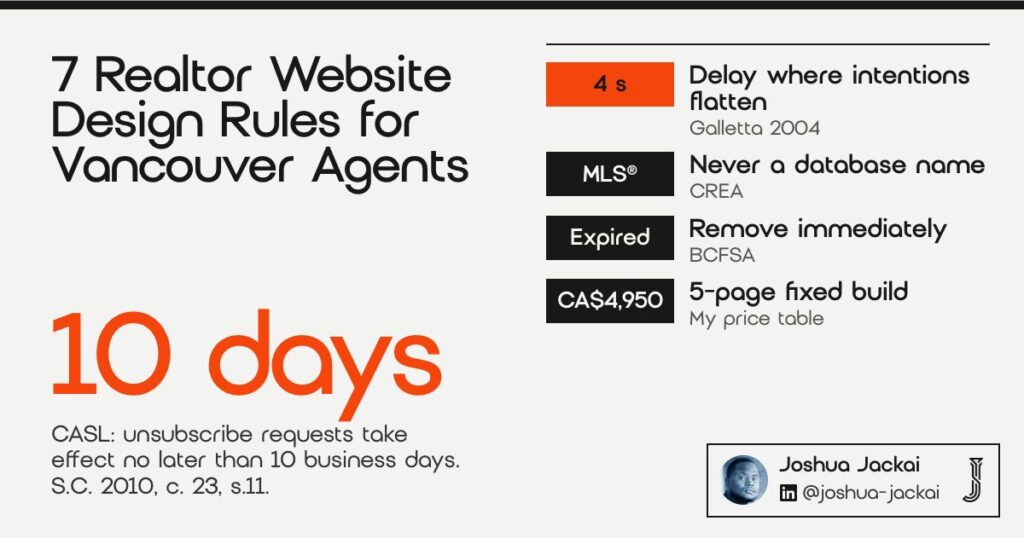
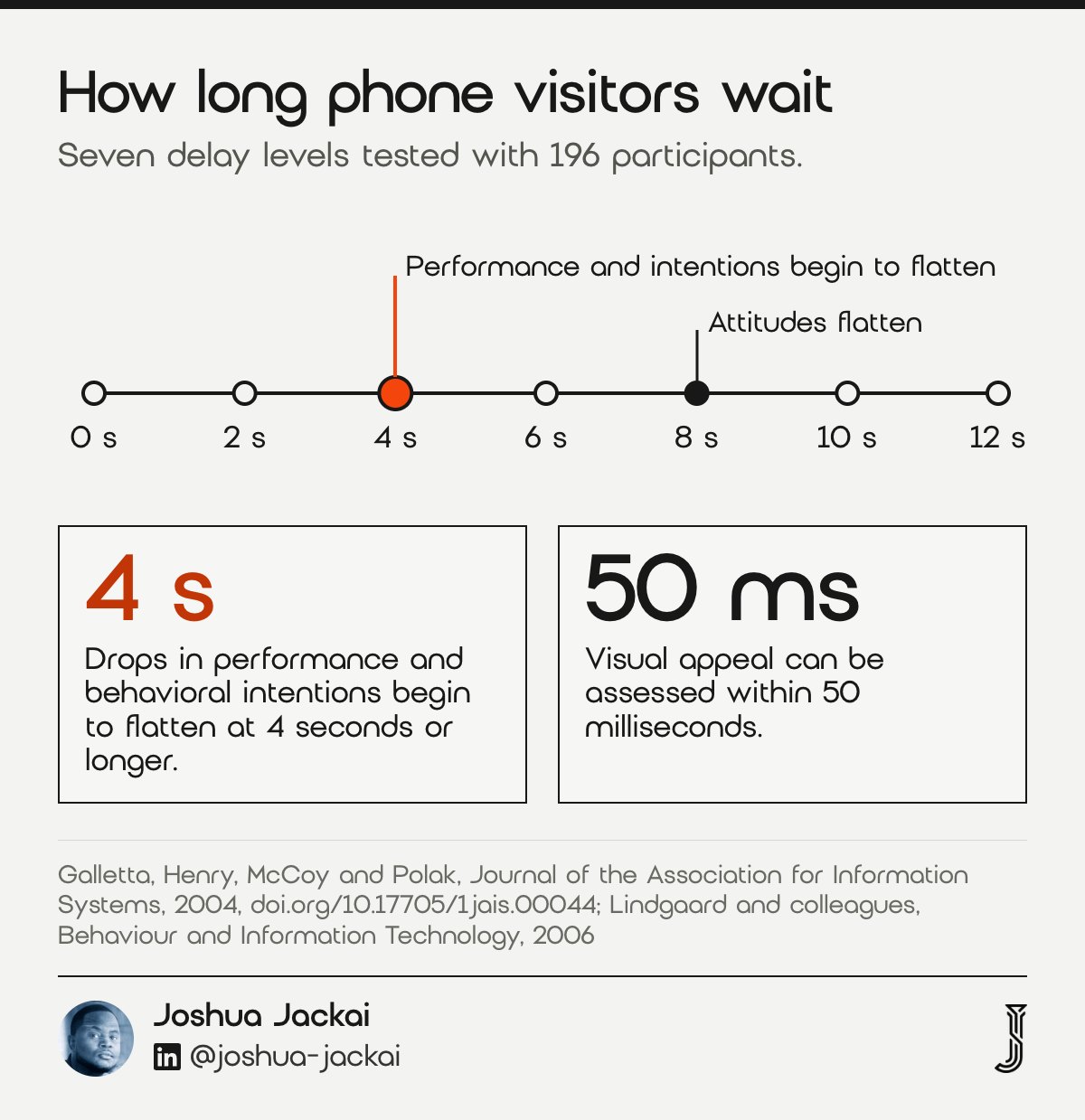
Buyers judge a page in a fraction of a second and lose patience within a few seconds of waiting. Lindgaard and colleagues found visual appeal can be judged within 50 milliseconds, and Galletta and colleagues found performance and intentions dropped as delays grew toward 4 seconds. Listing pages carry heavy photos, so speed takes deliberate work.
- Images: compressed, sized for the screen, lazy-loaded below the first photo
- Search: results that load in place, without a full page reload
- Tap targets: call, text and book buttons large enough for a thumb
- Map: load it when the visitor asks for it, not on page open
- Test: a mid-range phone on a cellular connection, not your office Wi-Fi
Lindgaard’s team titled their paper “Attention web designers: You have 50 milliseconds to make a good first impression!” and the finding holds up in practice. A buyer scrolling listings on the SkyTrain will not wait for a slow map widget.
“Visual appeal can be assessed within 50 ms, suggesting that web designers have about 50 ms to make a good first impression,” wrote Lindgaard and colleagues (Behaviour and Information Technology, 2006).
Delay is the second cost. Galletta, Henry, McCoy and Polak tested delays from 0 to 12 seconds and found that “decreases in performance and behavioral intentions begin to flatten when the delays extend to 4 seconds or longer.” Put plainly, by 4 seconds most of the damage to performance and intentions is done, according to the study, and attitudes keep falling until about 8 seconds. I aim for the first listing photo to appear well before that on a phone, and I check it with Google’s PageSpeed test before launch.
Data point: Galletta and colleagues tested 7 delay levels, 0, 2, 4, 6, 8, 10 and 12 seconds, with 196 participants (Journal of the Association for Information Systems, 2004).
How much does a realtor website cost in Vancouver?
My fixed quotes are CA$4,950 for a 5-page small business site on Framer, CA$5,950 on WordPress, and CA$7,450 and up for a custom build. These are my own prices, not a survey of other studios. Listing feed fees and hosting are separate, and a CA$995 audit is credited in full if a project starts within 30 days.
What moves the price for an agent is mostly the listing feed and the content, not the design. A site that shows only your own listings is simpler than one that pulls a shared pool with saved searches and alerts. Neighbourhood pages take time to write well. Multilingual versions double the copy work, and every version needs the same brokerage and trademark checks.
| Agent or team need | What you get | Price (my fixed quotes, CAD) |
|---|---|---|
| Solo agent, own listings | Small business site, up to 5 pages | CA$4,950 Framer or CA$5,950 WordPress |
| Team with feed search and CRM | Custom build with listing feed and lead routing | from CA$7,450 |
| One campaign or new development | Landing page | from CA$3,795 |
| Know where every lead came from | Lead source reporting | CA$2,600 |
| Before you decide | Website audit with a written report | CA$995, credited within 30 days |
Is there a monthly fee? Yes, for almost every site: hosting, the domain, and often the listing feed or the platform that displays it. Ask any designer to list those costs in writing, and ask who owns the domain and the CRM data if you change brokerage. If you are comparing quotes, my guide to website redesign costs in Vancouver explains what drives the range.
Compare the seven rules side by side
Use this matrix to filter the seven rules by the part of the site they touch and by what each one protects. Every row comes from a source cited in this guide: BCFSA’s advertising guideline, CREA’s trademark guidance, Canada’s anti-spam law or a peer-reviewed paper. Choose a site area to hide the rules that do not apply.
Showing 7 of 7 rules.
| # | Rule | Site area | Protects | Source |
|---|---|---|---|---|
| 1 | Show your licensed name and brokerage on every page | header, footer | rules, trust | BCFSA Advertising Guidelines; Rules s.40 |
| 2 | Use REALTOR® and MLS® in their proper form | footer, search | rules | CREA trademark policy; CREA Café |
| 3 | Pick a listing feed you are allowed to use | listings, search | rules, accuracy | CREA REALTOR.ca DDF®; BCFSA |
| 4 | Keep listing photos honest and complete | listings | trust, accuracy | Allen and colleagues 2015; BCFSA |
| 5 | Back every claim in your bio, awards and copy | about, listings | rules, trust | BCFSA; Rules s.41; Goodwin 2014 |
| 6 | Build lead forms that follow CASL and PIPA | forms | privacy, trust | CASL s.6 and s.11; BC PIPA; Gefen 2003 |
| 7 | Make it fast and clear on a phone | listings, search, forms | first impression | Lindgaard 2006; Galletta 2004 |
Check your realtor website against the seven rules
Answer eight yes or no questions about your current site to see which rules still need work. The score is how many of the eight questions you pass, based on the sources in this guide. Your answers stay in your browser, and the result is a checklist, not legal or regulatory advice.
Realtor website check
Tick each statement that is true for your site today. Your answers stay in this browser.
Realtor website questions, answered
These are the questions Vancouver agents search most before hiring a web designer, drawn from Google’s People Also Ask results for Vancouver, captured with AlsoAsked. Each answer is short and points to the rule that covers it, so you can go straight to the part that matters for your site.
How much does it cost to have a real estate website in Canada?
It depends on the listing feed, the pages and the integrations. My fixed quotes are CA$4,950 for a 5-page site on Framer, CA$5,950 on WordPress, and CA$7,450 and up for a custom build with feed search. Hosting, domain and feed fees are separate monthly costs.
What is the best website builder for real estate agents?
The best one is the one your listing feed supports and you can keep current. Agent platforms bundle a feed and templates; custom builds give you more control over speed, copy and lead routing. Either way, check brokerage name placement, trademark use and how fast expired listings disappear.
Can I show other agents’ listings on my website in BC?
Only with permission. BCFSA says you should not advertise another real estate professional’s listings on your own website without the listing agent’s permission, and you should not alter the listing information. If you link to an outside database, make it clear which listings are yours.
Do I need a CREA trademark statement on my realtor website?
Yes, if the site displays the REALTOR® or MLS® marks. CREA’s policy asks for a trademark statement wherever there is room, and it names websites as a place it expects one. Put the REALTOR® statement and the MLS® statement in the footer of every page.
How long does it take to build a realtor website?
My small business site takes 2 to 3 weeks, counted from the day the text and images arrive. Custom builds with a listing feed get a window set on the first call, because feed approval can add time. Start your bio, neighbourhood pages and photos early.
How I design realtor websites in Vancouver
I build fixed-quote websites for Canadian businesses, and real estate clients get three extra steps. At kickoff I check the site against BCFSA’s advertising guideline and CREA’s trademark rules. I confirm which listing feed the agent may use before I quote, and I connect the lead form to the CRM with each lead’s source.
“On a BC realtor website, the brokerage name, the trademark statement and the listing credits are design elements, not fine print,” said Joshua Jackai, Vancouver web designer.
If you work with other professionals who face marketing rules, my guide to professional services website design in Vancouver covers the BC Code and CPABC equivalents. To see where your site stands today, start with the free AI Visibility Report, or book the CA$995 website audit, credited if a project starts within 30 days. I am a web designer, not a lawyer or a regulator, so the rules check flags issues for you and your managing broker to confirm.
Sources
Peer reviewed
- Allen, M. T., Cadena, A., Rutherford, J. and Rutherford, R. C. (2015). Effects of real estate brokers’ marketing strategies: Public open houses, broker open houses, MLS virtual tours, and MLS photographs. Journal of Real Estate Research. https://doi.org/10.1080/10835547.2015.12091422
- Galletta, D. F., Henry, R. M., McCoy, S. and Polak, P. (2004). Web site delays: How tolerant are users? Journal of the Association for Information Systems. https://doi.org/10.17705/1jais.00044
- Gefen, D., Karahanna, E. and Straub, D. W. (2003). Trust and TAM in online shopping: An integrated model. MIS Quarterly. https://doi.org/10.2307/30036519
- Goodwin, K. R., Waller, B. D. and Weeks, H. S. (2014). The impact of broker vernacular in residential real estate. Journal of Housing Research. https://doi.org/10.1080/10835547.2014.12092089
- Lindgaard, G., Fernandes, G., Dudek, C. and Brown, J. (2006). Attention web designers: You have 50 milliseconds to make a good first impression! Behaviour and Information Technology. https://doi.org/10.1080/01449290500330448
Regulator, statute and association (not peer reviewed)
- BC Financial Services Authority (BCFSA), Advertising Guidelines, citing Real Estate Services Rules sections 37, 40, 41 and 42, checked 24 November 2026. https://www.bcfsa.ca/industry-resources/real-estate-professional-resources/knowledge-base/guidelines/advertising-guidelines
- The Canadian Real Estate Association (CREA), Trademarks, checked 24 November 2026. https://www.crea.ca/trademarks/
- CREA Café, Allison McLure, How to Properly Use the MLS® Trademark, checked 24 November 2026. https://www.creacafe.ca/how-to-properly-use-the-mls-trademark/
- CREA Café, Isaac Martin, Using the REALTOR® Trademark in Advertisements, checked 24 November 2026. https://www.creacafe.ca/using-the-realtor-trademark-in-advertisements/
- CREA, REALTOR.ca DDF®, checked 24 November 2026. https://www.crea.ca/ddf/
- Canada’s Anti-Spam Legislation, S.C. 2010, c. 23, sections 6 and 11, Justice Laws, checked 24 November 2026. https://laws-lois.justice.gc.ca/eng/acts/E-1.6/FullText.html
- Personal Information Protection Act, S.B.C. 2003, c. 63, BC Laws, checked 24 November 2026. https://www.bclaws.gov.bc.ca/civix/document/id/complete/statreg/03063_01
First party
- Jackai Agency price table, joshuajackai.com/pricing, November 2026.